





codeigniter
Members
-
Joined
-
Last visited
-
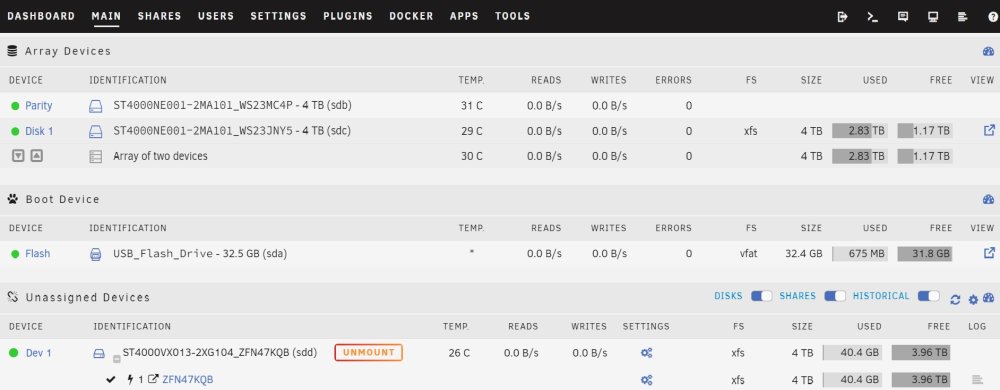
See attached screenshot, as I say though there is only 1 file showing as being cache, which I assume is some kind of temporary file. But before the system rebooted there were other files with that location. That's the only explanation I can think of for why my files have disappeared, if they were on the array they should still be there.

-
Screenshot
-
So going off what you're saying here I shouldn't have lost any data as it should have been on the array. Does the flash drive store anything related appdata, like pointers or anything, could it be the flash drive failing?
-
Apologies I thought the anonymised diagnostics would just strip IP's and MAC addresses etc. When I initially set up my server I only wanted a box to run docker containers on, there were other options, but for various reasons I elected not to go with any of those. So I confess I only read up on configuring Unraid to get it running to the extent that I needed it to. Up until now it hasn't let me down and there's been no need for me to dig any deeper. I only have 3 drives in the box, 1 parity, 1 data drive this is my array, and a third surveillance class drive that is unassigned I use in Frigate for recordings etc. Definitely no cache drive, caching wasn't something I concerned myself with as I don't have a drive for it, so I just assumed nothing was cached. When I say Disk 1 cache I'm going off what it says in the location column when I navigate the shares directory tree, right now there are only a couple of files showing Disk 1 cache, which I assume are temporary files in RAM or something, but before everything was deleted there were a few files with that location. I'm guessing that my lost files were Disk 1 cache, I haven't recreated any of the lost data yet, I'm gonna wait until my cache drive comes tomorrow.
-
Yeah I assumed that would be the case, but I wanted to get a NAS grade NVME drive and I'm not prepared to pay £300-£400 for a 2TB one, £50-£60 for a 250GB is fine, I've ordered a 250GB now.
-
My thoughts exactly, thanks for confirming, if the cache needed to be the same size as parity for some reason, I'd have just turned caching off...
-
Diagnostics attached. tower-diagnostics-20221018-1513.zip
-
Not sure whether I set up the AppData folder or if it was there already as it was soo long ago, but I only have 1 share 'AppData' and all the docker templates point to that in camel case. Sorry just tried to VPN onto server to pull diagnostics and I'm wrong it's 'appdata' lower case and everything points to that in lower case, apologies.
-
I'll pull the diagnostics when I get home and post them.
-
Not the templates they're fine, for instance Frigate, which has a path of something like 'mnt/user/AppData/Frigate' on the Docker template, but there's nothing in this directory to begin with I have to create the config yaml file for the cameras etc, on reboot the directory is emptied. With Home Assistant it has a similar path 'mnt/user/AppData/HomeAssistant' but there are a bunch of files in there by default, it's only the files added or modified after the initial installation of the docker that disappear on reboot. Just clicked the pop up notification that said there was a new Unraid version and followed the prompts.
-
https://wiki.unraid.net/Cache_disk#Purpose Above is the section I'm looking for clarification on, I assume it is what I said in my original post and it's only if I wanted to use it as a parity in the event parity fails? But I assumed my files were stored on the array and they weren't, so I don't want to risk assuming again.
-
Yeah I realise that now after looking into it yesterday, odd that I haven't lost anything before though. The AppData directory is set to prefer cache, but the subdirectories vary from being on the array to being disk1 cache, all of my dockers are set to /mnt/user, I didn't specify which subdirectories should be on cache and which shouldn't so seems to be something automatic, I don't know, I just want to stop it happening again. Do you know if I need a cache drive the same size as parity as per the docs or just big enough to store data between move operations? Does the mover automatically back up my cache or do I have to configure something? So if my cache failed could I just replace it and Unraid restores it from the array automatically?
-
I'm not near the machine to post the diagnostics, but I know the cause of the issue anyway, something has changed so those files were stored in RAM cache. I'm asking about moving forward with a dedicated cache drive and the mover.
-
Hi Guys, I've had Unraid running for about a year now, previously it's been rebooted several times to install updates, move cables etc and I haven't had an issue. A few days ago a notification popped up saying there was a new version of Unraid available, so I installed it and the server rebooted automatically. When it booted back up I'd lost the user created items in the AppData folders, so the configuration files for various dockers. I can't remember how I originally set up the server as it was quite a while ago, but I've rebooted it plenty of times and never had this issue, so either I've unknowingly changed something or updating Unraid has. Anyway it's going to take me ages to restore all the stuff I've lost so I'd like to try and safeguard against it in the future. I was reading up on the issue last night and as I don't have a cache drive I assume that the contents were being stored in RAM, although they clearly weren't before. I know I can turn caching off completely, but it would be nice to have a cache drive to speed things up when I'm transferring movies or large files across, so the plan is to throw a cache SSD in. I was reading the docs yesterday and in a section on cache drives there's a part that seems contradictory to me, so hopefully someone can clarify. In a section titled 'warm spare' or something like that, It says I need a cache drive at least the same size as my parity which would be 2TB, then just below that it says the cache needs to be big enough to hold anything transferred until the mover kicks in. In the latter case a 250Gb SSD would be fine for me. Do I need a cache the same size as parity? Or is that only if I for some reason decide to use my SSD as a parity if the parity fails? My other issue is the mover, if I install a cache drive will the default mover configuration automatically back up my cache to the array? Once everything is configured it doesn't get changed very often, so backing up once a day at 3:04AM is fine. I just don't want to assume it will and pay the price later on, as it clearly isn't backed up to the array now/anymore.

