lamebot
Members
-
Joined
-
Last visited
-
Hi I was using the latest BIOS and checked BMC Event Log sometime ago, no new errors. However, I found out what the problem was: RAM. I couldn't believe it but it seems like most or all of my 16 DIMMs (some of which I didn't even use before) are broken or not compatibale with newer versions of Unraid. Maybe the problem was there all the time but it became way more visible because of system changes. Don't know if that makes sense. After I installed differnt RAM, my system was running without problems. Well, almost no problems. The problem with the fans spinning up like crazy came back but I was able to fix it with some IPMI changes, which I found in some other threads. To be more specific, I had to lower the fan thresholds to 150/75/0 and changed the fan control to only use CPU2 temp and HDD temp, because at least two other sensors are doing weird things sometimes, like dropping to 0. So both of you were right pointing out that it still might be RAM. Thanks for the help
-
Hmm... I'm still trying to figure out some more things before I buy new hardware. The server is a little bit more stable now after I changed around DIMM slots again. I'm using 3x 4GB for both CPUs at the moment. It's able to run for about 3 days without crashing. RAM/CPU/Disk intense tasks still make it crash, f.e. parity checks or backups, which I disabled for the time being. Even without those, it crashes after some days. Some new Hardware Error I got in my syslog: Somtimes, the error occurs in combination with DIMM errors after which the server usually crashes. Today, I tried to mount a backup to recover a single file. Some days ago, I tried a parity check and got TONS of these Fallback Socket memory errors before a crash. Yesterday, I had another very strange problem: The server fans howled very loud every few minutes. I let it running during the day and returned to a running server in the evening, still doing it's howling. It was like a wounded animal begging me to put it out of its misery 😅 It crashed later that evening and the problem stopped today, after I removed two DIMMs and went back to 3x 4 GBs for both CPUs. Can anyone help me narrow this problem down? Could it be a broken memory controller? How can I find out whether it's mainboard or CPU related? Considering the error messages, I don't think it's a faulty PSU anymore (the server would probably crash more instantly, right?). Thanks for reading and have a great weekend
-
Here's a short update and a bump: I didn't touch the server for about 48 hours and changed the DIMM slots after that. So I have 4 x 4GB now. This time, the server was stable for about 30 hours before it crashed. After this, I wasn't able to start it at all, even though I didn't touch the hardware. Then I dismounted my graphics card (because why not) and it was able to boot up again. So... weird things happening. Might this be a problem with the PSU? Or maybe motherboard?
-
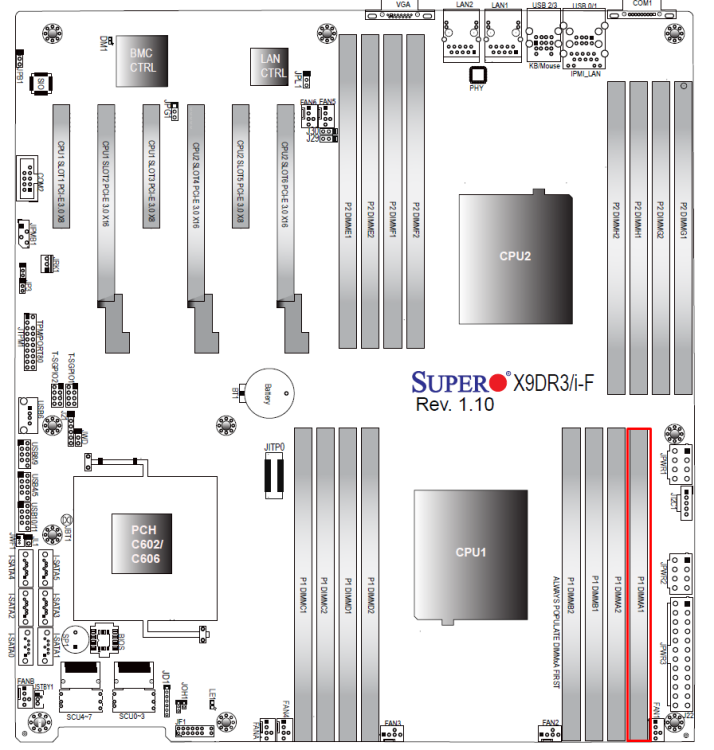
Hey, thanks for the reply! Recently, I was using 3 DIMMs only (2x CPU 1 and 1x CPU 2) in more or less random slots. But as I wrote before, this setup is very unstable. I have 13 other unused DIMMs of the same type. I never used all of them, because I didn't bother to demount the fans, which are blocking 3 of the slots (I also don't know if these 3 slots are working). According to the motherboard manual, the preferable slots for 4 DIMMs (2 per CPU) would be P1-A1, P1-B1, P2-E1 & P2-F1. So I'm assuming these should be the "first 2 slots" for each CPU. Result: No success (no booting/no beeps). So I tried some other constellations: P1-A1, P1-A2, P2-E1, P2-E2: No. P1-A1, P1-B1: No. P1-A1: No (here I used different DIMMs) P2-E1: Yes. P2-E1, P2-E2: Yes. P2-E1, P2-E2, P2-G1, P2-G2: Yes. Could it just be CPU 1 that's failing, you might wonder? Unfortunately not, because: P2-E1, P2-F1: No. P2-E1, P2-F1, P2-H1, P2-G1: No. Both P2-F1 and P2-H1 seem to be broken as well. Sorry if this is so cryptic. I could also take some time and label the broken slots in the picture above if that would help. In summary, random (I think) DIMM slots are preventing the server from booting, or in other words: appear as broken. Could a power outage have caused this? I know I had some in the past. But why, then, did the updates destabilize it so much? Pure coincidence? I hope I'm not causing any headaches, I know I'm starting to have one 😬
-
Hello everyone I've been using Unraid for some years now to run a personal media server and had a very good experience overall. Hardware information Supermicro X9DR3-F 2x Intel® Xeon® CPU E5-2660 v2 @ 2.20GHz Temporarily 12 GiB DDR3 Multi-bit ECC, usually more Array with 8 Disks ranging from 3 TB to 10 TB + SSD Cache The problem Since upgrading from 6.9 to 6.10 and 6.11, I'm having quite some troubles. It got worse with every update and right now, I'm at a point where the server is crashing every few hours or even sooner. Sometimes, I'm even able to trigger a crash by starting a download with SABnzbd. The download destination is a no cache share. When it crashes, there is no responsiveness at all (I can't even turn off NumLock on a keyboard, let alone type anything). So I set up a Syslog Server to save the log. In there, I found some mce errors, f.e.: Attached you can find the syslog starting today at midnight (I changed some of the share names for privacy reasons).syslog-lamebot-181022.log mcelog after the latest crash Now, the weird thing is: Even after I took out the RAM module, which I made out to be at CPU 0 BANK 7, the server kept crashing. Without showing anything in mcelog. And it gets even weirder: I played around with a lot of different RAM modules. And placing them in different slots sometimes resulted in the server not being able to boot up at all. So usually I get 2 or 3 beeps but in these scenarios, the server just hung with powered up fans, no beeps at all. If I place RAM in the slot P1 DIMMA1 (red in the image below), which should be the first slot to place RAM according to the motherboard manual, the server won't start at all. Same goes with other slots from CPU 2 (top row). Yesterday, I ran a Memtest for 3 passes and didn't get any error. But I read somewhere that Memtest can't detect any memory errors with ECC RAM. Is that correct? So either I'm having a bunch of broken RAM (I literally have a stack of about 20 which I got off an "old" server and non of them seem to work any better) or maybe my motherboard or CPU is broken or causing problems with newer versions of Unraid? Or do you have any other ideas? Thanks for reading and taking some time to brainstorm with me lamebot syslog-lamebot-181022.log