





strictlyparanoid
Members
-
Joined
-
Last visited
-
Hi guys, documenting my investigation here but of course interested in anyone who can spot the smoking gun. A little more than a month ago (early Dec, this crash is Jan 22), I had a server crash (first time in about a year or so), with no syslog captured so I turned it on and piped it to another Unraid server on my home network. Today, while away from home, the server became unresponsive sometime in the AM and I came home to find it hanging--made sure that there was an up-to-date syslog on the other server, and then shut down (uncleanly, held power). Unraid Version: 6.11.1 Intel® Core™ i7-6700K CPU @ 4.00GHz 48 GB DDR4 Mobo details ASUSTeK COMPUTER INC. TUF Z270 MARK 1 , Version Rev 1.xx American Megatrends Inc., Version 1301 BIOS dated: Wed 14 Mar 2018 12:00:00 AM PDT Powered by UPS (but I don't think it was a power blip...) The system log has from Dec to Jan 22 pretty much just 60k lines of of "synthetic_pathref opening [path] failed {sensitive info}", so I've just snipped the important tail here from the last log from a few days ago.syslog-192.168.1.105.log.tail.txt Diagnostics file (after the server was restarted, maybe not super useful.) castle-diagnostics-20250122-2322.zip The server is back on and beginning a parity check. As for my next steps, I fed the tail end of the syslog into chatgpt to see what it thought, and got some good direction; 1) Check drives for SMART report 2) Memtest 3) "Check logs for docker containers?" 4) Update all containers, BIOS, Unraid itself Based on these particular log lines, I think it's gotta be docker related: Jan 22 09:05:56 Castle kernel: kernel BUG at fs/inode.c:1760! Jan 22 09:05:56 Castle kernel: invalid opcode: 0000 [#1] PREEMPT SMP PTI Jan 22 09:05:56 Castle kernel: CPU: 7 PID: 5205 Comm: containerd-shim Not tainted 5.19.14-Unraid #1 I went looking to see what was going on around 9:00AM today, and saw that a family member was watching Plex (and transcoding) as recently as 10:00AM... not sure how it could be working then based on the logs, but maybe the server wasn't truly hanging until later in the day? It was around noon/12:00 when I noticed it was unresponsive. By the evening, I had some family members asking me if Plex was broken. When I got home I hard-powered off the server, maybe causing an unclean shutdown when I didn't need to. Curious to hear what anyone else thinks. Parity check will probably run till tomorrow.
-
Even powerdown -r didn't do it. Gotta unclean shutdown tomorrow in person I guess.
-
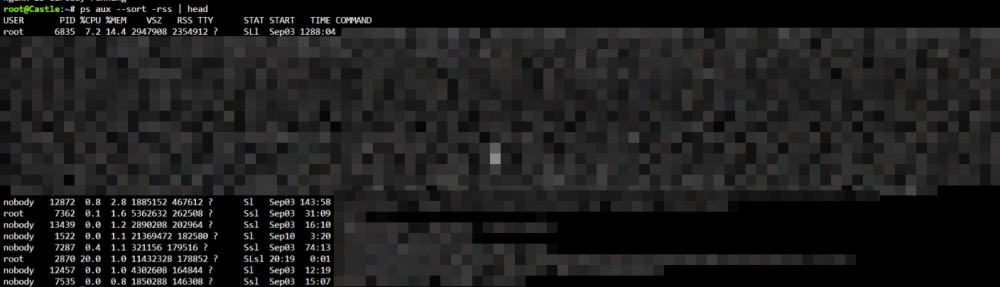
Based on some diagnostic stuff, it seemed like the CPUs werent pegged really, however I did see that my qbittorrent process ran out of memory, so maybe that lashed out and caused some damage? Not sure. going to powerdown -r
.png.d988c5581638bb02fff22b942079c990.png)
.png.6cfa96b13cfb5888dae38665edc580c8.png)
.png.f56cc791827034d10f611d43148b4813.png)
-
Hi, This evening my parents were watching some Plex, and texted me saying they think the server may be having issues. I went to check tautulli, couldn't connect. Remoted into my home PC to check out the Unraid server locally and noticed that the CPU is maxed out at 100%, and the docker page couldn't load. Immediately went to run diagnostics, but it hangs when it reaches the first user share, let it hang for 15 minutes to be sure it was stuck. So I have an unfinished diagnostics directory, won't be able to the dir off the server until tomorrow with another USB. I suspect this has something to do with the docker engine, because I can't stop/start/reboot the docker engine via /etc/rc.d/rc.docker but status responds quickly as "running". I can't access any container's web UI, and 'docker stats' cant run either. I cannot stop the array via web UI, and I cannot restart the server via sbin/reboot. Open to any advice. I have a semi-functional terminal for now, and I won't be at my house to perform an unclean shutdown until tomorrow. Thanks a lot.
-
Hi guys, Recently I got a Seagate 16tb IronWolf drive that just wouldn't recognize across a few different machines. It would spin up and then 'beep' nonstop as long as it had power. So I started the RMA process (which was entirely a hassle) and eventually got a new drive about a month later. I plugged this new drive into an Unraid system that is separate from my 'main' server and began the preclear process, which finished yesterday night showing a bunch of S.M.A.R.T. errors specifically on the "Reported Uncorrect" attribute. I read some other threads about this, and the associated "backblaze" blog post about S.M.A.R.T. stats and basically it seems like this is the kind of stat that suggests a drive may not be very healthy or fall into the "early" age of the bathtub distribution of drive mortality. Here's the report exactly: (serialnum scrubbed for paranoia) May 31 21:04:23 preclear_disk_SERIALNUM_5725: Preclear Disk Version: 1.0.27 May 31 21:04:23 preclear_disk_SERIALNUM_5725: Disk size: 16000900661248 May 31 21:04:23 preclear_disk_SERIALNUM_5725: Disk blocks: 3906469888 May 31 21:04:23 preclear_disk_SERIALNUM_5725: Blocks (512 bytes): 31251759104 May 31 21:04:23 preclear_disk_SERIALNUM_5725: Block size: 4096 May 31 21:04:23 preclear_disk_SERIALNUM_5725: Start sector: 0 May 31 21:04:25 preclear_disk_SERIALNUM_5725: Pre-read: pre-read verification started 1 of 5 retries... Jun 01 01:19:08 preclear_disk_SERIALNUM_5725: Pre-Read: progress - 25% read @ 238 MB/s Jun 01 05:53:05 preclear_disk_SERIALNUM_5725: Pre-Read: progress - 50% read @ 234 MB/s Jun 01 11:11:29 preclear_disk_SERIALNUM_5725: Pre-Read: progress - 75% read @ 185 MB/s Jun 01 18:18:21 preclear_disk_SERIALNUM_5725: Pre-Read: elapsed time - 21:13:53 Jun 01 18:18:21 preclear_disk_SERIALNUM_5725: Pre-read: pre-read verification completed! Jun 01 18:18:22 preclear_disk_SERIALNUM_5725: Zeroing: zeroing the disk started 1 of 5 retries... Jun 01 18:18:22 preclear_disk_SERIALNUM_5725: Zeroing: emptying the MBR. Jun 01 22:31:08 preclear_disk_SERIALNUM_5725: Zeroing: progress - 25% zeroed @ 253 MB/s Jun 02 03:06:54 preclear_disk_SERIALNUM_5725: Zeroing: progress - 50% zeroed @ 228 MB/s Jun 02 08:28:03 preclear_disk_SERIALNUM_5725: Zeroing: progress - 75% zeroed @ 179 MB/s Jun 02 15:39:29 preclear_disk_SERIALNUM_5725: Zeroing: progress - 100% zeroed @ 9 MB/s Jun 02 15:39:31 preclear_disk_SERIALNUM_5725: Zeroing: zeroing the disk completed! Jun 02 15:39:31 preclear_disk_SERIALNUM_5725: Signature: writing signature... Jun 02 15:39:32 preclear_disk_SERIALNUM_5725: Signature: verifying Unraid's signature on the MBR ... Jun 02 15:39:33 preclear_disk_SERIALNUM_5725: Signature: Unraid preclear signature is valid! Jun 02 15:39:33 preclear_disk_SERIALNUM_5725: Post-Read: post-read verification started 1 of 5 retries... Jun 02 15:39:33 preclear_disk_SERIALNUM_5725: Post-Read: verifying the beginning of the disk. Jun 02 15:39:34 preclear_disk_SERIALNUM_5725: Post-Read: verifying the rest of the disk. Jun 03 00:57:33 preclear_disk_SERIALNUM_5725: Post-Read: progress - 25% verified @ 235 MB/s Jun 03 07:20:25 preclear_disk_SERIALNUM_5725: Post-Read: progress - 50% verified @ 65 MB/s Jun 03 13:21:43 preclear_disk_SERIALNUM_5725: Post-Read: progress - 75% verified @ 183 MB/s Jun 03 20:35:11 preclear_disk_SERIALNUM_5725: Post-Read: elapsed time - 28:55:35 Jun 03 20:35:11 preclear_disk_SERIALNUM_5725: Post-Read: post-read verification completed! Jun 03 20:35:13 preclear_disk_SERIALNUM_5725: S.M.A.R.T.: Cycle 1 Jun 03 20:35:14 preclear_disk_SERIALNUM_5725: S.M.A.R.T.: Jun 03 20:35:14 preclear_disk_SERIALNUM_5725: S.M.A.R.T.: ATTRIBUTE INITIAL NOW STATUS Jun 03 20:35:14 preclear_disk_SERIALNUM_5725: S.M.A.R.T.: Reallocated_Sector_Ct 0 0 - Jun 03 20:35:14 preclear_disk_SERIALNUM_5725: S.M.A.R.T.: Power_On_Hours 1 73 Up 72 Jun 03 20:35:14 preclear_disk_SERIALNUM_5725: S.M.A.R.T.: Reported_Uncorrect 0 228 Up 228 Jun 03 20:35:14 preclear_disk_SERIALNUM_5725: S.M.A.R.T.: Airflow_Temperature_Cel 35 42 Up 7 Jun 03 20:35:14 preclear_disk_SERIALNUM_5725: S.M.A.R.T.: Current_Pending_Sector 0 0 - Jun 03 20:35:14 preclear_disk_SERIALNUM_5725: S.M.A.R.T.: Offline_Uncorrectable 0 0 - Jun 03 20:35:14 preclear_disk_SERIALNUM_5725: S.M.A.R.T.: UDMA_CRC_Error_Count 0 0 - Jun 03 20:35:14 preclear_disk_SERIALNUM_5725: S.M.A.R.T.: Jun 03 20:35:14 preclear_disk_SERIALNUM_5725: Cycle: elapsed time: 71:30:48 Jun 03 20:35:14 preclear_disk_SERIALNUM_5725: Preclear: total elapsed time: 71:30:51 Should I start the RMA process again based on this? Should I run another SMART test? TL;DR 228 Reported_Uncorrect on a replacement RMA drive, RMA again? Attached downloaded "smart report" ST16000NE000-2RW103_SERIALNUM-20230604-1059.txt
-
48 Hours no shutdown, marking a solution with memtest. Surprising that moving from one mobo to another resulted in faulty ram.
-
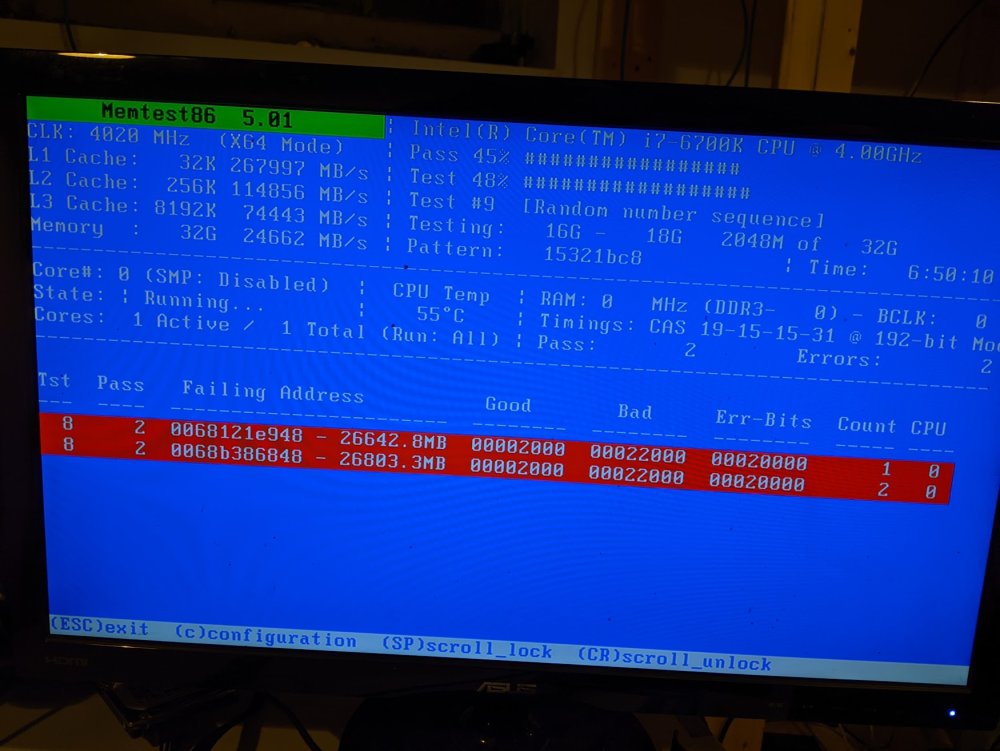
Since my ram were 2 different sets of 2 sticks, I've pulled out the two sticks that were significantly older of the 4, and now I am on 2 passes with no errors. After work, I will attempt booting with just the two passing ram Still, after some unexpected shutdowns it seemed BIOS was wiped, is that indicative of a dead/dying CMOS battery? Or can that also be laid against my faulty ram?
-
Checked on memtest before going to bed, seems like something has been identified! Man, am I reading that right, 26,000 MB is failing? That's basically all the ram is toast? (The config is 8gb in 4 slots)
-
Girlfriend accidentally shut the system down, so I took the opportunity on reboot to run memtest (it's ran for about 4 hours so far) Pass: 1 Errors :0
-
No I haven't run a memtest yet. The memory, CPU, parity.1x16tb+ storage.1x16tb HDDs was brought over from the previous iteration of the server, which had been running stable for about 7 months now, so I expected the memory to perform fine. My current ongoing test was to see if the server would go to sleep if I never started the array, since I thought after seeing the UDMA CRC error, maybe some of the new drives are at fault. Does that seem fruitless? My thinking was: If the server never goes to sleep, it means there is some sort of unlogged issue that happens between drives, containers and VM. If the server goes to sleep, it means that whatever's causing sleep has nothing to do with the drives.
-
Hi guys looking for theories/advice/commiseration, Some context: 2 weeks ago, I replaced my very old boot USB and moved to a highly-reviewed Samsung USB (per spaceinvaderone), this was in preparation to move into a new case with more storage capacity, and migrate motherboards from one used PC to another. After doing this, my server was humming along perfectly with the new USB in the old hardware configuration. My dream is to have the old unraid-server to be a machine for pre-clearing drives when I get new ones, and the one I am building to be the main storage behemoth. This past weekend, I shut down to rebuild in the new case. In the new case, there is a brand new corsair rm850 psu and a noctua cpu cooler with a low profile since it is a rackmount case. The CPU is an i7-6700 that was being used in the previous build, and it is going into a Asus TUF Z270 Mark 1 motherboard that was recently used for an old gaming PC. For storage I am adding 3 more 16tb drives, expanding my array from 2x16tb to 5x, maintaining 1 parity drive. I am also adding an additional M.2 SSD which is mostly why I am using this motherboard, in the previous build I had 1 M.2 SSD that was strictly for appdata share, the new one will be for cache pool. Additionally, I am adding a Dell H310 6bps SAS HBA LSI-9211-81 from ArtOfServer's ebay store, which is pre-flashed, because it will support some of the drives on this new case. Build goes smoothly. First Boot shows Asus splash screen, then some bios from the HBA takes over and tells me it recognizes one drive that is connected to it, thats good. We go back to Asus splash and I open BIOS. Enable CPU virtualization, enable VT-D (the passthrough-devices one), set boot order to USB (uefi) Can't recall if I was using legacy or uefi before, just set UEFI first then legacy second. Save and exit. Loop around and boot is blocked by some American Megatrends splash saying I need to press F1 to run setup since the RAID configuration has changed (what?), I open bios and check the drives, see all drives are marked AHCI. I notice here that it seems like one HDD is missing. I save and exit. I inspect the sata cables, they are plugged in well, not sure why that drive didn't appear. Find boot setting to disable "wait for F1 if boot errors". Reboot, smooth to Unraid. Go to desktop PC to manage from website. Nothing unusual inside the OS, except the drive is missing. I start the pre-clear process for the recognized drives because I am stupid and I think about how using two M.2s maybe uses one of my sata lanes now, which might ignore the HDD. The next day I check on the pre-clear and find I cannot connect to the local URL, go to the box and plug in monitor, server appears asleep. I cannot wake it up with anything. Ok, have to shutdown physically. Turn off PSU. Take this opportunity to see if I can recognize the unfound HDD in different sata port, move the cable. Reboot. American Megatrends blocker appears again, and does not go away. I have to hit F1 to go to BIOS. I notice that all my BIOS settings are wiped, so I apply them again. CMOS battery problem? This mobo is like 3-5 years old I think. Apply everything, save, reset, boot unraid. Unraid OS looks normal. Pre-clear had finished but because of unexpected shutdown Unraid wants to run parity check to start array. OK. Start array, go to start VM for HomeAssistant. ERROR: YOU MUST ENABLE VIRTUALIZATION ON YOUR MOBO. Wtf? I just set that. Ok, pause parity check. Shut down from UI. Boot for BIOS. American megatrends appears again, yes MOBO is misbehaving for sure. Set all the settings again, this time also disable C-State management, hoping this is what is putting the server to sleep. Boot to Unraid. Parity check wants to run because of unclean shutdown, thinking I am fixed now. Run parity overnight, qBitTorrent/Plex/Stash/Tautulli and HomeAssistant VM. Parity runs into the next day (17 hour parity), eventually its done. After work I check on server, can't load UI, go look at machine its asleep. This time, turn on, start array, pause parity check, turn on syslog copy to USB. If it sleeps, at least I will know why. Overnight, sometime it goes to sleep again. In the morning (Today) I boot to Unraid and have a syslog that does not tell me anything useful I can see. Unraid says that two of my 16tb drives (parity and another) now have UDMA CRC error count 1, very scary. I bought a new CMOS battery, should arrive tomorrow. Thinking to just turn off server until I have it installed, scared that these perpetual sleep and shutdowns will ruin my drives. Looking for advice, or other theories. Attached diagnostics and syslog. TL;DR New motherboard seems to make server fall asleep at night. After reboot, BIOS seems to wipe settings. Old CMOS battery to blame for everything? castle-diagnostics-20230427-1137.zip syslog
.png.d988c5581638bb02fff22b942079c990.png)
.png.6cfa96b13cfb5888dae38665edc580c8.png)

.png.f56cc791827034d10f611d43148b4813.png)
