





medmad
Members
-
Joined
-
Last visited
Everything posted by medmad
-
Followed instructions provided by JorgeB and everything is working fine after parity rebuild. Thanks for the help.
-
Sorry I meant rebuilding the parity.
-
Thank you JorgeB! I am assuming I should disable Dockers, VM's and Mover while I am rebuilding the Array?
-
I have a Supermicro chassis with 35 hard disks in it and have recently made a few changes to reduce the drive count. I Have gone from 2 - 6TB Parity to 1 - 20TB and have rebuilt parity with this setup. I have 7 - 1 and 2TB disks throughout the array of 28 disks that have been completely emptied of data onto the remaining disks in the array. I was planning on stopping the array and removing the 7 smaller disks and restarting and letting parity rebuild, but am unsure of the process needed to do this. I would also like to reorder the disks remaining in a specific order but unsure if this is possible without just starting a new array configuration. Have a screenshot of how the array is currently configured and was wondering if I can just reassign the disks I will keep in the array to whatever slot I choose and let parity rebuild from this setup, or does this try and clear the assigned disks to rebuild the array? As can be seen once the 1 and 2TB disks are removed there will be gaps in the disk slots that should probably not exist? And I would like to organize the disk slots to match how they associate with the shares that are on them, I realize that doesn't matter to unraid management but it helps me keep organized within the array. Any help with this would be appreciated.
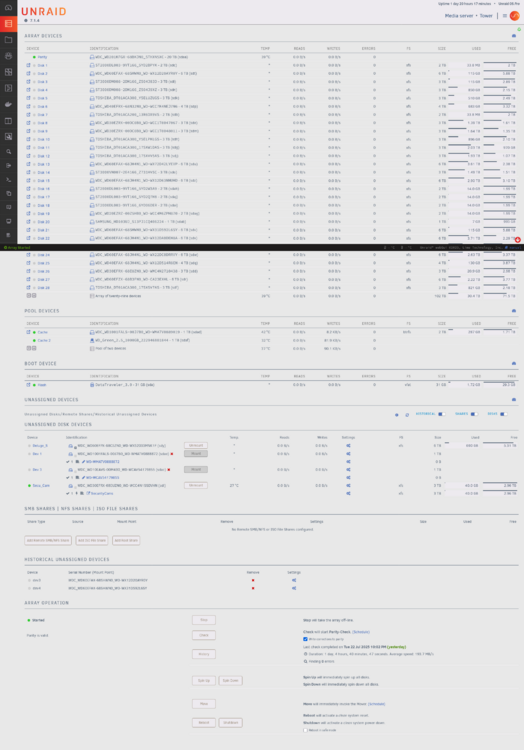
-
Oops, didn't think of that. When I did the copy I did it in MC and the new drive was not available on the shares as I had not configured the share properly yet. I just deleted the content on the destination drive that shares was not aware of yet. I will use file manager in unraid to do the renmove of the files I want moved.
-
I am sort of future proofing, I have far too many older smaller drives in the array and want to reduce the number of drives as well as reduce overall power consumption but leave the array size constant for now. The array is currently only ~ 40% occupied. As I need new drives I will likely get bigger drives (16 - 20TB). I realize the parity size is large and the parity rebuild on 20TB took about 65 hrs, but I schedule parity check every 3 months and pause so it will likely take 1-1/2 weeks every 3 months to do (probably not that long with my max array drive as 6 TB right now though). I do have enough space to move all the files from the disks I want to remove to disks that will stay. My first attempt was to copy from a drive I want to remove to a drive I am keeping while still in the array operating, but I think I need to move not copy if I want to take this drive out of the array?
-
First post to UnRaid forums. Currently have 36 bay Supermicro server with 35 drives installed: 2 - 6 TB parity drives 27 - 1 to 6 TB data drives assortment totalling 84TB 2 - 1 TB cache drive pool 4 - 3 and 6 TB unassigned drives I am starting a changeover to remove all my older 1 and 2 TB drives from the system (all are over 10yrs old) Started process by changing Parity drive 1 to a 20 TB disk. Next step is to shrink Parity drives from 2 to 1 Last step is to remove older 1 and 2 TB disks What is the best way to remove the older disks with the least amount of parity rebuilding and maintain data integrity?
-
Just upgraded to unraid 6.12.11 and starting up all my plugins and dockers and I am having problems with setting up the binhex delugevpn docker. I am using a disk installed with unassigned devices as the storage location for my download location. Once the container starts and you get to the web interface for deluge it shows an error in the bottom left corner of the interface (freespace in download folder). I think my problem is in the way that I have configured the SMB shares but not sure how to correct the problem. I cannot seem to configure the unassigned device that I want to use as an SMB share. Any help would be great. I posted this in unRaid general support but not sure if I should post in delugevpn support or unassigned device plugin support.
-
Just upgraded to unraid 6.12.11 and starting up all my plugins and dockers and I am having problems with setting up the binhex delugevpn docker. I am using a disk installed with unassigned devices as the storage location for my download location. Once the container starts and you get to the web interface for deluge it shows an error in the bottom left corner of the interface (freespace in download folder). I think my problem is in the way that I have configured the SMB shares but not sure how to correct the problem. I cannot seem to configure the unassigned device that I want to use as an SMB share. Any help would be great.
-
Yes I do and both NIC's are connected but eth1 is not activated. I can talk to UNRAID using ssh from a remote console using eth0. It seems that the web interface will not connect using the eth0 connection.
-
I have tried upgrading from 6.9.2 to 6.12.10 a few times attempting different fixes but the Web GUI will not start from a remote desktop on the same LAN. I can SSH to the 6.12.10 console from a remote desktop and 6.12.10 has started but the Web interface will not start. I only have a few Docker containers and a few plugins installed. On previous attempts I did see a connection refused error when trying to connect with a web browser from a remote computer. I am wondering if this could be a port conflict since I never took any upgrade steps between 6.9.2 and 6.12.10?

