t1mmz
Members
-
Joined
-
Last visited
Everything posted by t1mmz
-
No, I never did a New Config. Parity Check is still running, at 85%, with zero errors. Once it's complete and confirm zero errors, I'll proceed. I am out of physical drive space in my 5-bay rig, so I will need to utilize the disk3 location to Pre-Clear my new 6TB drive before adding it to the array. So, what now may be my best plan of action is: 1. Remove Data Disk from Array (Standard Method) - Stop Array, New Config, unassign disk3, start array with Parity Valid unchecked. Parity Sync rebuilds. Array now only utilizes parity drive and 3 data disks (1, 2, and 4). 2. Erase 2TB disk3 for use elsewhere not for array - run Pre-Clear using Unassigned Devices 3. Physically remove 2TB disk3 and replace with new 6TB disk - Prep/Test disk by running Pre-Clear using Unassigned Devices 4. Format new 'unmountable' 6TB disk3 as XFS - due to Pre-Clear, gets automatically added to the existing parity valid array after formatting Benefit with above plan is I can do the 2TB disk erase, swap drives and perform new 6TB drive pre-clear all while the array is active and maintains valid parity. Only then do I add the new 6TB XFS disk into the array as an additional disk. THEN... 5. Move all data from 4TB ReiserFS disk1 to the new 6TB XFS disk3 6. Format disk1 to XFS - stop array, change to XFS, format the 'unmountable' disk1 to mount to array. Confirm array and parity is valid. 7. Move all data from 6TB ReiserFS disk2 to the two updated XFS disks 8. Format disk2 to XFS - stop array, change to XFS, format the 'unmountable' disk2 to mount to array. Confirm array and parity is valid. 9. Move all data from 4TB ReiserFS disk4 to the three updated XFS disks 10. Format disk4 to XFS - stop array, change to XFS, format the 'unmountable' disk4 to mount to array. Confirm array and parity is valid. It's a long arduous process and I hope laying it out above in detail will keep me in check more carefully as I proceed with the ReiserFS to XFS conversion without losing my data. Open and happy to hear any recommendations on alternate strategy to what I laid out above.
-
As an update, my parity check came back with almost 500 million errors. (write corrections was enabled) All previous parity checks in recent history were 0 errors. Errors due to bad cables/hardware config is not my first guess, as I did not mess with any of the physical drives. Could this have been occurred due to the back and forth with the unmounted drives and/or switch from reiserfs to xfs on disk3, and parity now noticing that change? I am running a non-correcting parity check now to confirm if it was a one-time occurrance. Diagnostics file attached just in case. (As of this writing, 13 minutes elapsed with 0 errors detected) If it comes back with 0 errors, due to write corrections already taking place, I suppose I have this behind me and can proceed with the larger drive swap? hurley-diagnostics-20260106-0739.zip
-
Will do. Disk3 is now formatted to XFS, mounted, and I am currently performing a parity check. Once that completes, I'll move forward with the larger 6TB swap for Disk3. Then go from there (more carefully). Thanks again.
-
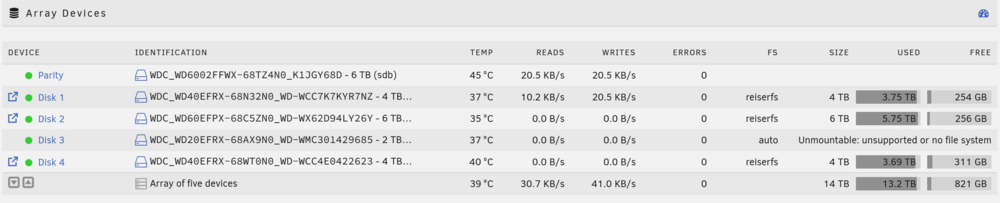
MY GOSH, THANK YOU! See screenshot. I did a quick browse and can see the files now on Disk2 as before. The 'auto' designation switched Disk2 back to its original ReiserFS. Disk 3 still shows it as Unmountable, as I erased it as intended to go to XFS. Thank you again JorgeB! Now, let me step back and describle my INTENDED plan: Remove all data from riserfs Disk3 (Complete) Convert Disk3 to XFS, remount and test/align with parity (current 'unmountable' issue) Unmount and wipe Disk3 for use elsewhere Swap in a 6TB drive to Disk3 to replace the 2TB XFS drive, align with parity Move data (one at a time) from the other existing reisferFS drives to an XFS drive THEN convert each remaining reiserfs disk one at a time to XFS. Should I still convert the 2TB drive to XFS, fix the unmount issue and repair parity, then swap with the 6TB as a larger XFS drive? What is the unmountable issue with the erased drive to XFS? Should I perform the 'XFS Repair' I have been reading out? Just not 100% sure at the moment, and feel a quick review here is best before I jump into it again.
-
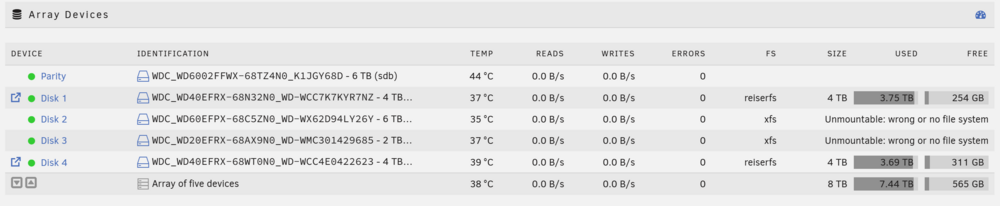
With the array offline originally, I changed the disks to XFS in the dropdown and hit Apply. Due to me being on 7.2.2, I cannot re-select reiserfs from the drop down to the depreciation. What I'm hoping is that since they were never mounted, I find a way to change the format back to reiserfs, and get them to mount to the original configuration. That's where I'm stuck currently, trying to make a workign copy of my flash on a secondary flash drive, but with 6.12 bz* files. Not working yet.
-
Hi Everyone, My setup: 1 Parity drive, 4 Data drives Unraid 7.2.2 Goal was to finally move my ReiserFS drives into XFS configuration. I have a 2TB drive that I moved all data off of to my other 3 drives, and planned to convert that disk to XFS. Royally screwing up, I mixed up in my head Disk2 (6TB drive) with Disk3 (2TB drive). Disk2 now is converted to XFS. In my panic, I converted Disk3 as originally intended to XFS as well. Now, the array for both Disk2 and Disk3 say 'Unmountable: wrong or no file system'. They have not been mounted back to the array due to this incompatibility message. I've been trying to find a way to revert back to 6.12, to allow for me to bring one or both of the drives back to ReiserFS, so I may attempt to repair them with the Parity. Current path is trying to create a copy of my flash OS drive on another flash drive and manually replacing my 7.2 setup with 6.12 setup, but having some issues getting it to show up currently. My intention was to revert Disk3 back to ReiserFS, get it back in line with the Parity, then do the same for the 6TB drive. Is all hope lost for the data on those drives? Or is there a process where I can reverse what I did, then carefully transition the proper way? If not, any way to get the data off of that 6TB drive in some fashion using another computer setup?