





danieltmcc
Members
-
Joined
-
Last visited
-
I know that parity isn't the same as a backup, but is it possible to restore any of the missing data from parity if it was successfully emulating disk2 before? Thanks for the UFS Explorer tip too, I'll look into that.
-
Thanks for the sanity check, I should have realized it makes more sense that the old parity drive wouldn't have a filesystem. I can mount sdb and it shows 1.52 TB used, similar to the 1.54 TB used on the clone drive. I can see data in /mnt/disks/ZL21YEJ6, but the newest files appear to all be from March 25 and I know my *arr Docker containers were writing data a lot more recently than that.
-
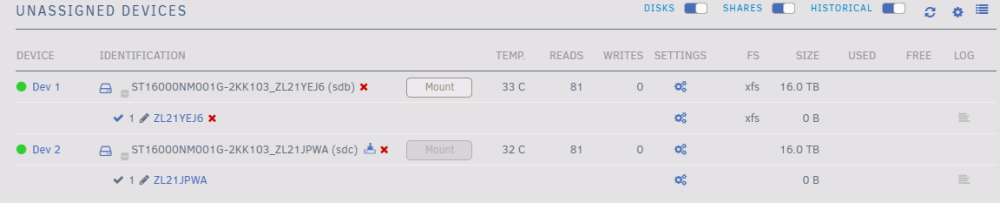
Dev 2/sdc is the old data drive, but Unassigned Devices doesn't seem to recognize the filesystem on it anymore and the mount button is disabled. This is the drive that was originally emulated by the old parity drive (sdb) though, so maybe the data drive is too far gone for ddrescue to be effective. My last completed parity check was in August, but would it make sense to re-clear the current disk2 and rebuild it from the new parity drive if that's possible? I don't completely know how the parity drive behaves in Unraid, but I'm thinking that the parity should have data that's more recent than August because it was emulating the data disk.
-
Did a reboot, started the array, waited a few minutes and then grabbed diags naskiller-diagnostics-20231017-0812.zip
-
I also downloaded a backup of my flash drive in case I needed to undo the new array config. Here are the latest diagnostics though. naskiller-diagnostics-20231015-1719.zip
-
Sorry for the late reply, but I had a separate issue with my UPS so I had to retry the ddrescue a few times. I used ddrescue on the 16TB parity drive to clone it to my 18TB replacement drive, then I used ddrescue on my 16TB failed data drive to clone it to my other 18TB replacement drive. I then created a new config that used the 18TB parity replacement as my parity drive (and checked "Parity is already valid" before starting the array) and the 18TB data replacement for disk2. I started the array and can see data in /mnt/user/ now, but the array devices in the Main tab of the GUI shows 1.54TB used (16.5TB free) in disk2 instead of the >15TB used that I expected. I stopped the array again to prevent writes that might complicate things and I kept Docker/VMs disabled the whole time. Is there a different way that I should have done this or a way that I can prevent any data loss from disk2? I'm thinking that I can put my old parity drive in place of disk2 (similar to a parity swap) since it was previously emulating the contents of disk2, but on the other hand maybe I can rebuild my 18TB disk2 from this replaced/cloned 18TB parity drive instead somehow. Is there a preferred/recommended solution?
-
I primarily use Unraid as a media server (*arrs, including Tdarr), so I download to cache before moving to the array, then transcode to cache before moving back to the array. A few weeks ago I started getting SMART errors on Disk 2 in my array, but my Parity drive started emulating the drive without a problem, so I didn't prioritize replacing the disk. Then my parity drive started throwing SMART errors, so I got the two replacement disks (and precleared them) to upgrade my parity and data drive. I initially tried doing a parity swap, removing the dead drive, using my current parity as the disk drive, and using the new (larger) drive as the replacement parity drive. Unfortunately the parity swap failed, even after 2-3 additional attempts. I couldn't find exactly where it stopped in the logs, but I saw in the GUI that the swap was still running after ~12 hours (I was expecting it to take close to 24 hours) and it failed overnight. I assume that the parity swap failed because of the SMART errors on the parity drive, so I won't continue trying that unless someone thinks that it's worthwhile. I looked through the forum and had difficulty finding posts about parity swaps while parity drives have SMART errors, so I looked through the FAQ and found a post about using ddrescue to recover data. My plan is to use ddrescue to recover my parity drive to one of the new 18TB drives, and I assume I can just swap the parity drive at that point since the data is (theoretically) identical. Then I can replace the dead drive and rebuild it from parity. Am I on the right track, or is there anything else that I should try first? Please let me know if I can provide any additional info, and any advice is appreciated! naskiller-diagnostics-20230920-1149.zip
