Sonetiz
Members
-
Joined
-
Last visited
Everything posted by Sonetiz
-
Heres the Diagnostics g8-unraid-host-diagnostics-20221130-2346.zip
-
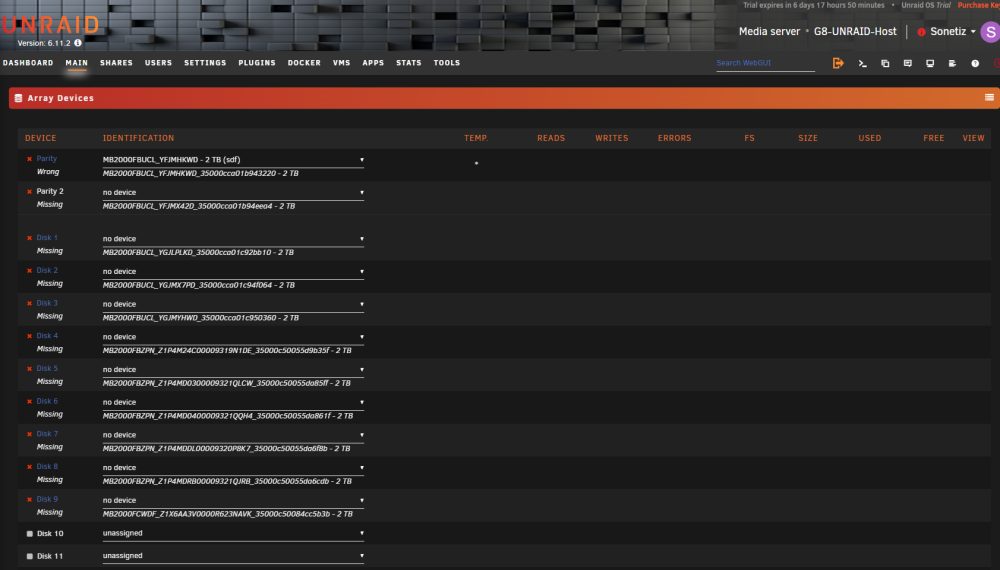
I had an Array of 11 2TB Drives with 2 Parity Disks Running when my Breaker tripped last night. I have not found any possible cause for the breaker tripping so my working theory is that the power to my entire house went out and the momentary surge in demand as my 2 servers and 1 drive shelf restarted after the power came back overloaded the breaker. That doesnt change my current problem though. After booting the Unraid host it wont recognize the array drives as the array drives(as shown in the picture - before today the drives did not have the _35000c... at the end) I can still tell which drive was in which place in the array but if i select the drives in the gui it just says wrong as shown in capture.png on the parity drive. Is there any other way to manually rebuild the array ?