





Christopher Deal
Members
-
Joined
-
Last visited
-
I ended up replacing all the disks with 20TB. The best bet is just let the parity rebuild do its thing. Time consuming yes, but a lot less work. Otherwise, if you're just replacing one of the drives in the end, just pull one drive and do a parity rebuild, and then manually move the files from the 2nd disk onto the first.
-
So currently I have the setup in the image below: Disks 2 & 3 are part of a share, and the share is currently set to high-water. I will be replacing disk 2 with another 20TB disk. What is the best way to handle this? The idea is I want to migrate data from disks 2 & 3 onto a single 20TB disk. My first guess was to just remove disk #2, replace it with the new 20TB. Let UNRAID rebuild disk 2 from parity, then once finished, move the data from disk 3 to disk 2 (which would update parity as it moves data) Is that the best method for doing this?
-
Just wanted to give an update - thanks everyone for guiding me. The move went perfectly. It took about 3 days to do but the parity worked great at rebuilding drives as they were replaced and didn't have to deal with much downtime other than installing the drives and cable managing everything.
-
The only reason I had the setup as I did, is I want one of the 14TB disks to replace disk 1. One of my shares is dedicated solely to disk 1 (an always online disk) where disk 2 and 3 are mostly just cold-storage and maybe spin up once a month at most. AH that's good to know it tracks by serial, I was thinking it tracked via mountpoint /sda etc. That does sound like a better idea, as I'd just have to deal with the replacing of drive #1 with a 14TB and replacing the parity disk.
-
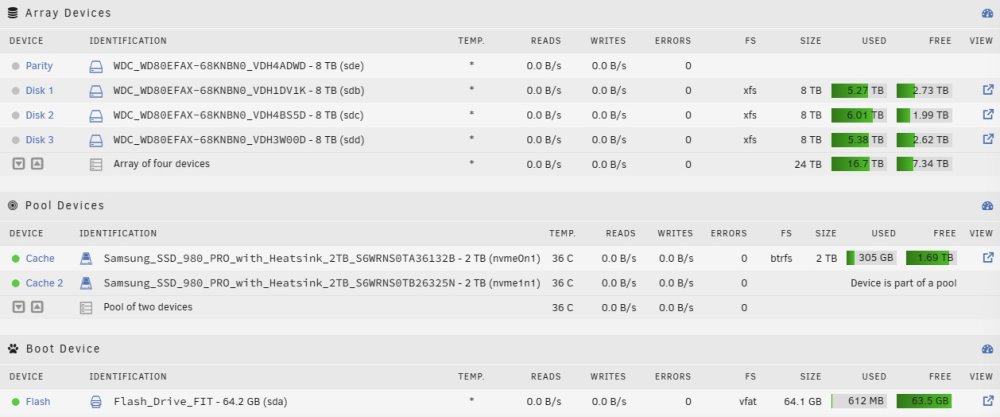
Thanks for the insights! I'm not terribly afraid of the rebuilds as I have all data backed up on external disks each month so right now I'm only a couple of days away - and most data is replacable. So what would be the best method of doing this? I have everything how I want it now, but was not sure how to set up the disks in the array. I attached a photo of what my current setup looks like. Please correct me if I'm wrong regarding this method. 1. Remove the current Parity disk from the array - remove drive from the server permanently (I'll have 2 extra 8TB disks) 2. Connect first 14TB disk in its place and set up parity to the disk. 3. Remove DISK 1 from the array. Shut system down and connect up 14TB disk. Assign this disk as DISK 1 in the array window and allow a rebuild. 4. Remove DISK 2 from the array. Shut system down and connect up 14TB disk. Assign this disk as DISK 2 in the array window and allow a rebuild. 5. Remove DISK 3 from the array. Shut system down and connect up 14TB disk. Assign this disk as DISK 3 in the array window and allow a rebuild. 6. Format a couple of the 8TB disks via the Unassigned disks and add as DISK 4 & 5. 7. I don't know how it specifically works with data already on the disk, but is there a way after all this is done to spread the data after the fact? Currently I use high-water but I assume after I add the 8TB's they would just be empty. Is this where Unbalance comes in? This is my end goal: SATA PORT 1: 14TB [DISK 1] SATA PORT 2: 14TB [DISK 2] SATA PORT 3: 14TB [DISK 3] SATA PORT 4: 8TB [DISK 4] SATA PORT 5: 8TB [DISK 5] SATA PORT 6: 14TB [PARITY] Hopefully the formatting sticks. So, if I use this method, it'll preserve all the shares and permissions? Thanks!
-
I'm sure this is probably a simple question but wanted some guidance on the best way to accomplish this, or if it's better to just backup/nuke and start over. I currently have 4 8TB Disks. (3 array, 1 parity) and a Cache Pool (2x 1TB SSD). The Cache Pools holds the dockers, appdata, etc..) These will stay as is. I have 4 14TB Disks coming and I'd like to use those all and keep 2 of the 8TB around for a total of 6 disks. I know one of the 14TB will become a parity disk. The current setup I have is my first 8TB disk is for a set of two shares, and the rest of the shares live on disks 2 & 3. Ideally what I'd like to do is the following: Parity #1 14TB Disk #1 14TB Disk #2 14TB Disk #3 14TB Disk #4 8TB Disk #5 8TB I was originally thinking to just disconnect the old disk one by one and let it rebuild via parity, I'm guessing that might take a really long time for 4 drives. Or is there a better method of moving the data? I had read about Unbalance but wasn't sure if that was the way to go. My first inclination was to just nuke the parity drive from the array (all my data is already backed up) and remove it from the system. Then connect a couple of the 14TB disks and find a way to move data from disk to disk (I'm not sure if it would mess up shares) - and then once all is said and done, turn the parity back on. Any guidance would greatly be appreciated.
-
I apologize if this is the wrong forum. I've read around a couple threads and looked at the notification options for UnRAID. I see how I can call notify -d -i etc... but what I was curious about is if there was a way to include the progress data/log to such a notification/e-mail? I just have a backup script that runs daily (works fine) but figured it would be nice to have a report of what was backed up etc..


