limp15000
Members
-
Joined
-
Last visited
-
Ok everything seems up and running again. Will take out the (maybe) faulty SSD to do some checks and send it back for an RMA. Will also monitor logs a bit more. Thanks Jorge for your assistance
-
Now that only the SSD is in the pool all my dockers seem to be working again after being deployed. Disk /dev/nvme0n1: 931.51 GiB, 1000204886016 bytes, 1953525168 sectors Disk model: Samsung SSD 980 1TB Units: sectors of 1 * 512 = 512 bytes Sector size (logical/physical): 512 bytes / 512 bytes I/O size (minimum/optimal): 16384 bytes / 131072 bytes Disklabel type: dos Disk identifier: 0x00000000 Device Boot Start End Sectors Size Id Type /dev/nvme0n1p1 2048 1953525167 1953523120 931.5G 83 Linux
-
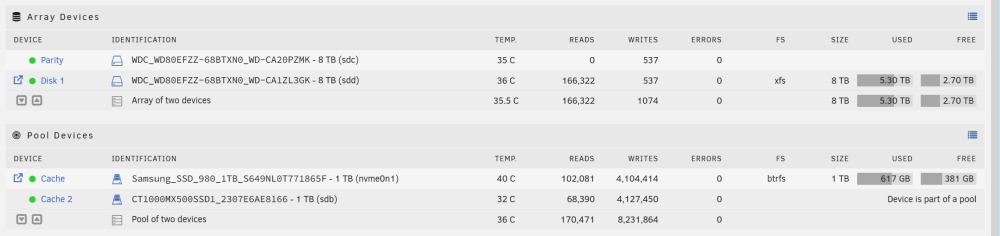
Here is what I understand the SSD I added seems to be faulty. My plan is the following. Move back to only the NVME drive and format the cache pool. Check the SSD and RMA it if faulty. I also realised when re-reading the docs that I should have setup a weekly scrub I will of course do this moving forward.
-
I started my array in maintenance mode and seeing this on sdb : [1/7] checking root items parent transid verify failed on 1209924911104 wanted 823389 found 822238 parent transid verify failed on 1209924911104 wanted 823389 found 822238 Ignoring transid failure parent transid verify failed on 1209335595008 wanted 834330 found 822738 parent transid verify failed on 1209335595008 wanted 834330 found 822738 Ignoring transid failure parent transid verify failed on 719384084480 wanted 834316 found 822640 parent transid verify failed on 719384084480 wanted 834316 found 822640 Ignoring transid failure parent transid verify failed on 1210170769408 wanted 833163 found 822281 parent transid verify failed on 1210170769408 wanted 833163 found 822281 Ignoring transid failure parent transid verify failed on 1209827524608 wanted 825514 found 822222 parent transid verify failed on 1209827524608 wanted 825514 found 822222 Ignoring transid failure parent transid verify failed on 1209827573760 wanted 825514 found 822222 parent transid verify failed on 1209827573760 wanted 825514 found 822222 Ignoring transid failure parent transid verify failed on 718642659328 wanted 831586 found 822538 parent transid verify failed on 718642659328 wanted 831586 found 822538 Ignoring transid failure parent transid verify failed on 1209200361472 wanted 829690 found 822717 parent transid verify failed on 1209200361472 wanted 829690 found 822717 Ignoring transid failure parent transid verify failed on 1209200541696 wanted 833720 found 822717 parent transid verify failed on 1209200541696 wanted 833720 found 822717 Ignoring transid failure parent transid verify failed on 1209200574464 wanted 833720 found 822717 parent transid verify failed on 1209200574464 wanted 833720 found 822717 Ignoring transid failure parent transid verify failed on 718550532096 wanted 832186 found 822525 parent transid verify failed on 718550532096 wanted 832186 found 822525 Ignoring transid failure parent transid verify failed on 718515798016 wanted 833364 found 822521 parent transid verify failed on 718515798016 wanted 833364 found 822521 Ignoring transid failure parent transid verify failed on 1209250955264 wanted 834321 found 822726 parent transid verify failed on 1209250955264 wanted 834321 found 822726 Ignoring transid failure parent transid verify failed on 1209201524736 wanted 833720 found 822717 parent transid verify failed on 1209201524736 wanted 833720 found 822717 Ignoring transid failure parent transid verify failed on 616064253952 wanted 829366 found 822434 parent transid verify failed on 616064253952 wanted 829366 found 822434 Ignoring transid failure ERROR: child eb corrupted: parent bytenr=1209103466496 item=113 parent level=1 child bytenr=616064253952 child level=1 ERROR: failed to repair root items: Input/output error [2/7] checking extents parent transid verify failed on 615336919040 wanted 828105 found 805826 parent transid verify failed on 615336919040 wanted 828105 found 805826 Ignoring transid failure parent transid verify failed on 615337017344 wanted 832611 found 822326 parent transid verify failed on 615337017344 wanted 832611 found 822326 Ignoring transid failure parent transid verify failed on 615353384960 wanted 832604 found 822323 parent transid verify failed on 615353384960 wanted 832604 found 822323 Ignoring transid failure parent transid verify failed on 615364034560 wanted 830699 found 822327 parent transid verify failed on 615364034560 wanted 830699 found 822327 Ignoring transid failure Extent back ref already exists for 718664499200 parent 0 root 2 Extent back ref already exists for 718635712512 parent 0 root 2 Extent back ref already exists for 718664515584 parent 0 root 2 Extent back ref already exists for 718633861120 parent 0 root 2 Extent back ref already exists for 718660009984 parent 0 root 2 Extent back ref already exists for 718633910272 parent 0 root 2 Extent back ref already exists for 718660042752 parent 0 root 2 Extent back ref already exists for 718664564736 parent 0 root 2 Extent back ref already exists for 718610169856 parent 0 root 2 Extent back ref already exists for 718664597504 parent 0 root 2 Extent back ref already exists for 718664613888 parent 0 root 2 Extent back ref already exists for 718652899328 parent 0 root 2 Extent back ref already exists for 718664712192 parent 0 root 2 Extent back ref already exists for 718660141056 parent 0 root 2 Extent back ref already exists for 615648051200 parent 0 root 2 Extent back ref already exists for 615499579392 parent 0 root 2 Extent back ref already exists for 615347027968 parent 0 root 2 Extent back ref already exists for 718643953664 parent 0 root 2 Extent back ref already exists for 718552907776 parent 0 root 2 Extent back ref already exists for 718804992000 parent 0 root 2 Extent back ref already exists for 718805041152 parent 0 root 2 Extent back ref already exists for 718461075456 parent 0 root 2 Extent back ref already exists for 718461124608 parent 0 root 2 Extent back ref already exists for 718461206528 parent 0 root 2 Extent back ref already exists for 718805336064 parent 0 root 2 Extent back ref already exists for 718461632512 parent 0 root 2 Extent back ref already exists for 718805401600 parent 0 root 2 Extent back ref already exists for 718805680128 parent 0 root 2 Extent back ref already exists for 718805712896 parent 0 root 2 Extent back ref already exists for 718805729280 parent 0 root 2 Extent back ref already exists for 718805745664 parent 0 root 2 Extent back ref already exists for 718805778432 parent 0 root 2 Extent back ref already exists for 718462222336 parent 0 root 2 Extent back ref already exists for 718805794816 parent 0 root 2 Extent back ref already exists for 718462992384 parent 0 root 2 Extent back ref already exists for 718463008768 parent 0 root 2 Extent back ref already exists for 718805827584 parent 0 root 2 Extent back ref already exists for 616257306624 parent 0 root 2 Extent back ref already exists for 615637319680 parent 0 root 2 Extent back ref already exists for 615637270528 parent 0 root 2 Extent back ref already exists for 1209107283968 parent 0 root 2 Extent back ref already exists for 719288991744 parent 0 root 2 Extent back ref already exists for 719289516032 parent 0 root 2 Extent back ref already exists for 616330543104 parent 0 root 2 Extent back ref already exists for 718665383936 parent 0 root 2 Extent back ref already exists for 718610874368 parent 0 root 2 Extent back ref already exists for 718647148544 parent 0 root 2 Extent back ref already exists for 718610956288 parent 0 root 2 Extent back ref already exists for 718647197696 parent 0 root 2 Extent back ref already exists for 718962655232 parent 0 root 2 Extent back ref already exists for 718962819072 parent 0 root 2 Extent back ref already exists for 719271297024 parent 0 root 2 Extent back ref already exists for 718962851840 parent 0 root 2 Extent back ref already exists for 718962884608 parent 0 root 2 Extent back ref already exists for 719258697728 parent 0 root 2 Extent back ref already exists for 616112996352 parent 0 root 2 Extent back ref already exists for 616113176576 parent 0 root 2 Extent back ref already exists for 718508867584 parent 0 root 2 Extent back ref already exists for 616113373184 parent 0 root 2 Extent back ref already exists for 615566376960 parent 0 root 2 Extent back ref already exists for 718410809344 parent 0 root 2 Extent back ref already exists for 615336919040 parent 0 root 2 Extent back ref already exists for 615474266112 parent 0 root 2 Extent back ref already exists for 615329202176 parent 0 root 2 Extent back ref already exists for 615329234944 parent 0 root 2 parent transid verify failed on 615386693632 wanted 823436 found 822332 parent transid verify failed on 615386693632 wanted 823436 found 822332 Ignoring transid failure parent transid verify failed on 615393083392 wanted 832617 found 822334 parent transid verify failed on 615393083392 wanted 832617 found 822334 Ignoring transid failure parent transid verify failed on 615407108096 wanted 823993 found 822338 parent transid verify failed on 615407108096 wanted 823993 found 822338 Ignoring transid failure parent transid verify failed on 615443300352 wanted 828716 found 822342 parent transid verify failed on 615443300352 wanted 828716 found 822342 Ignoring transid failure parent transid verify failed on 615471136768 wanted 828739 found 822347 parent transid verify failed on 615471136768 wanted 828739 found 822347 Ignoring transid failure parent transid verify failed on 615471546368 wanted 822347 found 841083 parent transid verify failed on 615471546368 wanted 822347 found 841083 Ignoring transid failure parent transid verify failed on 615472414720 wanted 822347 found 841083 parent transid verify failed on 615472414720 wanted 822347 found 841083 Ignoring transid failure parent transid verify failed on 615474266112 wanted 805827 found 841083 parent transid verify failed on 615474266112 wanted 805827 found 841083 Ignoring transid failure parent transid verify failed on 615475675136 wanted 822347 found 841083 parent transid verify failed on 615475675136 wanted 822347 found 841083 Ignoring transid failure parent transid verify failed on 615494942720 wanted 829260 found 822350 parent transid verify failed on 615494942720 wanted 829260 found 822350 Ignoring transid failure parent transid verify failed on 615499579392 wanted 817905 found 841083 parent transid verify failed on 615499579392 wanted 817905 found 841083 Ignoring transid failure parent transid verify failed on 615566376960 wanted 821665 found 842604 Ignoring transid failure parent transid verify failed on 615572602880 wanted 828179 found 822364 parent transid verify failed on 615572602880 wanted 828179 found 822364 Ignoring transid failure checksum verify failed on 616148729856 wanted 0x00000000 found 0xb6bde3e4 bad tree block 616148729856, bytenr mismatch, want=616148729856, have=0
-
Here it is : No valid Btrfs found on /dev/nvme0n1p1 ERROR: open ctree failed Tried enabling the cache again for appadata but seeing this warning again in the logs : Sep 11 20:33:00 Tower kernel: BTRFS error (device sdb1: state EA): parent transid verify failed on logical 719207088128 mirror 1 wanted 823173 found 822614
-
I also tried redeploying my docker images but am still getting a read-only error : 2023-09-11 20:16:13.540849 [info] Host is running unRAID 2023-09-11 20:16:13.558906 [info] System information Linux d5544ba16f26 6.1.49-Unraid #1 SMP PREEMPT_DYNAMIC Wed Aug 30 09:42:35 PDT 2023 x86_64 GNU/Linux 2023-09-11 20:16:13.578803 [info] OS_ARCH defined as 'x86-64' 2023-09-11 20:16:13.599065 [info] PUID defined as '99' 2023-09-11 20:16:13.620807 [info] PGID defined as '100' 2023-09-11 20:16:13.978800 [info] UMASK defined as '000' 2023-09-11 20:16:13.998316 [info] Permissions already set for '/config' 2023-09-11 20:16:14.018399 [info] Deleting files in /tmp (non recursive)... chmod: changing permissions of '/config/supervisord.log': Read-only file system
-
Here is the output : Disk /dev/nvme0n1: 931.51 GiB, 1000204886016 bytes, 1953525168 sectors Disk model: Samsung SSD 980 1TB Units: sectors of 1 * 512 = 512 bytes Sector size (logical/physical): 512 bytes / 512 bytes I/O size (minimum/optimal): 16384 bytes / 131072 bytes Disklabel type: dos Disk identifier: 0x00000000 Device Boot Start End Sectors Size Id Type /dev/nvme0n1p1 2048 1953525167 1953523120 931.5G 83 Linux And my SSD on Sata port : Disk /dev/sdb: 931.51 GiB, 1000204886016 bytes, 1953525168 sectors Disk model: CT1000MX500SSD1 Units: sectors of 1 * 512 = 512 bytes Sector size (logical/physical): 512 bytes / 4096 bytes I/O size (minimum/optimal): 4096 bytes / 4096 bytes Disklabel type: dos Disk identifier: 0x00000000 Device Boot Start End Sectors Size Id Type /dev/sdb1 2048 1953525167 1953523120 931.5G 83 Linux When I initially installed my server in fall last year I only had one NVME SSD. Then I added the Sata SSD during the summer.
-
Ok so for the moment I've set everything to array only to get my services back online. Not too sure what to with the cache drives at the moment.
-
It's still connected yes but I removed it from the cache.
-
Should I set back my cache pools to the two SSDs ?
-
Here is the output : Label: none uuid: dfdf7994-b9ed-4e6b-b3da-0ead374259ce Total devices 1 FS bytes used 702.71MiB devid 1 size 20.00GiB used 1.52GiB path /dev/loop2 Label: none uuid: 2fd959e1-0d66-4d1a-9b0f-746a3f6520fb Total devices 1 FS bytes used 412.00KiB devid 1 size 1.00GiB used 126.38MiB path /dev/loop3 warning, device 1 is missing Label: none uuid: facc2023-c5f7-4fe2-936d-d24631bef1c6 Total devices 2 FS bytes used 574.28GiB devid 2 size 931.51GiB used 605.03GiB path /dev/sdb1 *** Some devices missing
-
Quite odd getting the same error with my SSD :

-
Ok so I shutdown my server and unplugged my non NVME SSD thinking it was maybe the issue but it looks like my NVME drive is bad.

-
This is the error I am getting when starting HomeAssistant : Execution error internal error: process exited while connecting to monitor: 2023-09-10T10:49:58.575854Z qemu-system-x86_64: -blockdev {"node-name":"libvirt-1-format","read-only":false,"cache":{"direct":false,"no-flush":false},"driver":"qcow2","file":"libvirt-1-storage","backing":null}: Could not open '/mnt/cache/domains/homeassistant/haos_ova-9.3.qcow2': Read-only file system Ok and it seems my dockers won't start as well Ok so something seems quite wrong : root@Tower:~# btrfs dev stats /mnt/cache [/dev/nvme0n1p1].write_io_errs 0 [/dev/nvme0n1p1].read_io_errs 0 [/dev/nvme0n1p1].flush_io_errs 0 [/dev/nvme0n1p1].corruption_errs 0 [/dev/nvme0n1p1].generation_errs 0 [/dev/sdb1].write_io_errs 5849542 [/dev/sdb1].read_io_errs 4020 [/dev/sdb1].flush_io_errs 771738 [/dev/sdb1].corruption_errs 77158 [/dev/sdb1].generation_errs 0
-
My VM is stored in domains :