




-
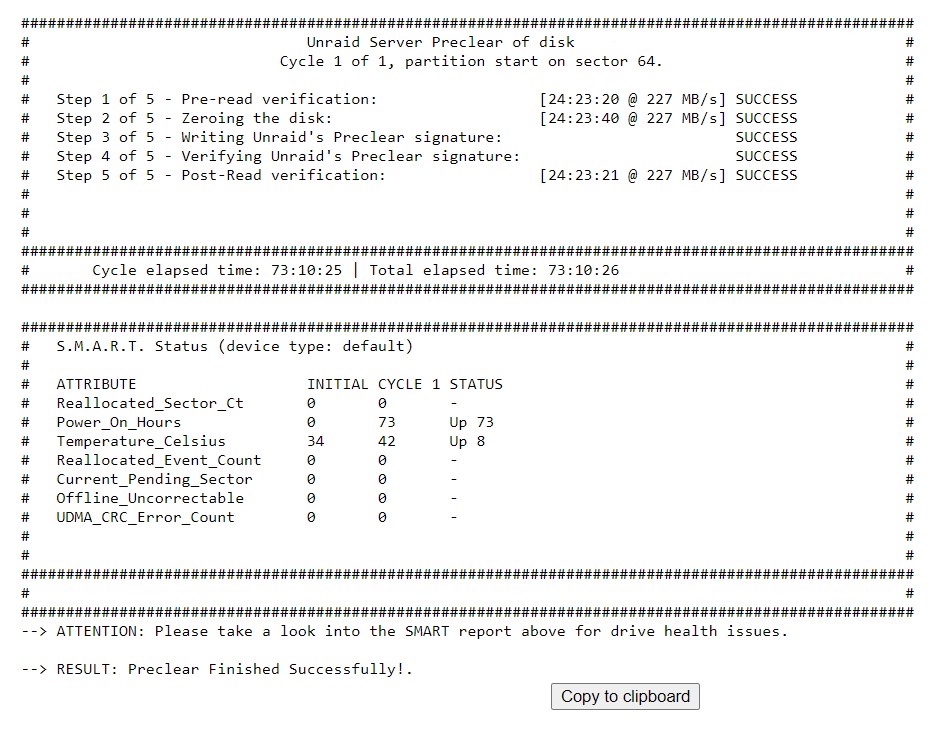
Preclear completed 2 x 20TB WD Red Pro's on unraid v6.11.4. Did both drives at the same time and took 73h 10m in total. Posting a screenshot of the report in case people are interested.
-
Oh my I feel so silly, thank you so much for the quick responses. My files are being moved now, I thought I read somewhere that it had to be set to 'No', this issue is now resolved.
-
I am trying to move a couple of shares back to my array as I would like to upgrade a couple of my cache drives. I stopped and disabled all of my Dockers, and I don't have any virtual machines (VM manager is also disabled). I've set the 3 shares I want to move back to my array by setting the 'cache' to 'No'. When I click on the move (mover), nothing happens. Please see attached log and advise if further information is required. unraid-diagnostics-20221114-0843.zip

View in the app
A better way to browse. Learn more.
