





baazaar13
Members
-
Joined
-
Last visited
-
I fixed the issue. So apparently what happened was after updating, my shares had their minimum free space set to 1.4 TB, while before the update I think it was either not set or lower, so I though that was not an issue. After reducing the value it fixed everything. I never changed this value so the update must have done that. If anyone else runs into this issue hopefully this can be helpful to them. (Looks like its set to 1.4 TB for all shares)
-
I think the latest update (6.12.14) caused some weird issues with unraid, and qbittorrent connection. I noticed my downloads were stalled/errored. I tried resetting vpn (wireguard), changed servers, restarted unraid, reset unraid update to previous version. (6.12.13). In qbt, the connection is green, and torrent def gets tracker update with seeders/leachers but it just wont DL. It's driving me crazy.
-
I figured it out. There were changes to the location requirements of custom init files.
-
I have narrowed it down to an ip route issue. It seems my custom-cont-init.d iptables config does not execute anymore on container start-up. If I manually configure the ip table for the qbittorrent container it starts to work. The exact same ip routing instruction that are in my custom-cont-init.d folder. Strange huh.
-
I had everything working fine until I updated a "Docker Patch". Now when I test a torrent with torrent leak test, It comes up as my home IP. I literally didn't change a thing. I have wireguard on it's own with a qbittorrent container that routes thru the WG container. I also have the qbittorrent container run a custom ip tables config. I'm just not sure what changed after this docker patch that could be causing this inconsistency. If anyone has any ideas or needs more info lmk. tower-diagnostics-20230124-1410.zip
-
Holy shit. I see. Thank u for your help !
-
I have two SSD drives, acting as separate caches. I have tried the yes->prefer mover procedure to drop one of the shares. Even when I make a new share, specifically pick one of the SSD's, it still adds the other share, and when I add files, they are present on both drives. I have gone into the file manager and clicked one of the cache drives, and pressed delete, and it deletes from both caches. I truly do not understand what I anm doing incorrectly. I have included the diagnosis log file. tower-diagnostics-20230124-1410.zip
-
It made sense in the moment lol, i figured it would fit in with my other shares. It was working fine, but I was also talking to someone and like an idiot clicked delete all. so I guess the zfs compounded the problem. Thank u man !! u are the best !!! There were still some issues but after a few hours the server fixed itself. !!
-
Lol i was trying to find a spot to mount it lol
-
I think u fixed it man .!!!
-
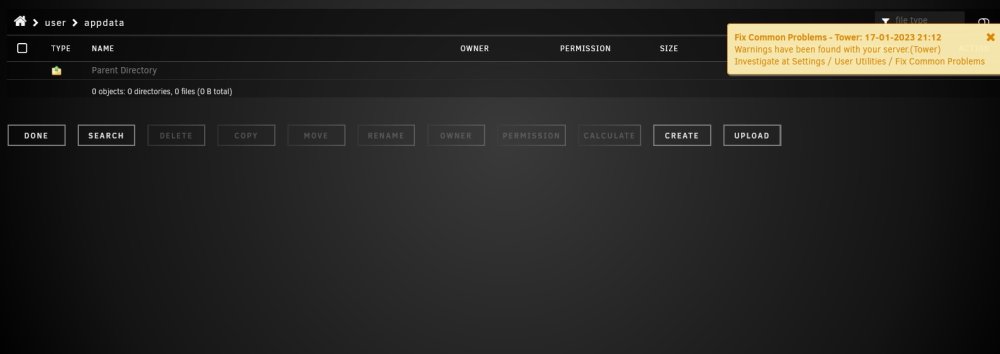
I remounted zfs pool to /mnt/user
-
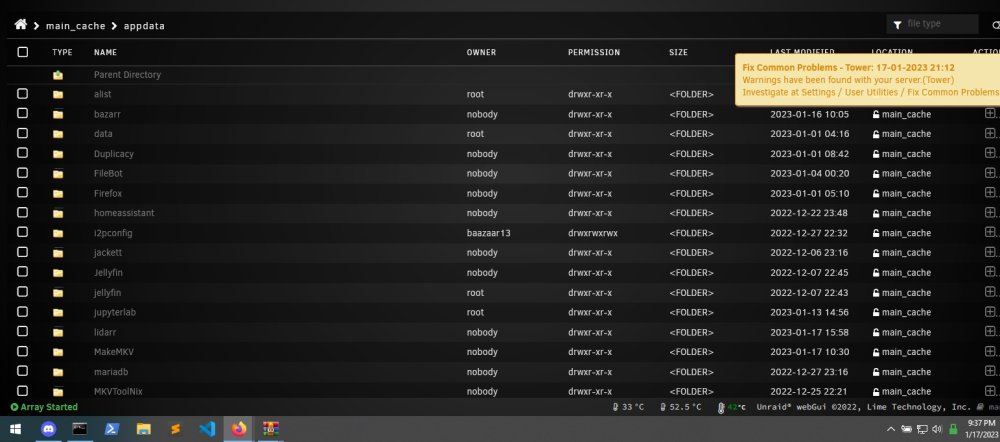
The directory /user/ got wiped , and I remade the share appdata, in an attempt to try to copy the files from main-cache, so the appdata folder is newly made.
-
backup is zfs pool. Side project of mine. I can delete it therei s nothing important on there. I was playing around with zfs pool commands. prob shows up weird because of that. Basically I need to figure out how to move my appdata and system folders I have on /main-cache. But I cannot download nor move nor copy anything from that directory.
-
tower-diagnostics-20230117-2104.zip
-
ok bon apetit. Thank u for your help I really appreciate it.


