





Sleepless In Seattle
Members
-
Joined
-
Last visited
Everything posted by Sleepless In Seattle
-
-
Hi Unraid Community, I’m looking for advice on the best way to get efficient macOS Spotlight search—ideally including content indexing—working on an SMB share hosted by my Unraid server (~10TB). I want searching from my Mac to feel as seamless as searching local files. Here’s what I’ve looked into so far: macOS client-side indexing (mdutil): Tried this, but indexing is extremely slow (still running after 24 hours on 1TB dataset). Third-party Mac apps (e.g., ProFind): Faster, indexing took less than an hour, but not no Spotlight integration, not native experience. Unraid server-side indexing (Samba vfs_spotlight): Seems promising. I see options for gnome tracker as a backend or using Elasticsearch/OpenSearch with FSCrawler on forums and samba wiki,, but I’m unsure about setup complexity and performance for a large share. My questions: What’s the most reliable solution for Spotlight-style search on large Unraid SMB shares? Does Unraid’s Samba include Tracker support out of the box, or does it need extra setup? For those who’ve tried both: How do Tracker and Elasticsearch/FSCrawler compare (performance, reliability, resource use, full-text vs. metadata search)? Are there any other server-side options that work well with macOS Spotlight? Thanks for any tips or experiences you can share! You guys are the best!
-
Thanks, do you know where i can find a old version of this?
-
Umm it did not work
-
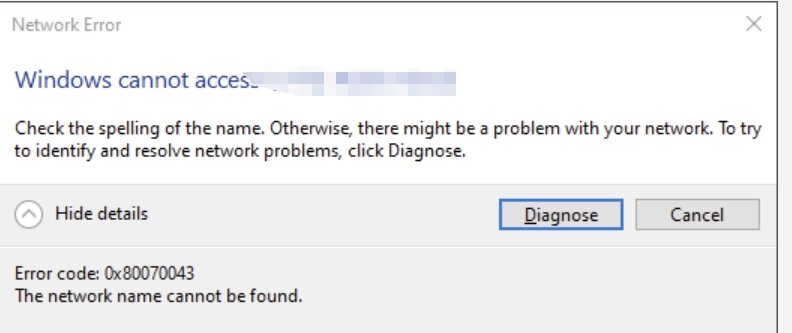
So it is basically like this when i input \\MyserverIP\sharefolder
-
Thanks for the response, here the log files @JorgeB z420-diagnostics-20240516-1455.zip
-
Hello Unraid Community, I recently updated my Unraid server from version 6.11 to 6.12, and since then, my SMB share has stopped working. Previously, I was able to mount the share folder on my Windows 11 PC with both Ethernet cards set to the same subnet. Here are the details of my setup: Unraid version: 6.12 Previous Unraid version: 6.11 Connection method: Direct Ethernet connection between Windows 11 PC and Unraid server Network configuration: Both Ethernet cards set to the same subnet Since the update, I haven't been able to access the SMB share from my Windows 11 PC. I've double-checked the network settings on both machines, and everything seems to be configured correctly. Has anyone else experienced this issue after updating to 6.12? Are there any additional settings or configurations I need to check or adjust with the new version? Any help or suggestions would be greatly appreciated. Thank you in advance for your assistance!
-
Yeah that's exactly what I am gonna do.. on my server i have 2x 1GB ports and planning to add a 2x10gbe card to it. I guess my question is if i connect one of them to my PC and another to router/switch, will my PC get access to internet automatically? Or do i need to install a VM that runs openwrt/pfsense that does the job for me
-
is 10gbe switch my only option here?
-
Hi guys, I am new to the diy NAS world. Forgive me if the question sounds very dumb I wanted to get 1G/s speed between my desktop and home server so I am planning to add 10gbe network card to both my home server and my desktop. But my problem is I do not have a 10gbe switch also I do not plan to put my server within the same room(too noisy). so I have to connect the home server to my 1gbe switch and let my desktop connect to my server directly through the pre-routed port on my wall to get the 10gbe ethernet. But that way I am losing connection to the internet . So I am wondering is there some kind of way that I can set up a "virtual switch" in my server like I did in my previous synology and qnap so I can get 10gbe ethernet and 1gbe internet using 1 single cable?

