





gaarakenpachi
Members
-
Joined
-
Last visited
-
I removed one RAM stick and it was successfully able to complete a parity check with all the services on -- which it has never been able to complete before -- so I think it's fixed (unless I post again in a few weeks). Thanks Jorge for your help!
-
No luck, the issue reproduced again. Even when just using the system as a NAS, without plugins, dockers, VMs. Are there any extra logging features I can enable to get better information?
-
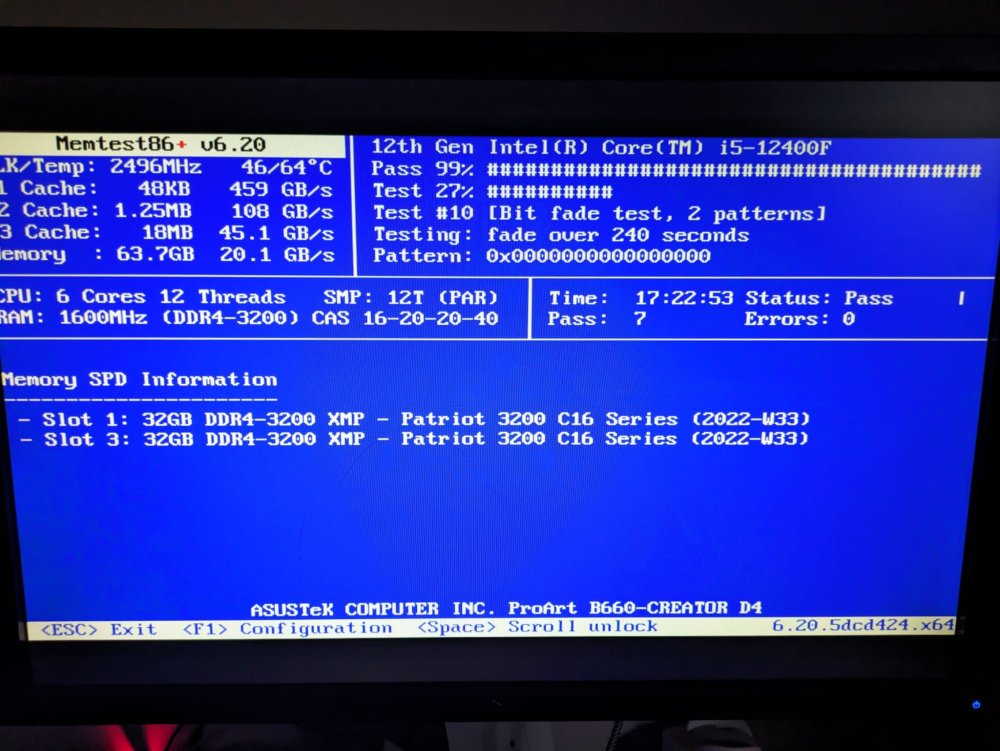
Thanks Jorge, I attached my memtest. The FixCommonProblems plugin did just yesterday link me to https://docs.unraid.net/unraid-os/release-notes/6.12.4/#fix-for-macvlan-call-traces so I did that fix. I had 1 docker (setup about a week ago) and 0 VMs running. I have it booted into safe mode now, though I'm not able to access the share I had setup before. Is there a way to turn that on?
-
I am a newbie, really appreciate any help. I've had this server running for a year or so, every 2-3 weeks my server will get into a state where the console display shows nothing/can't be typed on, and the web UI won't load, can't be pinged -- appears to be crashed. I managed to grab the attached log right before this occurred. I've noticed if I do a hard powercycle that it will auto-start the parity check, and usually crash again within a couple of hours, if I abort the parity check by a 2nd soft reboot then it'll stay alive for much longer. I can't rule out it being a hardware or BiOS problem, since it's been happening since I initially setup the server. unraid-diagnostics-20240207-1520.zip
-
The ones I got were https://www.amazon.ca/dp/B09FFK1QLR which register as incompatible to the USB Creator tool I will have to give the manual method a try.
-
I went to my local Walmart and bought every 32GB USB they had, a random EMTEC brand USB 2.0 ended up working. None of the USB 3.0+ drives worked (including the name brand Sandisk ultra fit ones). The unraid documentation should probably add the USB 2.0 requirement if that's what it is. "You will also need a high-quality, name brand USB flash device that is 2GB or larger that must contain a unique GUID (Globally Unique Identifier)." -- Unraid Docs Worked for me: Brand: EMTEC Model: c410-neon I expect these are cheap & terrible quality drives, I just wanted something ASAP since my old drive died. I'll try other USB 2.0 drives in the future.
-
I've purchased a few different 2-32GB USB drives, none seem to be compatible when I load up the Unraid USB creator. Where is the list of make/model numbers of USB drives that will be compatible?

