techmoney11
Members
-
Joined
-
Last visited
Everything posted by techmoney11
-
My apologies, as I did get this fixed and going within two weeks of the suggested post. Thank you for the support, it's one of the reasons why I decided on Unraid. I ran QNAP's for the last 16 years. Quite happy with the move over so far, want stability and less too touch. Take care.
-
Thank you both, will be doing both suggestions later.
-
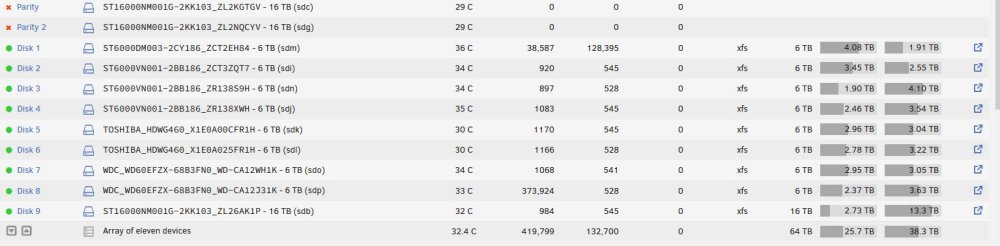
Like the title states, I am a new user since September. I have had a few issues and things are in a state where I need assistance. I ran pre-clear on all the spinning disk that got added (getting to setting up 2tb of cache after this issue is resolved (fingers crossed). The array was running with 2 x 16TB as parity drives, I added another 16Tb to the array (pre-clear) and it ran for a few days and then had a few errors. I just to remove the drive, and rebuild parity. Today I get home from work to both parity drives displaying zero reads and writes. Not sure how I should proceed. Thank you.tower-diagnostics-20221124-1721.zip