lxr200
Members
-
Joined
-
Last visited
-
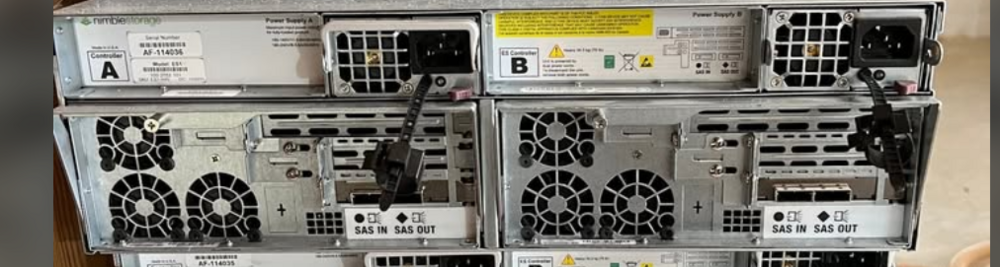
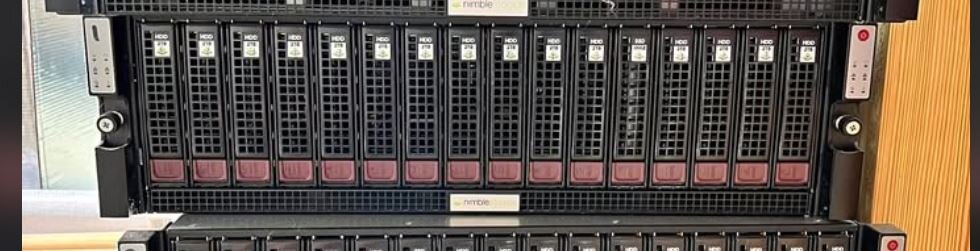
Hey All! So I'm dipping my toes a little bit further into my home server / media server (Plex) that is running Unraid 7.0.1 and its a bit out of my knowledge area so I wanted to pick everyones brain a little. I got sent some interesting options I think I might want to try. What I'm trying to do is completely new to me, and wanted to know if you guys think this is a good option that would work well for what I plan to do. Current system is a home server I built in a 4u Rosewill 12bay chassis. ASRock Z790 with an i5 12600k processor. Currently have a 9207-8i SAS card with sata break out cables. I'm 10 out of 12 drives full and was looking into expansion options and this is what I found / want to try. I found a Nimble ES1-H45 disk shelf for $100 and I was going to get a LSI 9305-16i controller with 4 SAS ports to replace the 9207-8i, 2 for my drives I already have, and 2 that will be going to the nimble ES1. Its just going to be used for storage / back up / media server storage nothing super demanding. Does this sound like my plan would work? Are there any limitations of the ES1-H45 such as only being able to use certain size drive capacities, or would I be free to continue using 10TB - 16TB sata drives? Would my speeds go to shit? I'm kind of excited if this would work, I have a buddy thats about to give me like a 26u rack so I can move everything downstairs lol. Anywho, Let me know what yall think.
-
sweet, I might be picking up that drive shelf this upcoming weekend, not sure when I'll get everything hooked up, but I'll try to give an update when I get everything situated. Thanks for the assist!
-
Ok so in my situation it sounds like this would be a solid plan and "SHOULD" work out well? Move GPU to x4 mode slot, put the SAS controller in the x16 mode slot, and send it lol. - well when I end up getting the new hardware that is.
-
Hey All! so I got a weird-ish question for everyone. Little back story, my chassis is starting to run out of physical space for HDD's (10 out of 12 slots full) I currently have an 9207-8i sas card (with some additional drives connected to my motherborad sata ports., I'm thinking of getting a 9305-16i card and a hard drive shelf that connects via sas cable so I can expand an additional 16 cards with a Nimble ES1. I mainly use Unraid for my Plex media server. Now for the odd question. My motherboard has (1) PCIe 5 x16 (x16 mode) PCIe slot through the CPU and (1) PCIe4 x16 slot (x4 mode) along with (2) x1 PCIe slots that are through the chipset. I currently have a Intel ARC A750 for transcoding in my x16 slot. The LSI 9305-16i is an x8 card, I don't want to lose a lot of drive speed by running that at x4. SO, would I lose an INSANE amount of transocoding power if I put my ARC A750 in the x4 slot and ran the LSI 9305-16i in the x16 slot (which I assume would just drop down to x8). I know my setup is not ideal for what I'm trying to do, but I didn't really think this far ahead when I built my server - first one I've built and didn't know half this stuff existed when I built it haha. Not really trying to get a new motherboard with 2 x16/x8 slots at the moment. I don't transcode much, 95% of the time its direct play, but I like having the capability of transcoding through my GPU. Let me know what you guys think! Thanks! ** Hardware is as follows ** ASRock Z790 Pro RS/D4 Motherboard Intel I5 12600k 16GB DDR4 Ram
-
So after It did the disk clear, it was saying unable to mount / unsupported file system, so I tried formatting it assuming that it needed to be formatted but then kept having issues. I will say, I went ahead and just did the "data rebuild" and it rebuilt the empty drive lol, so it seems to be working now, even if it did do it in a weird and I'm assuming an unnecessarily complicated way. I'm not sure if I messed a step up, or what. EDIT - for clarification, in the steps that I saw, after the new parity has been built on the new parity drive, it said to just pop the old parity disk in an assigned data drive spot and unraid wil clear it and do everything that needs to be done (maybe i misread something). going forward I assume after the new parity is built, I just just keep the old parity drive unassigned and do a pre-clear before trying to add it to the array? EDIT 2 - this is the post I followed.. maybe its supposed to be common knowledge to pre-clear the drive first which I didn't do. but I just did it in that exact order and something got goofed up
-
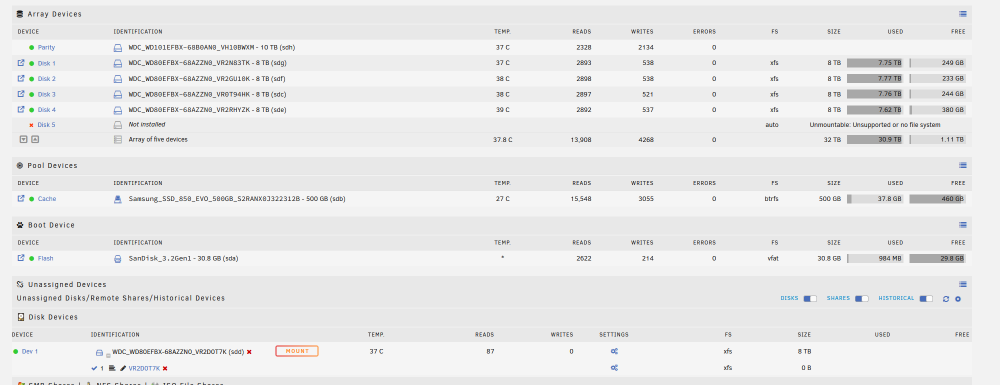
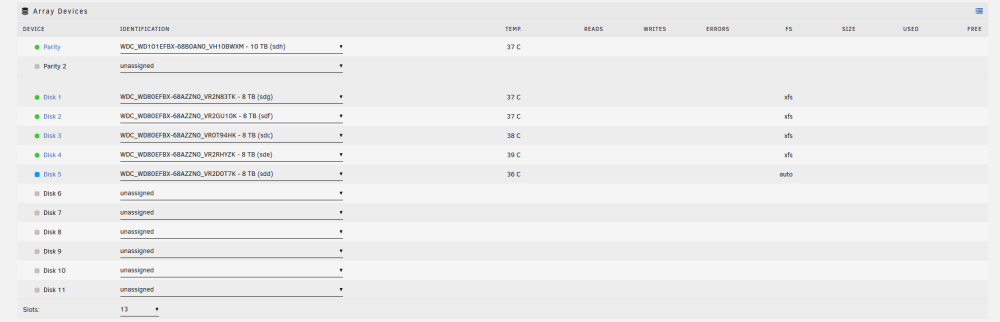
Hey all! so quick explanation - have a 12bay rack mount case with (1) 8TB parity and (4) 8TB data drives (all WD Red Plus) recently just got (2) 10TB WD Red Plus drives. My goal is to replace the 8TB Parity with one of the new 10TB drives, then use the old 8TB parity as a new data drive. I followed this route below: - Precleared new drives and formatted - Stopped array, unassigned old pairty - Started Array - Stopped array - Put new 10TB drive as parity and let it rebuild parity - Assigned old 8tb parity drive in data and let it do a disk clear - Formated old parity to XFS Now whenever I try to assign it to a data drive it always tries to "rebuild parity" and now when I unassign it and start array it shows Disk missing contents emulated. or Disk dsbl in error state. For the life of me I can't figure out how to just get it to be a data disk. Maybe I missed a step or I'm just being stupid. EDIT - Unraid version is currently 6.12.8 EDIT 2 - a few pics of what I'm seeing. Attached is my Diagnostics. mediaserver-diagnostics-20240403-2054.zip


-
Hmm I'll peek around within the bios and see if theres anything that can be changed to help, but BIOS update is unlikely as its officially a no longer supported device I'll look around some settings but I might just have to live with it. If its something to do with that unfortunately.
-
syslog is attached to the main post, but I'll re upload everything in this as well. mediaserver-diagnostics-20230108-1935.rar
-
My bad, didn't know which ones in there I should post. Here is the rest of them mediaserver-diagnostics-20230108-1935.rar
-
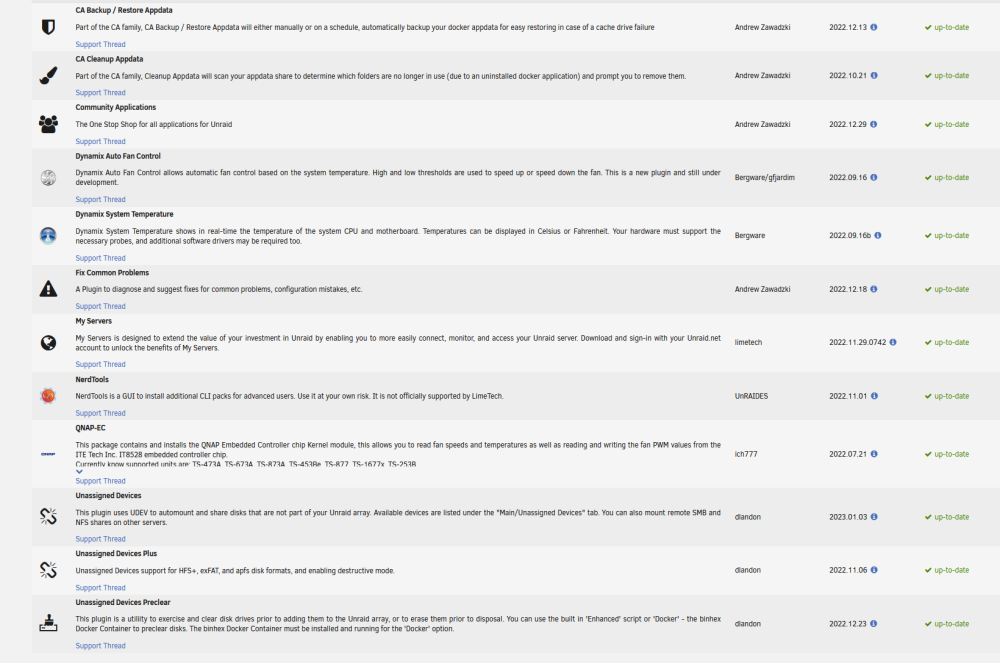
Also a List of my plug-ins
-
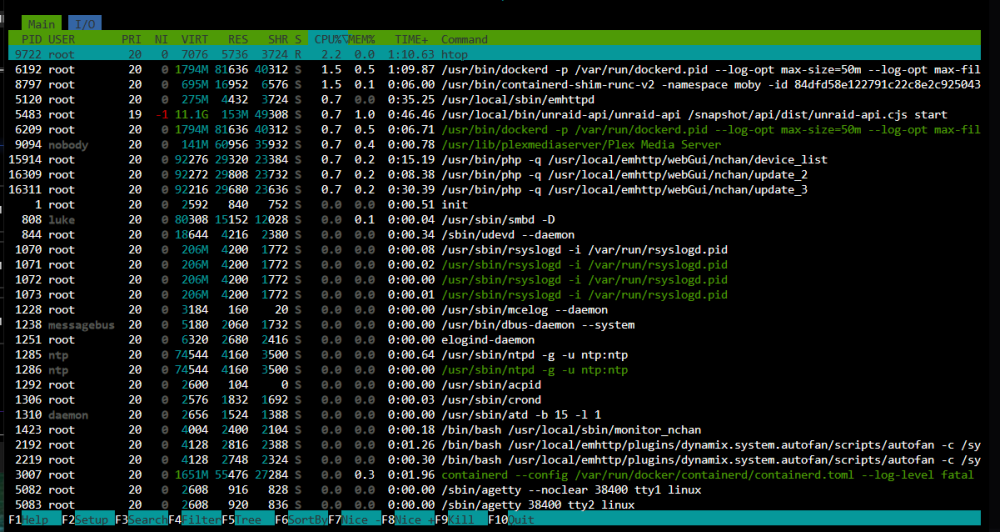
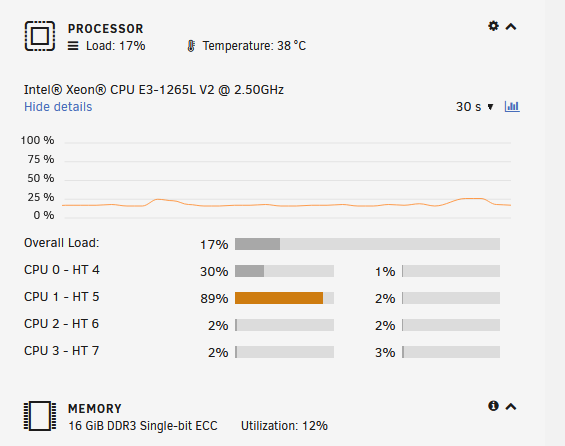
Hi all! I've been looking into a weird little issue, I've noticed ever since I started my Unraid server, one of my cores on my CPU has pretty much been 100% all the time. I thought It was normal until I started googling around, I noticed a lot of people say its the WSD setting within Windows SMB. I tried disabling it, even adding the "i- br0" option in with it enabled. I would reboot, it would be at normal usage, then an hour or 2 later, would be right back to full usage on one of my cores - even with WSD fully disabled. I've tried Shutting down all my dockers, I only have Krusader, tautulli and Plex server, still no change. The only thing constantly running on it is a Plex server as this is basically what this is for, Also to note, at the time of this usage, there were no streams going, its just always like this at idle I'm still pretty new to Unraid / Linux so Maybe I'm missing something, but here are a few screen shots and syslog, If anyone has any suggestions I'd be more then happy to try a few things out. syslog.txt
-
I did change the entire drive permissions as well as the folder itself (its data only drive within my Desktop) I tried enabling "Everyone" but it was still giving me the same issue. I added an "everyone" permissions with full control..... Update: I googled around and didn't realize that the share itself in the "advanced sharing" properties had permissions as well. This fixed it! Thank you very much for your help! I've been trying to figure this out for about a day now. Thank you again!
-
Hey All! I'm really new to unraid, had some help with a buddy getting everything set up to use for a media server, so far its amazing! I have a quick little issue - more of just a little nuisance that I found that I can't seem to take care of. Following is what I've been doing to explain then what my issue is: I'm in the process of transferring all my media files over from my old NAS drives (lots of video files, MP4s and MKVs) I'm using a USB hard drive dock so I can attach my drives straight to my NAS then mount my drives in Unassigned devices, then through Krusader, I "Move" the files over to the drives within my NAS - therefore, when they are done moving, they are no longer on the old drives (instead of copying and deleting). That works perfectly fine and dandy, no complaints, no issues. Now to where I'm having an issue... The problem is I have a Remote SMB share from my desktop connected to my unRaid server, that way I can easily use Krusader to move over video files straight from my PC, I can "Move" them over, but constantly get an error message when the file finishes saying "Access Denied to 'remote share/folder/file.mp4'".. The transfer completes, the file is on my NAS but it also stays on my other drive on my desktop as well. If I try to straight up delete the files on my desktop remote share through Krusader, it doesn't give any error, just doesn't delete it. Also cannot rename any files on the desktop remote share. Originally I thought it was something to do with folder permissions, so I made sure to make sure within windows "users" AND "Administrators" have full access to read, write, and modify files, but it still won't work. Anyone have any suggestions? Its not a huge deal, like I said its more of just a nuisance, I can always just copy the data, then delete it manually from my desktop, but it would be nice to take that step away. NAS Specs: - Netgear RN516 (Modified slightly) - Intel Xeon 1265L V3 - 16GB ECC DDR3 1600 - 5 8TB WD Red Plus drives (1 of them as a parity) - 240GB WD Easyshare SSD Cache My Desktop is using the latest version of Windows 10 Let me know if more info is needed. Thanks! EDIT: and to clarify, I have mapped network drives for shares on my desktop that I can access just fine. Just having issues modifying files on the remote share for my desktop through unraid. syslog.txt