





ClutchAviator
Members
-
Joined
-
Last visited
Everything posted by ClutchAviator
-
Finally having a rock stable server after replacing all of the RAM sticks. Thank you @trurl and @JorgeB.
-
I ran the memtest and all of the RAM sticks failed!! Finally managed to get replacement sticks and so far the server has been stable like a rock! Seems like UNRAID gods are pleased with new RAM?!
-
Here! galaxy-diagnostics-20240115-2023.zip
-
Hello @trurl & @itimpi, Seems like UNRAID gods arent pleased me with just yet and I am always running into the same issue!! My UNRAID freezing up saga continues...attached is the syslog for your reference. syslog syslog-previous
-
One more thing to note is that yesterday I installed an Iocrest SY-PEX40166 card to expand SATA ports. The system was solid, and I went through a 2 x 16TB and 1 x 18TB disk clear and data rebuild without issue. Suddenly, after installing SY-PEX40166 and adding 18TB and 2 SSD for cache pools, I went on to do the disk pre-clear, and the system started acting funny! For now, I did ran Memtest and it has errors but also I took off SY-PEX40166 to see if that was what caused freeze-up!
-
Alright, I'm on it!
-
No, I'vent. BTW, server just freeze up again.
-
Update Jan 6, 24: Server decided to freeze again in the middle of 16tb disk pre-clear ops . Attached syslog for review @itimpi and @trurl. syslog-previous
-
@trurl so far after changing that power idle setting, system has been stable and up n running with no connectivity lost for last 15 hours and counting!!
-
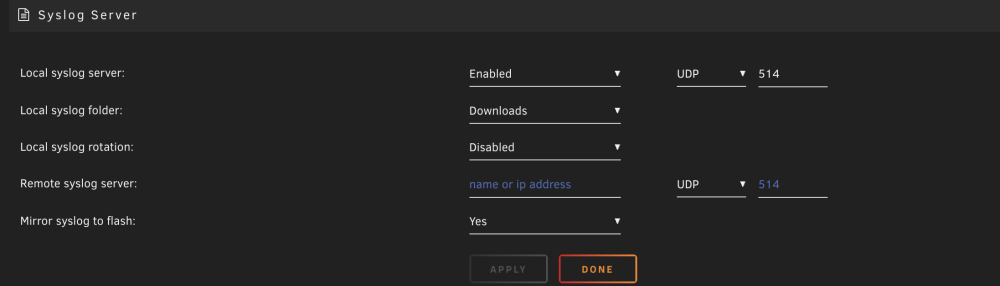
Is this all I need to do to get syslog going?
-
@trurl, I changed that Power Supply Idle Control to typical current idle. Fingers crossed
-
I got Ryzen 5 7600x with 48GB DDR5. I thought the above mentioned issue only affected older gen Ryzen. Never had to deal with this in 6.11.5 on the same hardware!
-
Forgot to add, even SSH wont work! just times out when server freezes!!!
-
Here's the syslog just in case! syslog
-
Happy New Year, everyone! For the last few weeks, I've been getting the short end of the Unraid stick!! It all started with the MOBO Bios update. I have had nothing but flawlessly working 6.11.5 up until a few weeks ago, when I decided to bring the BIOS firmware in line with the latest release. Well, that was the worst decision! I'd like to chase down random boot-up issues with Unraid, and I ended up replacing MOBO! Now, I am in the middle of upgrading my Parity drive to a larger one and then swapping a bad data drive. Every time I start a parity drive upgrade, Unraid keeps freezing to the point that only restarting or rebooting will make it work again. I've got a screen connected to the server, and even that becomes frozen, let alone trying to access the server over the local network! I've attached diganostic zip hoping someone will be able to help bring some sanity into this madness. Fixes I've tried so far without success, 1. Using a USB-C to RJ45 adapter (even tried multiple brands) 2. Different CAT6 cables 3. Docker NewOrk is already set as ipvlan 4. RTL8125 plugin (with the old MOBO) 5. Clean Unraid Setup Please note that I swapped the old MOBO with the same make and model to make things a little less painful. I never had any issues with the old MOBO until I decided to do that dreadful bios upgrade!! galaxy-diagnostics-20240101-1555.zip
-
Thank you @itimpi, I'll follow the guide. However, I'd to replace my MOBO cause I was keep getting VFS kernel panic which I narrow it down to the faulty motherboard. That said, how do I go about accomplishing a) upgrading to the larger parity drive and b) replacing faulty data drive. I also replaced Unraid USB to a brand new Sandisk cruzer one just in case.
-
As the title says, I am just having bad luck lately with my UnRaid build. A few weeks ago, I decided to upgrade the motherboard firmware, which resulted in no post screen! I figured out what went wrong and decided to upgrade to 6.12. Two days later, one of the data drives decided to give up! So I told myself, what the heck, I’ll just get new drives and build it away! Now the challenge is, I have 1x 16TB parity with 2x 16TB data drives, one of which is bad. I bought two 18TB drives, hoping to swap the bad one with a slightly larger capacity while also upgrading that 16TB parity drive to an 18TB one. My question is, how do I go about doing it? I know how to add a larger parity drive, but I am not too sure about doing that while also swapping the bad data drive. Does anyone have a suggestion?
-
where can I learn more about it?
-
but doing this requires port forwarding and I am little afraid to do that.
-
ok so in that case, which is the easiest proxy solution for me to try? I am a noob and need to be spoon fed lol
-
So if I am understanding correctly, as long as there is no client except me for any of my media sever, I dont need to worry about proxy and such. correct? What about nextcloud or duplicati backups? do they need to be secured with proxy or swag apps?
-
For each docker, I've been using private network created within UnRaid, does that suffice or should I also setup swag internally like you have done? For arr apps though, as long as my download client is using VPN (though I do usenet indexer mostly), am I all set with the security or I need swar or comparable apps there too?
-
Hello Everyone, I am a newcomer to the world of UnRaid. Prior to UnRaid, I was primarily using Ubuntu for media server needs. I was quite happy with that setup, which was running on an old Intel 5th generation i5 laptop, until I was introduced to UnRAID one day. Today, I have Unraid 6.11+ up and running on a custom build. So far, I've installed Plex and a few *arr apps for the media server. I also have it set up to backup Mac and Windows PCs. After watching some of the spaceinvader and ibracorp videos, I'm being drawn down a rabbit hole of securing UnRaid to its full potential. My question is, how seriously should I consider setting up Nginx/Swag and anything else with it if I only want to use it for local use and backups? Every guide I've read appears to be extremely overwhelming for my use cases, which is why I'm asking for the guidance.

