bsstudios
Members
-
Joined
-
Last visited
-
Now it works! I can pass through both cards to the router and use them. Thank you for the quick help! All the best for 2025!
-
bsstudios changed their profile photo
-
UNRAID OS : kernel /bzimage append vfio_iommu_type1.allow_unsafe_interrupts=1 iommu=pt intel_iommu=on intremap=no_x2apic_optout pcie_acs_override=downstream,multifunction initrd=/bzroot


-
I have attached screenshots of the VM configuration and the IOMMU groups
-
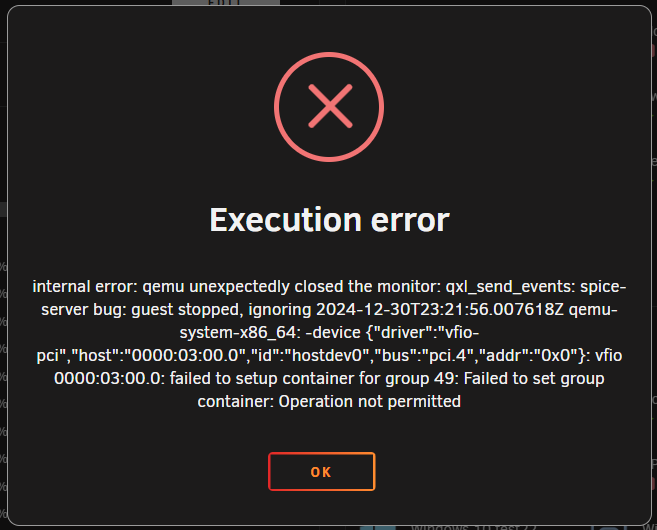
Good evening, everyone. I have a problem with my UnRaid server when passing through an Intel Ethernet card to a VM. The following error message appears when I start the VM with passthrough: qemu-system-x86_64: -device {"driver":"vfio-pci","host":"0000:03:00.0","id":"hostdev0","bus":"pci.4","addr":"0x0"}: vfio 0000:03:00.0: failed to setup container for group 49: Failed to set group container: Operation not permitted 2024-12-30 23:07:35.787+0000: shutting down, reason=failed When I start the VM without passthrough, it starts without any issues. I have already tested the following settings: PCIe ACS override: All 3 options VFIO allow unsafe interrupts: Yes / No IOMMU: Enabled in BIOS My hardware: HP ProLiant DL380e Gen8 System ROM: P73 05/24/2019 Ethernet card passed to the VM: Intel 82571EB/82571GB Gigabit Ethernet Controller D0/D1 I have attached a screenshot and the VM log for reference. Can anyone help me? VM_Log.txt