Chris.P56
Members
-
Joined
-
Last visited
-
Hey, I can't get this bot to sign into my plex account. I tried using my email and my UN to fill-in that part of the command; and nothing. It keeps on spitting out the error that it can't connect to my plex server. Could it be due to two-factor auth being enabled?
-
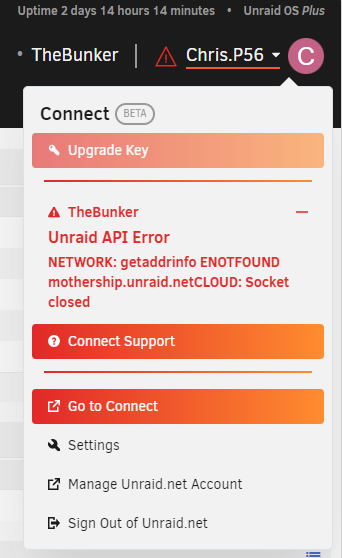
Hello, I need some help. Every since I updated to 6.12, around every 4 days, I have to restart my server to get this "Unraid API Error" to be "fixed". However, as I've been doing this, one of my dockers is having some issues with the constant restarts. I've tried to "unraid-api restart" command and it doesn't do anything. I am really tempted to go back to 6.11 (cause it was the most stable for me and lasted around 95 days without hiccup, then I decided to update and here I am) but I don't have a flash backup to prior 6.12 that isn't too old. So, I have two requests. 1. Can someone please help be solve this issue? 2. Can someone please share with me a way to go back to 6.11 either by command lines or another method (just without losing any data) Thanks in advance Update 1: rollback back to 6.11.5 and now I'm waiting to see if this issue will happen again in ~3 days Update 2: The rollback seemed to have worked, going on ~5 days of uptime and there hasn't been an issue at all.