Axel Ostenkötter
Members
-
Joined
-
Last visited
Everything posted by Axel Ostenkötter
-
That was the Problem "Enable schedule" was not enabled. Maybe the unsability could increase if the selections are not visible, when not enabled. But sof far everythink worked as designed. Thx & Regards Axel
-
Hello Thorsten, I have found a problem. If you build a new job and edit the shedules, they won't be stored in the job-config. You can then bypass the problems when editing the shedules over the three point menu of the job. Regards Axel
-
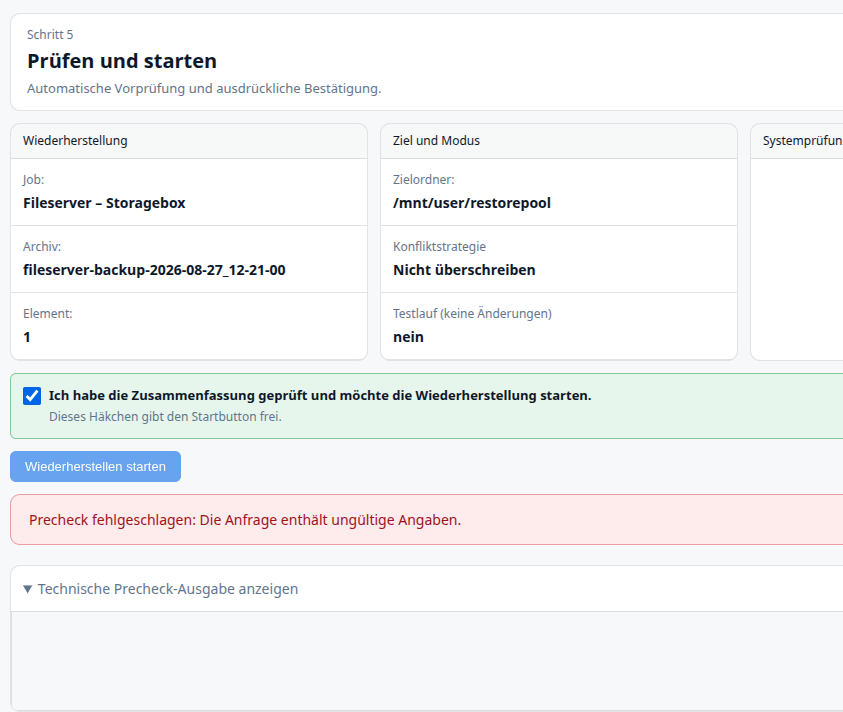
Hello Thorsten, Thanks a lot for the great plugin. Regarding my issue: 1. I created an SSH storage box. 2. I created multiple repositories on this target. 3. A job was created for each repository. 4. All jobs can successfully write data to the repositories. 5. The restore test for all repositories completes without errors. However: Folders and files from these repositories cannot be restored to a new share. This applies to individual files as well. Only manually downloading a file to my workstation works; restoring it to an Unraid share does not. The "Start Restore" button does not become active. The error message "Precheck failed: The request contains invalid information" appears. This also happens during test runs. The target folder was manually created as a share in Unraid. What am I doing wrong? I am using plugin version v2026.17.1225 on Unraid version 7.3.2. Thx