Wookiee of the Year
Members
-
Joined
-
Last visited
Everything posted by Wookiee of the Year
-
Making the change in those release notes seems to have done the trick. I did some jellyfin transcoding to stress test before and after the change. Before, I saw it reading several MB/s on the flash drive, and it eventually crashed. After the change, there were no reads on the flash drive and no crash! I will give it some time now and see if it crashes at all in the next few days. So if I'm understanding correctly, it would seem lack of RAM is the issue. Is it okay to keep running this way or is it more of a temporary workaround? I'll probably just wait until RAM prices are more reasonable. For limiting memory on docker containers, is that done on a per-container basis, or is there an easy way to limit docker as a whole?
-
Every day or two, my server crashes. The WebGUI won't load. SSH and directly connecting to the server give the login prompt, but timeout after 60 seconds. The server still responds to ping, but all containers/vm are inaccessible. Based on advice found in some other threads, I have replaced my flash drive and changed docker from macvlan to ipvlan. I also updated to the latest version of Unraid. None of these changes seem to have had any affect on the issue. I have set up the syslog server and installed the netdata container to hopefully help figure out the root cause. Notes from crashes in the past week:5/21 03:12 CPU not at 100%, but incredibly spiky 5/22 11:02 CPU 100% (60% system, 35% iowait) similar spike 10 mins before, lasted ~2 mins 5/24 17:40 CPU 100% (60% system 35% iowait) similar spike 50 mins before, lasted ~3 mins 5/26 23:41 CPU 100% (60% system, 25% iowait) This one seemed to be triggered by a few torrents being added to qbittorrent Most of the time I don't notice the crash when it happens, so it doesn't seem to always be caused by me directly interacting with a container or vm. The only reproducible trigger I have found is by watching something on jellyfin that requires transcoding. Syslog and diagnostics are attached. I can share info from netdata, but I'm new to it and don't always know what I'm looking for. syslog-192.168.1.58.log nasa-diagnostics-20260527-1551.zip
-
00:02.0 VGA compatible controller: Intel Corporation Xeon E3-1200 v3/4th Gen Core Processor Integrated Graphics Controller (rev 06) 01:00.0 VGA compatible controller: Advanced Micro Devices, Inc. [AMD/ATI] Tonga PRO [Radeon R9 285/380] (rev f1)
-
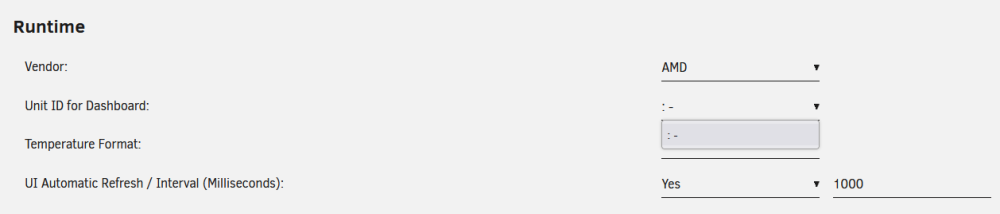
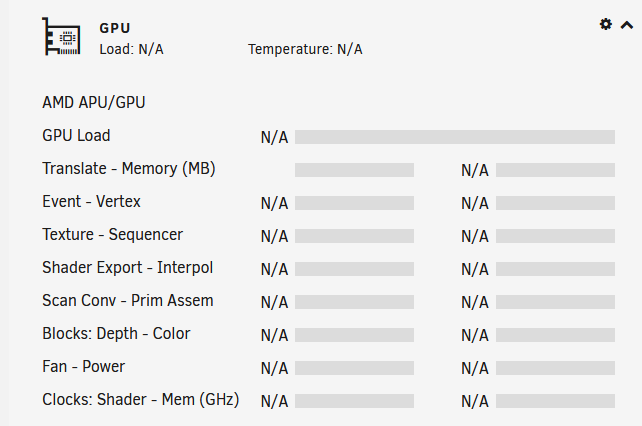
I just installed Radeon top and gpustats plugin, but I am getting N/A for everything on the dashboard. I'm guessing this is because I don't have any option for unit ID in the settings dropdown. Here is my prerequisite info: 1c) 1671328975.837183: bus 01, gpu 0.00%, ee 0.00%, vgt 0.00%, ta 0.00%, sx 0.00%, sh 0.00%, spi 0.00%, sc 0.00%, pa 0.00%, db 0.00%, cb 0.00%, vram 0.13% 5.30mb, gtt 0.23% 9.04mb, mclk 10.53% 0.150ghz, sclk 31.98% 0.317ghz 2) just hangs, left it for a few minutes but no result 3) 4) VENDOR="amd" GPUID="" TEMPFORMAT="C" DISPCLOCKS="1" DISPENCDEC="1" DISPPCIUTIL="1" DISPTEMP="1" DISPFAN="1" DISPPWRDRAW="1" DISPPWRSTATE="1" DISPTHROTTLE="1" DISPSESSIONS="1" UIREFRESH="1" UIREFRESHINT="1000" DISPMEMUTIL="1" DISP3DRENDER="1" DISPBLITTER="1" DISPVIDEO="1" DISPVIDENH="1" DISPINTERRUPT="1" DISPEVENT="1" DISPVERTEX="1" DISPTEXTURE="1" DISPSHADEREXP="1" DISPSEQUENCER="1" DISPSHADERINTER="1" DISPSCANCON="1" DISPPRIMASSEM="1" DISPDEPTHBLK="1" DISPCOLORBLK="1" DISPGFXTRANS="1" Any help would be greatly appreciated!