csu
Members
-
Joined
-
Last visited
-
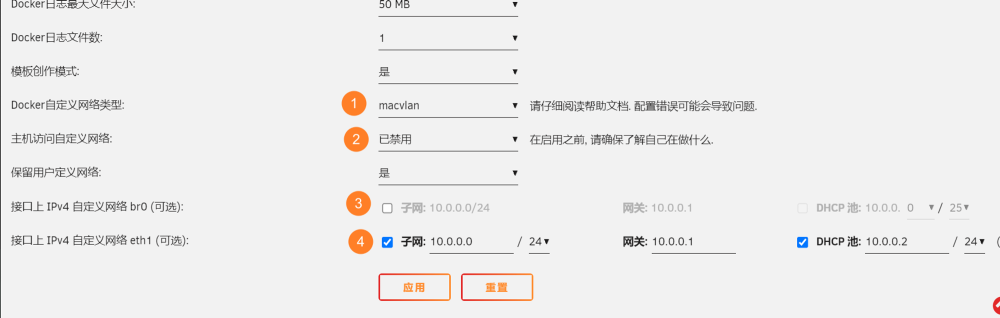
I think it is because I set the address segment of the custom network eth1 and the address segment of the management network port to the same address segment, that is, 192.168.1.0/24, which is not allowed by the Unraid system. When I changed the address segment to 192.168.0.0/24, the system will automatically generate a custom network eth1. However, the system itself does not prompt that this is not allowed and does not report an error. And through the docker network create command, such a network can be created. I am not sure whether this is a bug.
-
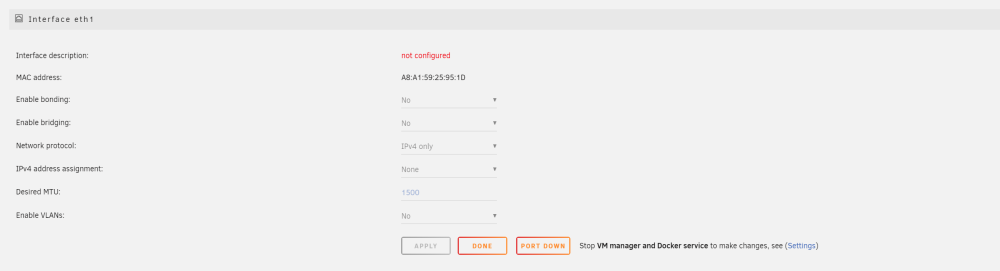
This is my eth1 configuration. And this is the command I used " docker network create -d macvlan \ --subnet=192.168.1.0/24 \ --ip-range=192.168.1.128/25 \ --gateway=192.168.1.5 \ -o parent=eth1 macvlan” I think this should solve the problem of lost connection.
-
Bridging of eth1 is turned disabled. I think this should solve the problem of lost connection. But I don’t know why the custom network set through the docker settings WEB UI cannot take effect and can only be created through the docker network create command.
-
After I upgraded from 6.11.5 to 6.12.8, there is still a problem of using macvlan causing Unraid to lose connection. I used bond between eth0 and eth1 and opened the bridge. Then in the custom network of docker, I opened the macvlan of br0. Two days later, I discovered that Unraid had lost contact. After restarting, I plan to use eth1 as a separate macvlan network port. So I unbonded eth1 and opened it in docker's custom network. But after I start the array, I cannot see the docker custom network generated by the system. The configuration is similar to this: Docker network only has bridge and host. What's the reason? In version 6.11.5, it can run normally according to the description in https://www.jackiewu.top/article/how-to-solve-macvlan-and-ipvlan-issues. Currently I can only create a custom network for eth1 through the docker network command. For eth1, I haven't assigned any ip address to it or opened a bridge or anything. Can this solve the problem of lost connection?