





PeterB
Community Developer
-
Joined
-
Last visited
Everything posted by PeterB
-
I'm not using Black Hole but, since the deluge interface from CouchPotato no longer works with deluge v2, I have set CP to use the BH method of sending magnet/torrent files to deluge V2. Simply configure the 'AutoAdd' plugin in deluge to find the magnet/torrent files.
-
I've just noticed that my deluge wasn't reporting any transfers. Test active port was failing too. I restarted the container, everything is back running. I found this: in the log. I'm guessing that it all stopped at: 2019-06-26 09:11:29,128 DEBG 'watchdog-script' stderr output: Unhandled Error
-
All plugins will have to be modified/re-written for the new application interface, and converted for Python v3.7
-
Preferences -> AutoAdd
-
The new deluge release adds a number of facilities over v1, which had been untouched for some years now, and improves performance considerably. I, for one, am extremely happy to have v2 available. Clearly, the system interface has changed and caused many incompatibilities - I'm happy to have a workaround for CouchPotato. The other major drawback at the moment is that the Windows version is not yet complete, so those who use Windows on their desktop don't have a thin client available (but the webUI should be good).
-
Well, for the time being, I have set CP to use Black hole as the downloader, and configured 'AutoAdd' in Deluge. That seems to be working but I had to enable 'Magnet File' in the CP Black hole downloader section. Obviously, you have to have the same path added in both containers so that they share a folder for writing/reading the torrent/magnet files. I recommend this for anyone who wishes to retain CouchPotato while moving to the updated deluge.
-
The v1.3 gui/console is not compatible with the v2.03 daemon, so no surprise that doesn't work. The v2.03 console (thin client) works well with the v2.03 daemon - again, shouldn't be a surprise. However, if you run your desktop computer on Windows, you're out of luck because the v2.03 conversion to Windows isn't complete yet. For me, the web gui and/or the thin client work well for me on my Linux Mint desktop. My big problem is the couchpotato/deluge v2.03 incompatibility.
-
Thanks for your effort on this, but I still get "Connection failed. Check logs for details" when I click on the 'Test Deluge' button in 'Settings -> Downloaders'. I look in the logs and I don't see anything relating to the problem.
-
Okay - it would be a shame to loose CP. I still cannot accept the fact that sonarr/radarr enforce one movie per directory. Using .mkv containers eliminates the need and fs overhead. Yes, I found the radarr and sonarr issues that you identified. I did try forcing deluge to create a new ssl certificate, but that wasn't the issue.
-
Upgrade to the deluge v2.03 version appears to have completed without major incident. I did take a prior copy of the deluge appdata folder, but it wasn't needed. Deluge v2 doesn't appear to have hit the mint/ubuntu repositories yet, so I went to the deluge ppa to upgrade my thin client. All working well! Edit: One oddity to report. I have the scheduler enabled, and everything I'd done with upgrade and testing had been during a 'slow speed' period. I noticed that, while uploads had been running, I hadn't seen any download activity - downloads only started running when I set the current schedule period to 'high speed'. After that, I set back to 'low speed' and downloads continued running. Oh, and others have reported, I don't seem to be able to get the CouchPotato connection to Deluge working (from the Binhex CP docker).
-
If you read the release notes for deluge v2, you will see that v1 plugins will need to be modified/re-written.
-
Okay, got it now - was being stupid!
-
How? I'm told that I'm on latest and deluge is still at 1.3.15
-
Well, have you placed a .ovpn file in /config/openvpn/? You download the .ovpn files from your vpn provider and place the appropriate one in that location.
-
Similarly, I have a 50Mbit/s connection (in Philippines), and I'm seeing download hovering around 5MBytes/sec (up to 5.3) on the Ubuntu image. What environment are you running in, itractus? I'm on unRAID with my incomplete files written to the cache drive and copied to a protected share on completion.
-
I'm awaiting further reports before I risk an update!
-
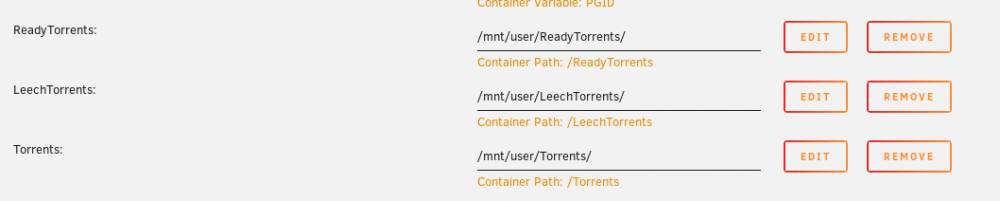
If you add new volume mappings to the docker container for /Completed and /Incomplete, then you can point them, individually, to anywhere accessible from your server, giving you total flexibility. My volume mappings: 'LeechTorrents' are those currently downloading. On completion, deluge automatically moves them to 'Torrents'. I then do some manual processing to extract the files I need after which I manually move the torrents to 'ReadyTorrents' from within deluge.
-
I've been using the Pieces plugin for years - I don't remember having to do anything special to get it working. It works with WebUI and remote client. I'm not sure what to advise - it just works for me!
-
In the Deluge UI, Preferences -> DownLoads, 'Move completed to:'
-
Thanks, that did it!
-
How do you disable theses? In ItConfig, there are three boxes on these lines. The left-hand box is unticked. The boxes under the 'Setting' and 'Actual' columns will not change state.
-
Might the same be true of DE Berlin and DE Frankfurt?
-
Ah, you may be correct - I don't see it in the web-ui. That's a shame, because it must be the definitive proof of whether the port forwarding is working.
-
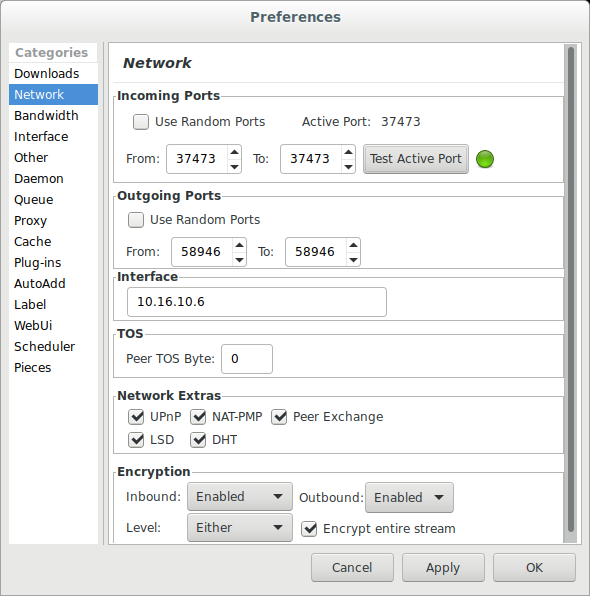
When torrenting, there are various methods of making a connection, but unless the appropriate public port is open/forwarded, the performance is likely to be dismal. The important measure is what Deluge sees - in Deluge "Preferences -> Network" the top pane is 'Incoming Ports'. If you click on the 'Test Active Port' button there, after a few seconds, you should see a green 'blob' to indicate the incoming port is contactable. If that doesn't come up green, then there is a problem with your port setting/forwarding.
-
I've just looked at the OVPN web site - looks like a good service. If you are successful with getting the port forwarding set up and working, there could be several other people interested in switching to OVPN. Please keep us all informed - more choice would be good.


