allasvarta
Members
-
Joined
-
Last visited
-
Solved it by going out and getting a used gtx 1060 instead. For some reason I had better luck with the nvidia driver plugin.
-
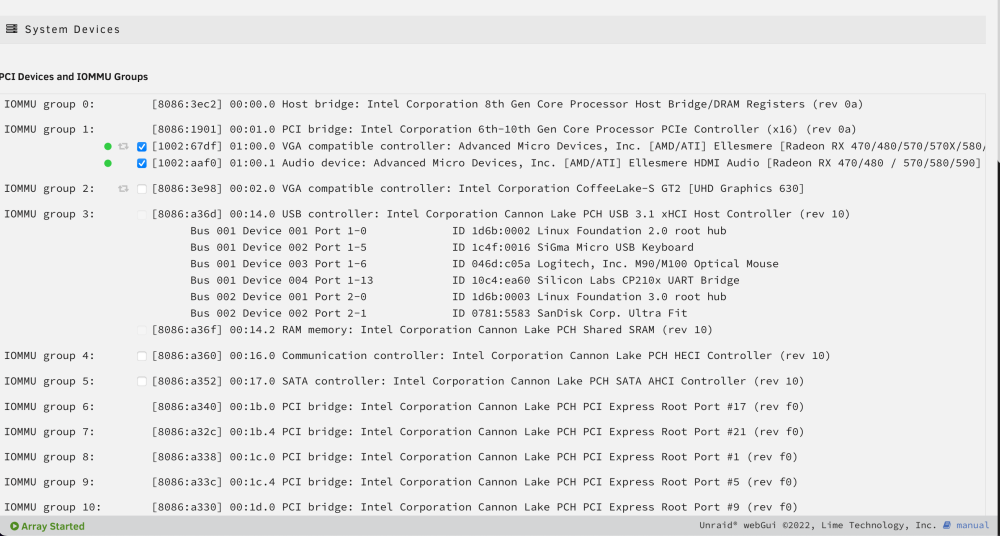
Longtime listener, first time caller... Went out and bought a used GPU (rx580) to use with this Docker, but I think I am in over my head here. This is my first unRaid server, and also my first time building a PC. So my knowledge is really limited. I installed the GPU no problem and after boot I see it under System Devices. Went ahead and fired up the steam headless container, but preformance was lacking so I figured it didnt use the GPU at all. After a bit of google I found out about vt-d. Booted into bios settings and changed to enable. Now the information under System Devices looks a bit different: I checked the two boxes corresponding to my GPU and pressed the "Bind selected to vfio at boot". Dunno if this was right, but after that I now have to green indicators besides my GPU. And about here is where my google skills run out. Steam headless container still runs like it did the first time I tried it, so Im assuming it's not using the GPU. Sorry for the total n00b question, but I am at a loss here and don't know how to proceed.