SpiceyCadmium
Members
-
Joined
-
Last visited
-
Thanks, do you have any ideas what typical causes could be?
-
Hi all, Wondering if anyone knows what could be happening here. Haven't been able to find a thread on this issue, so please forgive me if there is already one going. Essentially my instance gets all the way to "Reboot: power down" and then just hangs. So far as I can tell, Unraid believes it has performed a clean shutdown. It just... doesn't power off at the end. No diagnostic logs seem to be generated, because Unraid thinks it was a clean shutdown - and I have not found any evidence it wasn't clean. Really it seems to just be very inconvenient, because the system will keep drawing power from the UPS when there's a power outage, significantly reducing the amount of time my lower-power devices can keep going. Not even sure what information I could provide that would be helpful, but if you know I will upload it.
-
I seem to have a new problem now. After a while downloads seem to just stop, seems to be typically at 99% complete. Have you encountered this issue before? I found this reddit user with a similar issue also using a PFsense router but replicating their fix didn't fix it for me.
-
This issue seems to be fixed now, not sure what changed but thank you again for your help!
-
For step 6, do you mean 'Type in 'rm ${DATA_DIR}/SteamPrefill/Config/account.config' and press ENTER' This is what I had to add for it to work, but it did not seem to resolve my login issue unfortunately.
-
Damn, ok. Thanks for looking into it
-
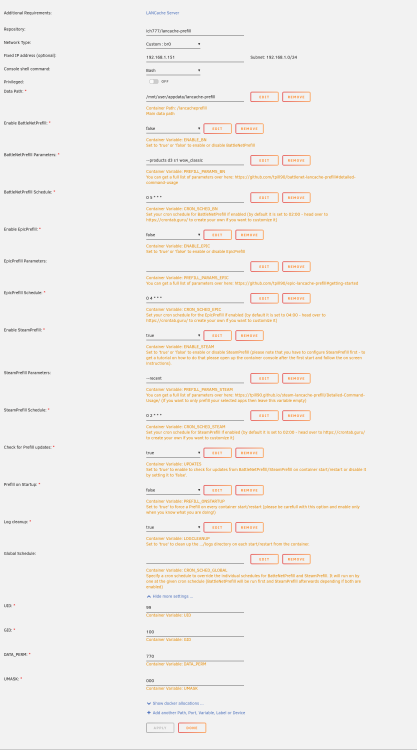
Forgive my delayed reply, appreciate your response! 1. Yep its installed on the cache drive. 2. Please see below: 3. /Appdata/ is set to "Only."
-
Thanks for the crazy fast reply! I'm on 6.11.5. I did that command and restarted, it let me login but on the prefill finish it happened again.
-
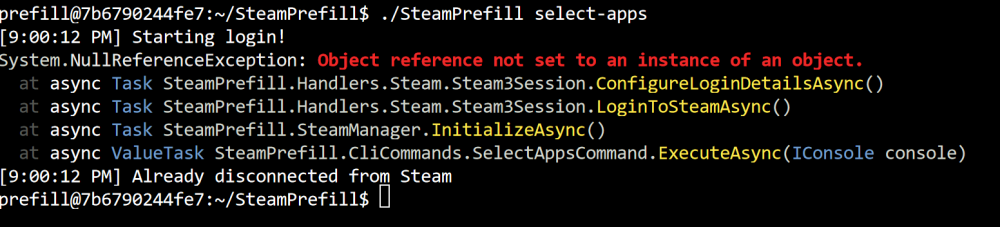
Trying to use the Lancache Prefill docker. When I login I get a "This session will not stay connected" error and then if I try again I get this: