C_Simler
Members
-
Joined
-
Last visited
Everything posted by C_Simler
-
Just tried and it worked flawlessly! Thank you so much for this plugin and the instant support!
-
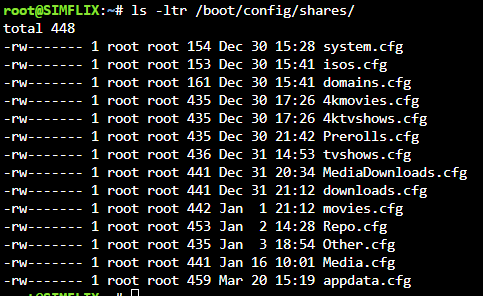
Yeah I am newer to Unraid (been running 6 months now) so my shares went through a few changes before I settled on something. Here is what that command output: So looks like you were right! and just to clarity, after a back up, I change the Media.cfg to media.cfg? correct? Thanks for the super fast help, I really appreciate it! Edit: I made the change and this did fix my issue for the mover plugin! Thanks so much!
-
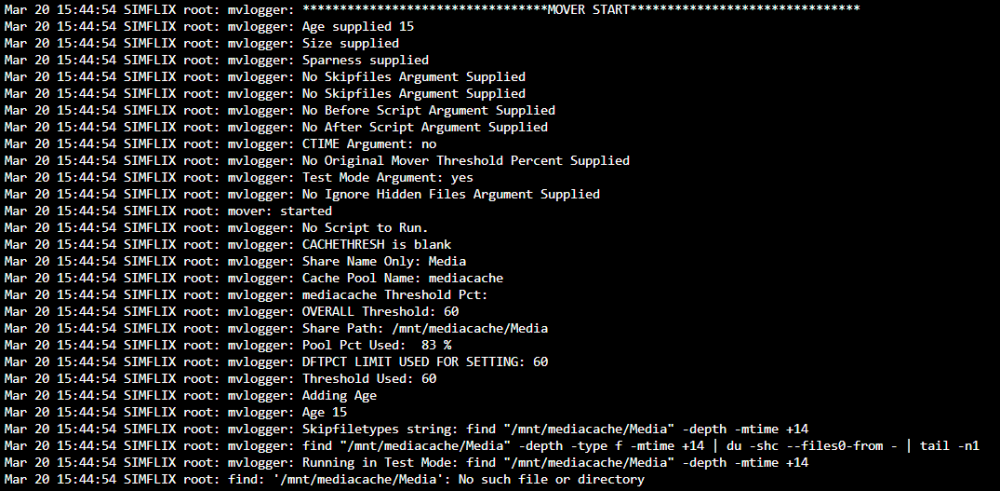
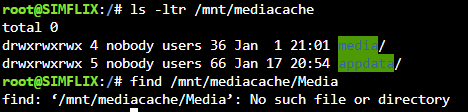
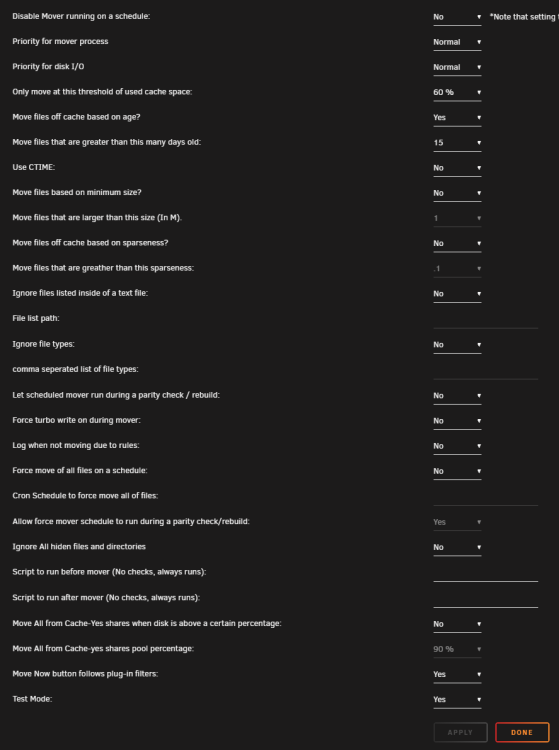
Can anyone help me? I can't figure out CA Mover Tuner to save my life, it seems like it is not finding the paths correctly to my file to move. It throws a No such file or directory, here is the trail: Through my troubleshooting it seems, for whatever reason, the plugin thinks my share/folder is capital M in media when it in fact is not: Here is me performing a find on a capital M (what the plugin is doing) But if I do: find /mnt/mediacache/media it will work successfully and list all my files. Does anyone have any ideas on how to fix this? I would love to use this awesome plugin but don't know where I went wrong, here is my config file for the plugin