





thericeking
Members
-
Joined
-
Last visited
Everything posted by thericeking
-
Sorry to necro this post but I need this driver as well to use with my 2.5GB LAN NIC https://www.amazon.com/gp/product/B08V1HG47H/ref=ppx_yo_dt_b_search_asin_title?ie=UTF8&psc=1
-
I'm struggling to understand how to assign my Blu-ray drive to a Windows 11 VM. Could someone guide me on this?
-
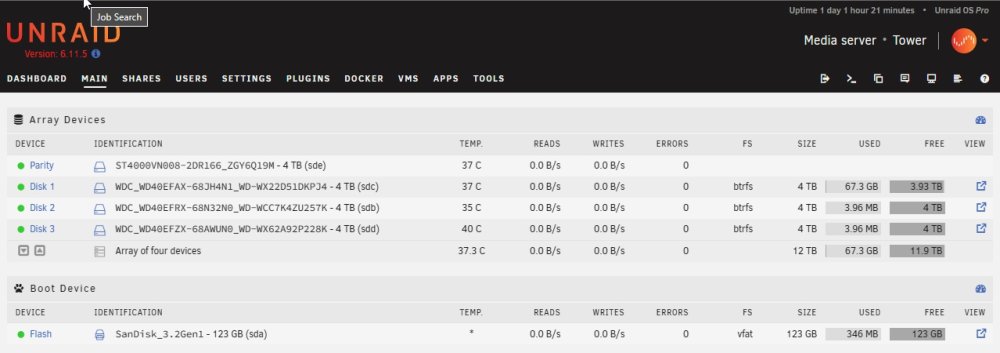
I'm new to UNRAID. My setup is 4x4TB HDD (No cache) 1 Parity 3x4TB Disk for storage Since UnRAID works differently, by looking at the screenshot does it look like my setup is protected same as a RAID5?
-
@tjb_altf4 This is exactly the straight forward simple answer I was looking for to my question. Thank you!!
-
Why RAID10? For performance of course. I don’t have extra SSD. I only need a little more performance. Thanks for the link but a lot of stuff on the link are dead links. Sent from my iPhone using Tapatalk
-
@JorgeB Can you share a link on how can I create a RAID10?
-
Can someone please help point me in the right direction? I want to create a RAID10 but can't find a guide on how to with UnRaid.
