Philip Kluz
Members
-
Joined
-
Last visited
-
@itimpi apologies. Here we go: marick-diagnostics-20230217-2112.zip
-
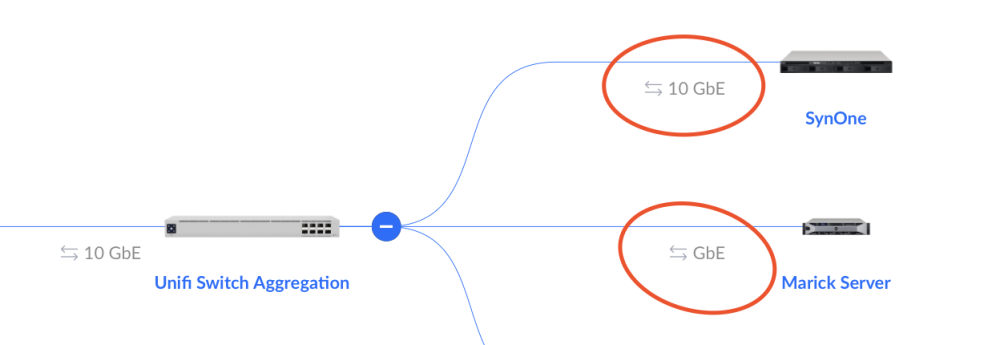
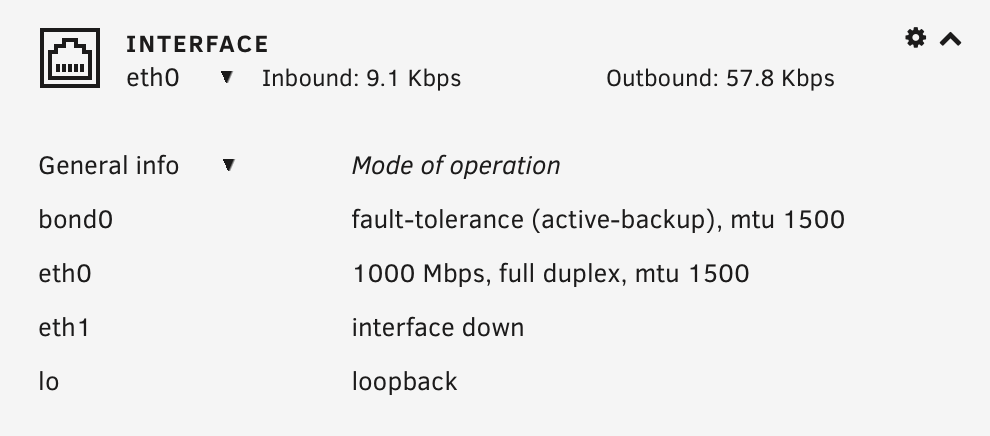
Greetings, I've recently set up my first Unraid and am enjoying the experience tremendously (Version: 6.11.5). There is, however, one issue that I'm running into that I seem to be unable to resolve. Namely my network connection (LAN) is only showing as 1000Mbps despite my hardware supporting 10GbE. I'm running the following hardware configuration: ASUS ProArt X670E-CREATOR WIFI (BIOS dated: Fri 04 Nov 2022 12:00:00 AM +04) AMD Ryzen 5 7600 6-Core @ 3800 MHz 4x 32 GiB DDR5 Memory 2x 16TB HDD (Parity + Disk 1) 4x 1TB (Cache Pool 1 through 4) via ASUS Hyper m.2 x16 GEN 4 card My Mainboard has a 10GbE ethernet port and is connected to a 10GbE compatible switch (same as my Synology RS820+ which is also equipped with a 10GbE NIC). Attached you will find a screenshot from the Unraid dashboard as well as my Unify console readout. I'm actually having the same problem using a different motherboard (AM4 platform that that doesn't have a native 10GbE port) using a 10GbE PCIE Network Card (ASUS XG-C100C). Only shows 1000 Mbps rather than the - technically possible - 10GbE. Please let me know if it were helpful to post the boot logs.