conermurphy
Members
-
Joined
-
Last visited
-
So good news, the fresh install of Unraid, resolved the issue. No idea what was wrong but going to mark this as solved now.
-
So, I'm going to give a fresh install a shot and will report back if it works.
-
Ah okay, that's good then. I did also find this page which seemed to cover it all as well. But, hopefully it doesn't come to doing a fresh install.
-
I'll get these done anyway as a backup and hope I never need them as you say. Out of curiosity, how come you'd lose no data currently on the array? I presumed if you did a fresh install of Unraid it would need to wipe the drives again to reconfigure the array? Or, can Unraid detect a previous installation of it and pick up where the old one left off without needing to format anything providing it is configured the same? Anyway, I'll wait for @limetech and @jonp to weigh in on the post before doing any drastic like a fresh install.
-
I do remember seeing something about this I have to admit but while shopping for a decent USB to put Unraid on I could only get a 64Gb one same day so went with that. Other than this issue with shares it has been rock solid stability and performance wise. But, if need be and it comes to it I can always get a new one. Out of curiosity, if I was to move Unraid to a new USB what would I lose data/configuration wise? Would I have to reconfigure the Array as well as plugins, docker containers, etc? Also, I'm sure it's a drastic solution but could a fresh install of Unraid fix the issue possibly? But, I presume I would need to reformat the drives in the Array for them to work with that?
-
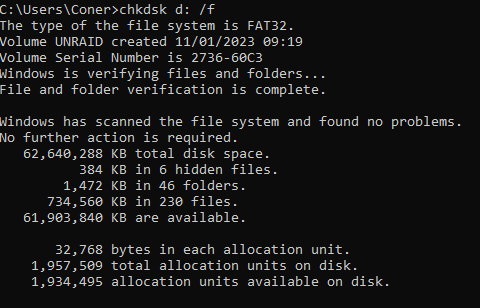
Just ran chkdsk, seems to be all okay, see the output below.
-
No worries at all and I'm not sure what's happening but it doesn't seem good whatever it is. Is there any particular paramaters I should use with chkdsk, I ran it yesterday with /f and it reported no errors (see post earlier in the thread) but happy to try again with the same or other parameters if you think any are worth a shot in particular? Although we're not quite there yet with the solution, just wanted to say thank you for all the help, I appreciate it.
-
So, I've only ever connected to the share successfully on my Win 10 laptop. I have tried unsuccessfully since the original issue described with another Win 10 PC and a MacBook. In the case of my Win 10 laptop, all I ever did the was the normal setup that is create an unraid user, goto \\UNRAID in Win explorer, enter the credentials and then it worked. Although, I have no evidence to prove otherwise, my instinct is something is wrong with the Unraid server as that's what had issues and then everything else stopped connecting to it after those issues described. Saying this I may be completely wrong as I have limited knowledge in Unraid and network shares. I saw an input like this, the first time I ran the command and that was removing my WSL2 Network Connection to Ubuntu. Since then I've only gotten the output in my previous post saying "no entries".
-
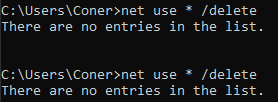
I just followed the steps outlined in the "Resolution" portion of this document and still getting the same issue as before. So, I've updated my user share passowrd to be just numbers and letters. It's an interesting point this because prior to events I described in my original post I was using a password with symbols, letters, and numbers without issue. Anyway, I updated the password in both Unraid and Windows and ran the net use * /delete command again but still no luck, same issue as before. Interestingly when I run that net use command I always get the below output even if I try to connect to the server between runs of it. For each time I try to connect to the server, I only ever see the error shown in the video in my previous post. I'm just at loss for what it could be, I never changed anything on any client devices, just moved some files on the share and restarted the array when the UI was glitching out and now no device can connect to the server through explorer/finder.
-
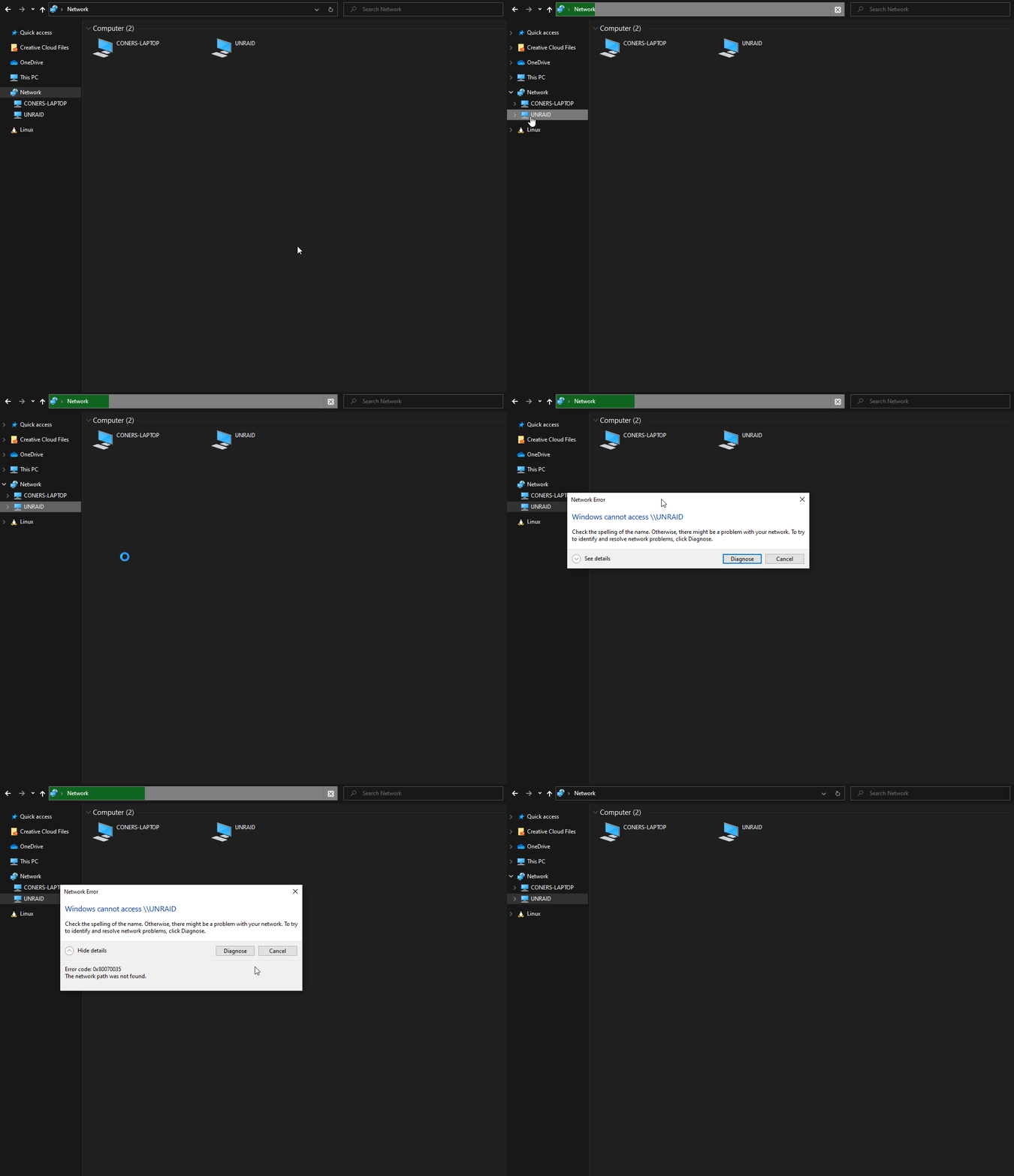
Unfortunately not, here is a recording of what happens. Same as if I click on the UNRAID item in the main panel itself.
-
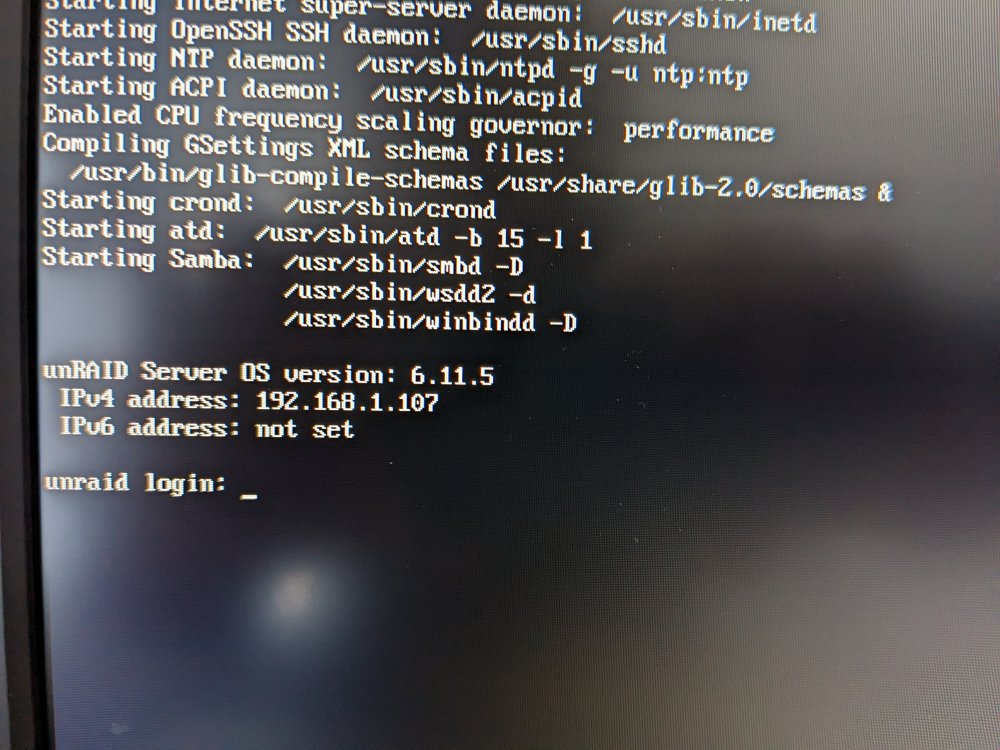
Not sure why but I had to restart the server to get any video output from it? I tried connecting to the dedicated GPU in it and the iGPU and got no video signal output. Rebooted and got one. Anyway, I can't see that line, I have a starting Samba line. I'll attach a photo of the screen below. I do have both of these outputs as well. Just tried doing this and then accessing the share again but no luck, same error as before.
-
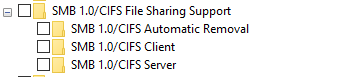
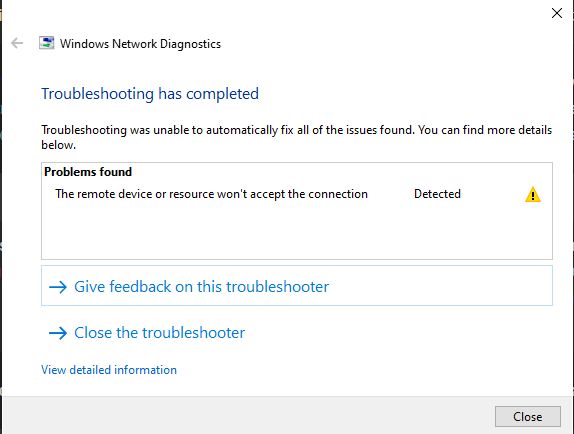
So, I shutdown all my client devices (both Win 10 and OSX) and left the Unraid server running overnight (approx 9 hours) to hope this would give it enough time to allow the Unraid server to become the Local Master. Unfortunately, I just tried connecting again with my Win 10 laptop and I'm still getting the same issues as yesterday. Windows Network Diagnostics says the issue is "The remote device or resouce won't accpet the connection" but I find this interesting because I can ping the IP and access the Web GUI from the device. I have doubled checked and I have a windows credential configured for the IP of the Unraid server with the username and password configured for the coner user in Unraid. I've also tried adding one with the server name to be sure but neither of these approaches worked. I went through these PDFs (the overall one and the step-by-step ones ) a couple of times to check the settings all line up and all the Group Policy and Registry Edits match the PDFs, the network sharing centre settings also line up. Something I did notice which I'm not sure is of note or not but my WIndows Explorer matches the "With SMBv1 Turned On" example on Page 5. That is to say I can exapnd the Network field and see the Network devices including my Unraid Server. But, as per below, SMB 1.0 is turned off on my machine. Not sure if it could be anything or not but could the System Error 6118 I get from Scotties LANScanner be relevant here? I also get this error when running net view.
-
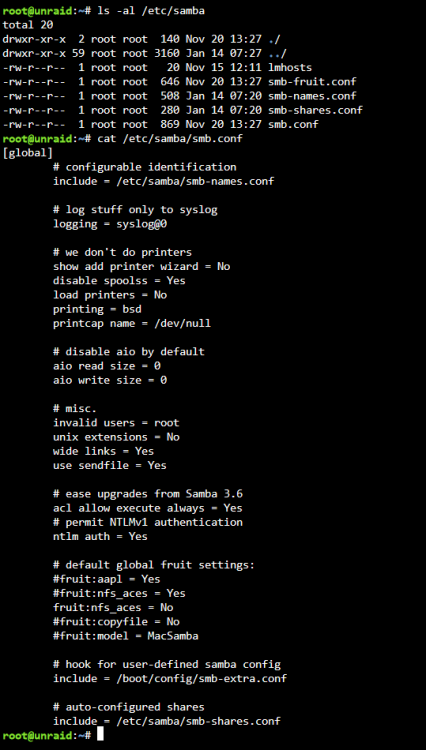
So I double checked the "Samba extra configuration:" in the Unraid UI and there was an extra space as you said, I've removed it, restarted the array and ran `testparm` again and got the below output. Hope it points to a potential fix as the issue is still present in Windows with this change. Load smb config files from /etc/samba/smb.conf lpcfg_do_global_parameter: WARNING: The "null passwords" option is deprecated Loaded services file OK. Weak crypto is allowed by GnuTLS (e.g. NTLM as a compatibility fallback) Server role: ROLE_STANDALONE Press enter to see a dump of your service definitions # Global parameters [global] disable netbios = Yes disable spoolss = Yes domain master = Yes load printers = No logging = syslog@0 map to guest = Bad User max open files = 40960 multicast dns register = No ntlm auth = ntlmv1-permitted null passwords = Yes os level = 255 passdb backend = smbpasswd preferred master = Yes printcap name = /dev/null security = USER server min protocol = SMB2 server multi channel support = No server string = Media Server show add printer wizard = No smb1 unix extensions = No fruit:nfs_aces = No idmap config * : range = 3000-7999 idmap config * : backend = tdb acl allow execute always = Yes aio read size = 0 aio write size = 0 create mask = 0777 directory mask = 0777 hide dot files = No include = /etc/samba/smb-shares.conf invalid users = root map archive = No map readonly = yes use sendfile = Yes wide links = Yes [data] path = /mnt/user/data valid users = coner vfs objects = catia fruit streams_xattr write list = coner fruit:encoding = native
-
I think we've found the issue. Do you know what could be causing the error?

-
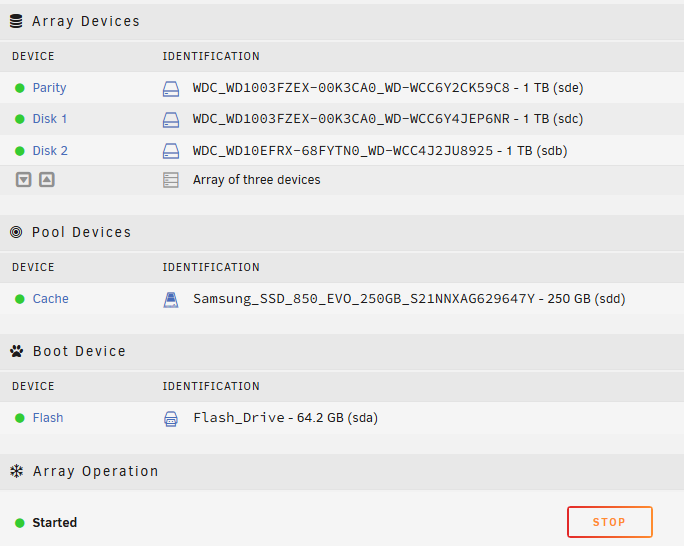
All green for the devices in the array as per below. I did notice some errors for Disk 2 yesterday around the time you mention. Although these errors disappeared in the UI and went to 0 so I wasn't sure if that meant they were resolved or not? Outputs of the commands below.