





DoctorBubba
Members
-
Joined
-
Last visited
Everything posted by DoctorBubba
-
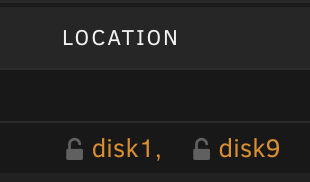
I've searched around and I can't find anything about this in the documentation. Recently, I tried to move a folder via SMB and it was taking too long, so I just opened the console and moved the folder with a mv command. But I noticed something that I've never seen before. Now, when I go to the Shares tab and browse to the folder that I moved, the first file in the folder has its filename in orange, and there are also two disks listed in the locations tab. I tried looking for clarification on the locations column but I couldn't find it. Does this mean that the file is spread across two locations, or that it exists in both of them? I know that it doesn't mean there's a hardlink, because I checked some of my files that do have hardlinks, and none of them were orange, nor did they should two locations in the locations column. I also noticed that there are some folders which would list multiple disks, but the folders weren't orange. The curious thing is that when I went into these folders, none of the folders I checked had files in two disks. The folder says that it has files in multiple disks but the actual files themselves are only in one disk. So as far as I can tell, this seems pretty inconsistent and I can't find an explanation for what this is supposed to mean. Is there anywhere that clears this up? Thank you!
-
Okay, after parity sync finished and I restarted, I was able to add the drive again. Does parity need to be built in order to add a new drive, or was this all because I was using Firefox? Thank you!
-
I do. I have so many tabs open ATM though that the easiest way to log them out for sure will be to let Unraid finish and then reboot. Will do, as soon as my current tasks finish, which will take a few days. It also says "stale configuration" at the bottom. I assumed this was related to using "new config" and I hoped this would rectify after I get everything set back up properly.
-
It's a little weird right now. It seems to be partially started and partially not. Parity sync is running, and I'm able to access my data on the server via SMB. However, if I go to the shares tab, it says that the array has to be started to view shares. If I go to the Docker tab, it says that the array has to be started to see containers, yet the containers are visible under the message. Also, the only buttons available on the bottom of the main tab are reboot and shutdown. There are no visible buttons, not even grayed out ones, relating to starting or stopped the array or parity sync. It's acting strange right now, probably because I hit "new config", but I'm hoping it starts working normally after the parity sync finishes and I restart. That will take a couple of days though because I'm also transferring files to the share which has brought parity sync to a crawl. I did do them in separate steps, or at least I thought so. I removed the parity drive and replaced it with the new one. I started the array up and it worked fine. I didn't let parity sync finish because it seemed like it would be pointless to build the parity right before adding a new driving and having to build it again. I stopped the array and still couldn't add the drive. I've tried restarting and now I've tried "new config". Do I have to let the parity sync finish before I can add another drive? vortex6-diagnostics-20230115-1336.zip

-
I just tried the New Config option and that didn't seem to fix anything. Now it seems like I can't access the share until parity-sync is built. I pressed start array but it still says the array is stopped.
-
I had two data drives and one parity drive. I went to add another data drive and I was told that I couldn't do this because the parity drive was now not the largest (all of the drives are 16TB). So, I removed the parity drive and added the new one as parity. I tried to add the old drive back as a data drive but I got the error message, "You may not add new disk(s) and also remove existing disk(s)." I tried a preclear to see if that helped but it didn't. I still get the error, "You may not add new disk(s) and also remove existing disk(s)."
-
It looks like you were right. I had mistakenly entered it with a capital letter. Thank you for the help!
-
Okay, I think I've got most of this sorted out but one thing I've run into. At the end of my rClone user script, I copied the commands from the New Permissions tool and changed the folder to the SeedboxCache folder. chmod -R u-x,go-rwx,go+u,ugo+X /mnt/user/Share/SeedboxCache chown -R nobody:users /mnt/user/Share/SeedboxCache Sync The problem is that when I run the script, it says the sync command isn't found. Is this a problem? I thought it was a basic Linux command. Would I need to do these with sudo or is that implied with UnRaid? Thank you!
-
Thank you! That fixed the issue and it fixed other problems I was having. But it also gave me more questions. First, the obvious, I need to figure out how to either make rClone set the permissions as required when downloading, or add the chmod command to the rClone user script. That should be doable. Now the part that's confused me. I was having permissions problems when trying to access most of my files via Samba. Most of the problems seemed to be connected to folders that Qbittorrent wrote to. For example, when accessing my share outside of root, I couldn't write or delete files from folders used for seeding, incomplete downloads, torrent files, etc. I had suspected that this was something to do with the way Qbittorrent was managing permissions for files that it wrote. But now, I don't have this problem. I consider that a good thing. However, this leads me to wonder why I had the problem in the first place and how to prevent it in the future. The descriptions in the New Permissions tool didn't make it sound as if it was something that needed to be done on a regular basis. Do I need to enter these same permission settings when installing Dockers perhaps?
-
First off I just want to say that I'm new to Linux systems and I'm still very confused about the way permissions are handled. To focus on the main issue, here is the big problem that I haven't found a workaround for; the contents of folders that are downloaded via Rclone are unable to be moved via Qbittorrent. Individual files seem to work fine, but if I try to move a folder, it will create a new empty folder without moving the contents. I'm using Qbittorrent to generally manage the location of my files and categorize them. I used Rclone to download a bunch of files into a folder called SeedboxCache. I can add the torrents for these files and Qbittorrent will scan them and seed them from their current locations. If I tell Qbittorrent to move the files then any files that were in folders are not actually moved. Strangely, it works okay with individual files that aren't inside of folders. I have tested and confirmed that the problem is with the individual folders that were downloaded and not the parent folder, SeedboxCache. I moved a file from a local computer into the SeedboxCache folder and Qbittorrent was able to move that one properly. I also tested moving a folder out of SeedboxCache manually using the terminal and the mv command. Qbittorrent is still unable to move that folder even if it has been taken out of SeedboxCache. So it appears that the issue is related to a permission incompatibility between Qbittorrent and folders downloaded with Rclone, but I do not know to go from there.
