ikenji
Members
-
Joined
-
Last visited
-
Hi everyone, thougtht I'd update the thread and close it out, since it seems to be working now. The cause was my network switch (HP ProCurve 1800), which I reset to factory settings. Thank you everyone for the help, I didn't think this could happen since I hadn't configured any of the features of the switch.
-
Windows -> Unraid: PS F:\Downloads\iperf-3.1.3-win64\iperf-3.1.3-win64> .\iperf3.exe -c 192.168.1.78 Connecting to host 192.168.1.78, port 5201 [ 4] local 192.168.1.38 port 52606 connected to 192.168.1.78 port 5201 [ ID] Interval Transfer Bandwidth [ 4] 0.00-1.01 sec 384 KBytes 3.12 Mbits/sec [ 4] 1.01-2.00 sec 0.00 Bytes 0.00 bits/sec [ 4] 2.00-3.00 sec 128 KBytes 1.05 Mbits/sec [ 4] 3.00-4.00 sec 0.00 Bytes 0.00 bits/sec [ 4] 4.00-5.01 sec 128 KBytes 1.03 Mbits/sec [ 4] 5.01-6.01 sec 0.00 Bytes 0.00 bits/sec [ 4] 6.01-7.01 sec 128 KBytes 1.05 Mbits/sec [ 4] 7.01-8.00 sec 384 KBytes 3.17 Mbits/sec [ 4] 8.00-9.01 sec 512 KBytes 4.15 Mbits/sec [ 4] 9.01-10.01 sec 256 KBytes 2.10 Mbits/sec - - - - - - - - - - - - - - - - - - - - - - - - - [ ID] Interval Transfer Bandwidth [ 4] 0.00-10.01 sec 1.88 MBytes 1.57 Mbits/sec sender [ 4] 0.00-10.01 sec 1.64 MBytes 1.37 Mbits/sec receiver iperf Done. Unraid -> Windows: iperf3 -c 192.168.1.38 Connecting to host 192.168.1.38, port 5201 [ 5] local 192.168.1.78 port 55320 connected to 192.168.1.38 port 5201 [ ID] Interval Transfer Bitrate Retr Cwnd [ 5] 0.00-1.00 sec 79.8 MBytes 669 Mbits/sec 3063 294 KBytes [ 5] 1.00-2.00 sec 101 MBytes 846 Mbits/sec 4081 120 KBytes [ 5] 2.00-3.00 sec 103 MBytes 860 Mbits/sec 3956 286 KBytes [ 5] 3.00-4.00 sec 79.3 MBytes 665 Mbits/sec 3174 294 KBytes [ 5] 4.00-5.00 sec 102 MBytes 858 Mbits/sec 3860 249 KBytes [ 5] 5.00-6.00 sec 101 MBytes 844 Mbits/sec 3974 297 KBytes [ 5] 6.00-7.00 sec 101 MBytes 849 Mbits/sec 4087 151 KBytes [ 5] 7.00-8.00 sec 81.0 MBytes 679 Mbits/sec 3113 283 KBytes [ 5] 8.00-9.00 sec 80.2 MBytes 673 Mbits/sec 3267 291 KBytes [ 5] 9.00-10.00 sec 80.8 MBytes 678 Mbits/sec 3151 146 KBytes - - - - - - - - - - - - - - - - - - - - - - - - - [ ID] Interval Transfer Bitrate Retr [ 5] 0.00-10.00 sec 908 MBytes 762 Mbits/sec 35726 sender [ 5] 0.00-10.00 sec 905 MBytes 759 Mbits/sec receiver Sorry I forgot to mention, I have tried 3 different network cables. Thanks for the help so far!
-
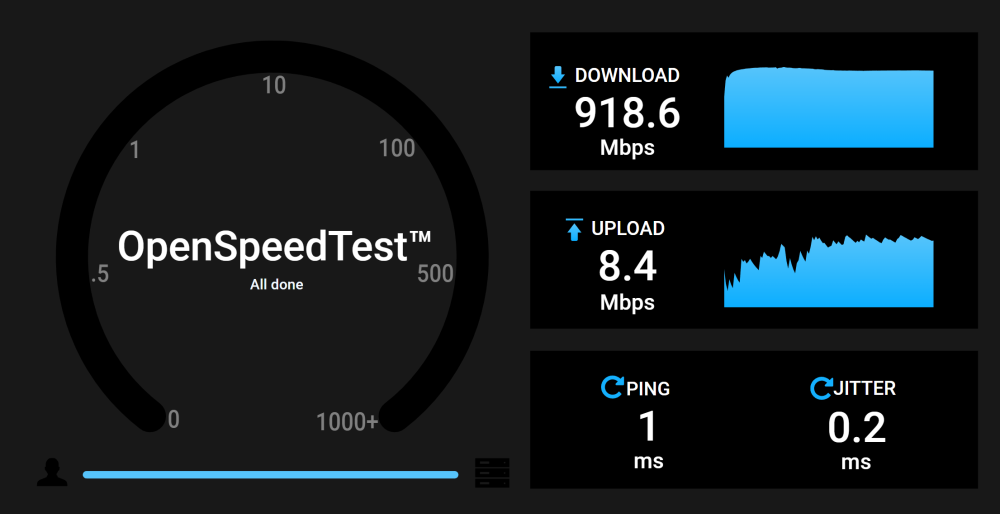
Hello, Lately I've been experiencing frustratingly slow (5-15mbps) network connection over ethernet. However what's strange is that only the inbound connection is slow, and outbound traffic is not affected. This has been reproducible using many different devices to connect to Unraid as well as a speedtest.net result from a VM running on the server. I'd also like to clarify that the server used to run at full speed in both directions, but the file transfers became slow more recently, though I can't pinpoint it to a specific release due to my set and forget tendencies. Troubleshooting I have tried so far: USB 3 NIC Bonding using USB nic and built-in NIC Upgrade to latest version of Unraid Disable Docker (I tested speed by copying file to a share) Disable VMs Run speed test using different PC The only thing I've considered but have not tried yet is running a different OS on this hardware, and doing a speed test from there Here are some screenshots from my speed tests: OpenSpeedTest result from another PC over LAN: Speed test from VM running on this server: Any ideas on how to troubleshoot this problem? I've looked at the logs briefly but don't have the background to separate any useful logs from the noise. Thank you in advance for the help! tower-diagnostics-20230118-2341.zip