





ketchy311
Members
-
Joined
-
Last visited
-
My errors now seemed to be pointing towards an issue with the Docker image / its cache drive that it resides on: Mar 14 14:05:01 GreatBambino kernel: BTRFS: error (device loop2: state A) in __btrfs_free_extent:3073: errno=-2 No such entry Mar 14 14:05:01 GreatBambino kernel: BTRFS info (device loop2: state EA): forced readonly Mar 14 14:05:01 GreatBambino kernel: BTRFS error (device loop2: state EA): failed to run delayed ref for logical 14184448 num_bytes 8192 type 178 action 2 ref_mod 1: -2 Mar 14 14:05:01 GreatBambino kernel: BTRFS: error (device loop2: state EA) in btrfs_run_delayed_refs:2150: errno=-2 No such entry I have now deleted the docker.img and recreated a new one, installing Plex from the Previous Apps section and so far so good. Not sure if this will be a long term solution, maybe the docker.img just got messed up somehow? Or perhaps a hardware gremlin will still pop up after this runs a while. How do I move or recreate docker.img? The easy way to move or recreate docker.img - 1 Go to Settings -> Docker -> Enable Docker, and set to No, then click the Apply button (this disables Docker support) 2 If recreating your docker.img file, then switch to Advanced View, then check off the box and press Delete, then skip to step 5 3 Using mc or any file manager or the command line, move docker.img to the desired location (/mnt/cache/docker.img is recommended) 4 In Settings -> Docker, change the path for Docker image to the exact location you just copied to 5 Now set Enable Docker back to Yes, and click the Apply button again (re-enabling Docker support) NOTE: If you have created any custom docker networks (eg through docker network create) you will need to recreate them after recreating your image and before reinstalling your applications The standard way to move or recreate docker.img is to stop Docker support, delete the current image, re-enable Docker support The easiest way to reinstall your applications would be to go to the Apps Tab, Previous Apps Section. Then check off all of your previous applications and hit "Install"
-
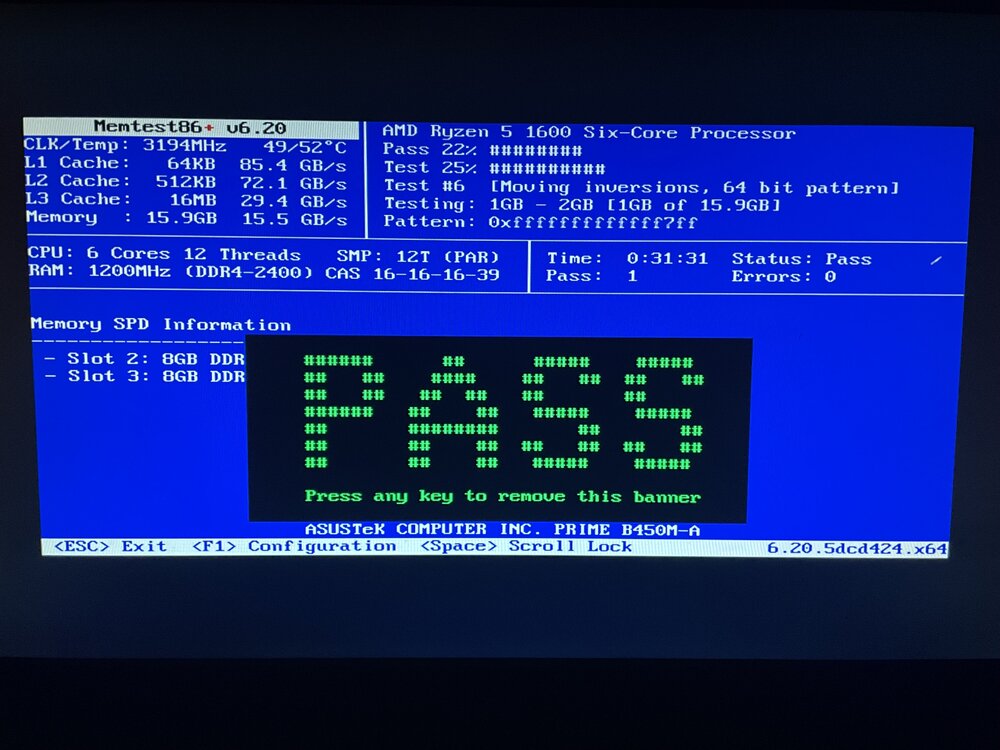
Memtest appears to have passed, unless I am missing something with this. Next thought was maybe it's the SSD Cache drive? Smart short self-test passed, Extended currently in progress.
-
Running memtest now, assumed this was likely a bigger issue than just the Plex docker, as I am having similar issues with all other Docker containers now as well (even trying to delete unneeded ones - I get the error "Execution Error: Server Error". I also noticed that Fix Common Problems is saying "Unable to write docker image". Could that relate to bad RAM as well, or could that indicate the problem is in another direction?
-
I am clicking on "apply update" on the Docker page (the same process that has worked without issues for several years now).
-
Noticed yesterday that Plex was suddenly having issues loading some files. Saw there was an update for the Docker, so attempted to run the update to see if that fixed the issue. This update was unable to run: Pulling image: plexinc/pms-docker:latest TOTAL DATA PULLED: 0 B Removing container: TheStash2.0 Error: Server error Command executiondocker create --name='TheStash2.0' --net='host' -e TZ="America/Chicago" -e HOST_OS="Unraid" -e HOST_HOSTNAME="GreatBambino" -e HOST_CONTAINERNAME="TheStash2.0" -e 'PLEX_CLAIM'='claim-boCsbosDZxRLyqhcAges' -e 'PLEX_UID'='99' -e 'PLEX_GID'='100' -e 'VERSION'='latest' -l net.unraid.docker.managed=dockerman -l net.unraid.docker.webui='http://[IP]:[PORT:32400]/web' -l net.unraid.docker.icon='https://raw.githubusercontent.com/plexinc/pms-docker/master/img/plex-server.png' -v '/tmp':'/transcode':'rw' -v '/mnt/user/Bambino Media/':'/data':'rw' -v '/mnt/user/Bambino Music/Music/':'/music':'rw' -v '/mnt/user/appdata/Plex-Media-Server':'/config':'rw' 'plexinc/pms-docker' Error response from daemon: Conflict. The container name "/TheStash2.0" is already in use by container "645b02faf3692806d591b3cbe4dc3705691a062ad68956741ac4914d94ea60bc". You have to remove (or rename) that container to be able to reuse that name. The command failed. Unsure what exactly is causing this, then attempted to just start the Plex Docker again, now receiving a message: Execution error Image can not be deleted, in use by other container(s) Server had been rebooted during this troubleshooting, so all other dockers were also stopped. Noticing now that any attempts to start other dockers results in the same "Execution error" message. This server has run mostly problem free for quite some time, so I am at a bit of a loss and appreciate any suggestions. Diagnostics file is attached. greatbambino-diagnostics-20250314-1135.zip
-
My Samsung SSD Cache Drive has suddently become Unmountable. There have been no system changes leading up to this. Any idea on if the drive has just gone bad, or something else? Diagnostics attached, greatly appreciate any help! greatbambino-diagnostics-20230120-1421.zip
