Heizer
Members
-
Joined
-
Last visited
-
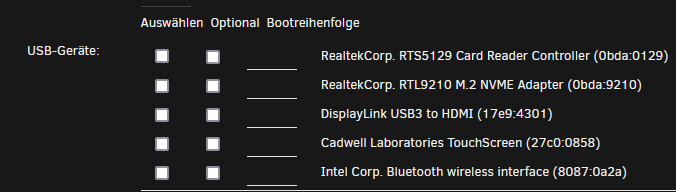
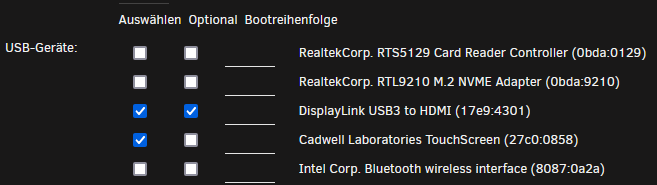
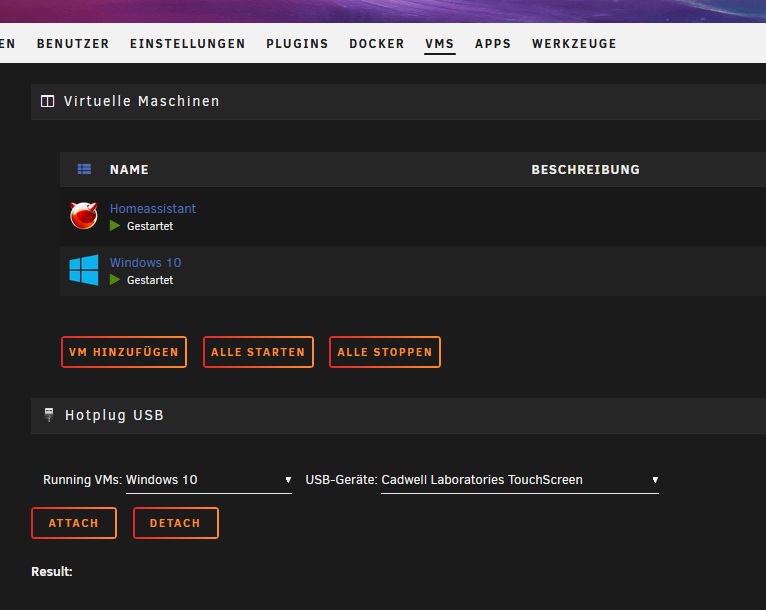
Habe es hinbekommen, hab eine Windows 10VM erstellt was noch wichtig ist zu erwähnen ist, den USB treiber der VM auf USB3 zu stellen, sonst kommt eine fehlermeldung wenn man die USB GPU hinzufügen will. Dann hab ich die treiber für den Wavelink installiert (in der Windows10 VM) und siehe da, ein Bild ist auf dem Bildschirm. https://www.synaptics.com/products/displaylink-graphics/downloads/windows Habe Homeassistent aktuell über Firefox laufen. Sollte der Touch nicht sofort funkionieren, muss er einfach per hotplag einmal weg und wieder hin gemacht werden. Es gibt noch folgendes Problem: Windows erlaubt die Anzeige nur als erweitert (erster bildschirm Virtuell, 2 Bildschirm USB GPU). Ich habe mir damit beholfen Anzeige nur auf Bildschirm 2 auszugeben. Nachteil ist, ich habe mit VNC keinen zugriff auf bildschirm 2. Das heist wenn ich mich mit dem Unraid VNC auf die VM verbinde sehe ich nur einen schwarzen Bildschirm. Ich habe mir behelfsmäsic parsec installiert. Parsec zeigt mir den einzig aktiven Bildschirm, von daher erstmal ok für mich.

-
Erst mal vielen Dank für eure Antworten. Das die HA VM keine ausgabe für einen Bildschirm liefert hatte ich nicht mehr auf dem Schirm, macht aber Sinn. Ich versuche jetzt das ganze mit einer Windows VM. Leider benötigen die virto treiber 12h zum downloaden (keine Ahnung warum, muss wohl an github liegen). Egal. Ich werde berichten, wenn ich weiter gekommen bin. @alturismoDanke für deinen vorschlag. Das mit Tablet zu lösen stand auch mal im Raum. Wir haben uns dagegen entschieden weil wir es stationer im Flur haben wollen. Der Hauptgund ist aber die Brandgefahr des Akkus im Tablet. In der Arbeit hat so ein "Smarthome" Tablet mal dicke Backen gemacht. Das will ich nicht in einem sanierten Altbau an die Holzwand hängen.
-
Hallo zusammen, Ich habe folgendes anliegen: Ich will einen Touchscreen an den Unraid server anschließen um darüber Homeassistent zu bedienen. Ich habe folgende Hardware: geekom Mini Air 11 Tragbarer Monitor Touchscreen, 18,5 Zoll https://amzn.eu/d/dqramRL WAVLINK USB 3.0 zu HDMI Adapter Slim Externe Video Karte https://amzn.eu/d/5pJwfTd Ich konnte den Touchscreen und die externe GPU an einem Windows PC in betrieb nehmen, funktioniert da auch einwandfrei. (komponenten tun) Da ich schon hörte, dass Unraid die erste GPU für sich beansprucht, und das Headless thema auch nicht ganz einfach ist, dachte ich eine externe GPU löse mein Problem. Homeassistent läuft in einer VM und in dessen Optionen wird mir der Touch und die USB GPU auch angezeigt. Leider wird mir die GPU nur als USB gerät angezeigt und kann nicht als Grafikkarte zugewiesen werden. Ich gehe davon aus das mir der richtige treiber fehlt. Wavlink bietet nur treiber für Windows und MacOS an, ich hab aber eine Seite gefunden, welcher den adapter auch unter Ubuntu (Linux) zum laufen gebracht hat. https://askubuntu.com/questions/1488474/i-cant-use-my-usb-to-hdmi-adapter-in-ubuntu-22-04-534d6021-macrosilicon-vga-d Ich habe dann versucht den Treiber über das Terminal in Unraid zu installieren, als allerdings dann die meldung kam das er beim Befehl "sudo apt install -y build-essential" mit apt nichts anfangen kann, war ich raus. Meine Frage: 1. Bin ich auf dem richtigen weg? 2. Wenn ja, ist es in Unraid möglich den Treiber zu installieren? 3. fals nein, gibt es einen Workaround (windows VM oder so)? Wenn es bereits schon so einen forenbeitrag gibt wäre ich froh wenn mir jemand den we dorthin zeigt, habe nämlich nichts gefunden. Vielen Dank für eure Zeit