





Macj72x
Members
-
Joined
-
Yes it does. That thread seems to be my situation. I'll try to run through some of those troubleshooting steps.
-
Anyone have any recommendations? I'm not sure where to start and my troubleshooting has been turning up empty
-
For the past few months, a many if not all of my containers will fail to update. They will leave a orphaned image and I need to redownload them and then they work properly. I recently noticed it still is doing it, but not leaving an orphaned image any more. The container just drops off my system. Can anyone point me in the right direction or see any issues with my diagnostics? chunkymonkey-diagnostics-20241212-1255.zip
-
My server has been having intermittent issues where the gui and ssh will become no longer accessible until I reboot the server. I received a notification that it froze at around 11ish today 4/17. I set up a remote sys log server and attached the results. Could someone provide me some guidance on what may be happening or how I can troubleshoot this? I don't see anything in the logs that stick out to me. syslog-192.168.3.7.log
-
I am having trouble getting the array to stop. I keep getting these errors continuously: Feb 7 15:52:11 ChunkyMonkey emhttpd: Unmounting disks... Feb 7 15:52:11 ChunkyMonkey emhttpd: shcmd (310): /usr/sbin/zpool export cache-system Feb 7 15:52:11 ChunkyMonkey root: cannot unmount '/mnt/cache-system': pool or dataset is busy Feb 7 15:52:11 ChunkyMonkey emhttpd: shcmd (310): exit status: 1 Feb 7 15:52:11 ChunkyMonkey emhttpd: Retry unmounting disk share(s)... Feb 7 15:52:16 ChunkyMonkey emhttpd: Unmounting disks... I followed this link: and ran losetup to receive these results: NAME SIZELIMIT OFFSET AUTOCLEAR RO BACK-FILE DIO LOG-SEC /dev/loop1 0 0 1 1 /boot/bzfirmware 0 512 /dev/loop2 0 0 1 0 /mnt/cache-system/system/docker/docker.img 0 512 /dev/loop0 0 0 1 1 /boot/bzmodules 0 512 I ran umount /dev/loop2 to force the array to stop. Are there any diagnosing steps to prevent this from happening again? I've attached my diagnostics. chunkymonkey-diagnostics-20240207-1556.zip
-
Did you ever find a solution to this? I have a synology nas that I setup a point to point tunnel to that I wish to run backups to. Trying to find an easy and secure solution.
-
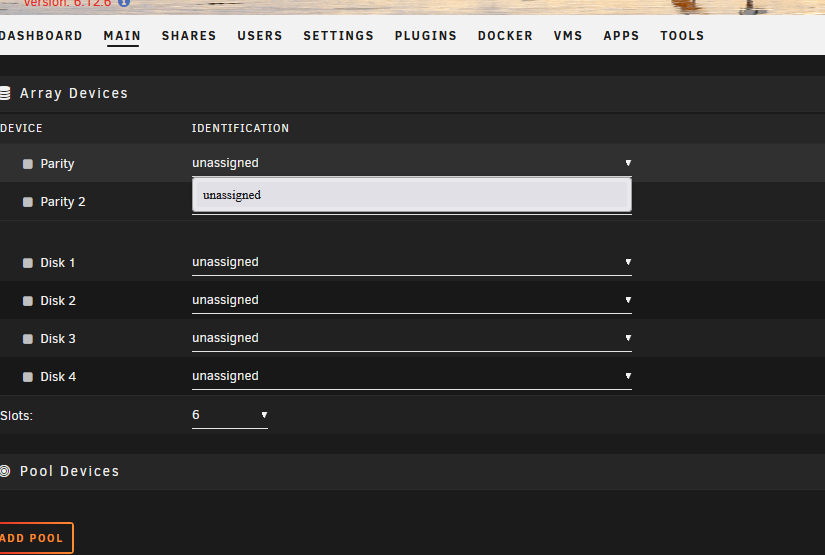
So I solved it. I was thinking you change the setting at the RAID controller configuration to go to HBA mode, but that didn't work and caused me more issues. After lots of tinkering and get my drives to show again, I found the best solution. I had to go into the configuration of each individual drive and change it to non-raid mode then click go.
-
Hey I have a new Dell R430 Poweredge server running Unraid. I can get it to boot fine, but the disks are not loading. I have another server with a similar configuration that pulled up these same disks with no issue. Can anyone tell me what I'm doing wrong? impairedbear-diagnostics-20240111-1823.zip
-
Hey All, I'm getting the error message /var/log is getting full. I've looked through them and fixed the cron issue with userscripts, but other than that, I'm not sure what else to do or where to start. Any advice? I've attached my diagnostics. chunkymonkey-diagnostics-20240111-1018.zip
-
That was it. Thank you!
-
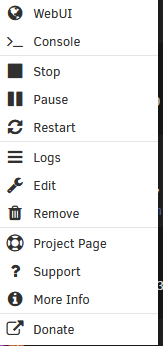
When I try to start, stop, restart, pause, force stop, hibernate, remove VM, or remove VM and Disks a container or VM it doesn't do anything and will just sit there with the menu highlighted. Without clicking everything, most all the other menu items seem to work find including start with console(VNC) for the vms. I've tried using different browsers. This seems to be a relatively new development maybe in one of the last few updates. I have no clue where to start with diagnosing this. Please see my attached diagnostics. chunkymonkey-diagnostics-20231207-1449.zip
-
I redid the flash drive. I didn't get a boot error the two times I tried booting it so fingers crossed that is fixed, but my appdata share ownership keeps changing to unknown. Any advice on how to diagnose that?
-
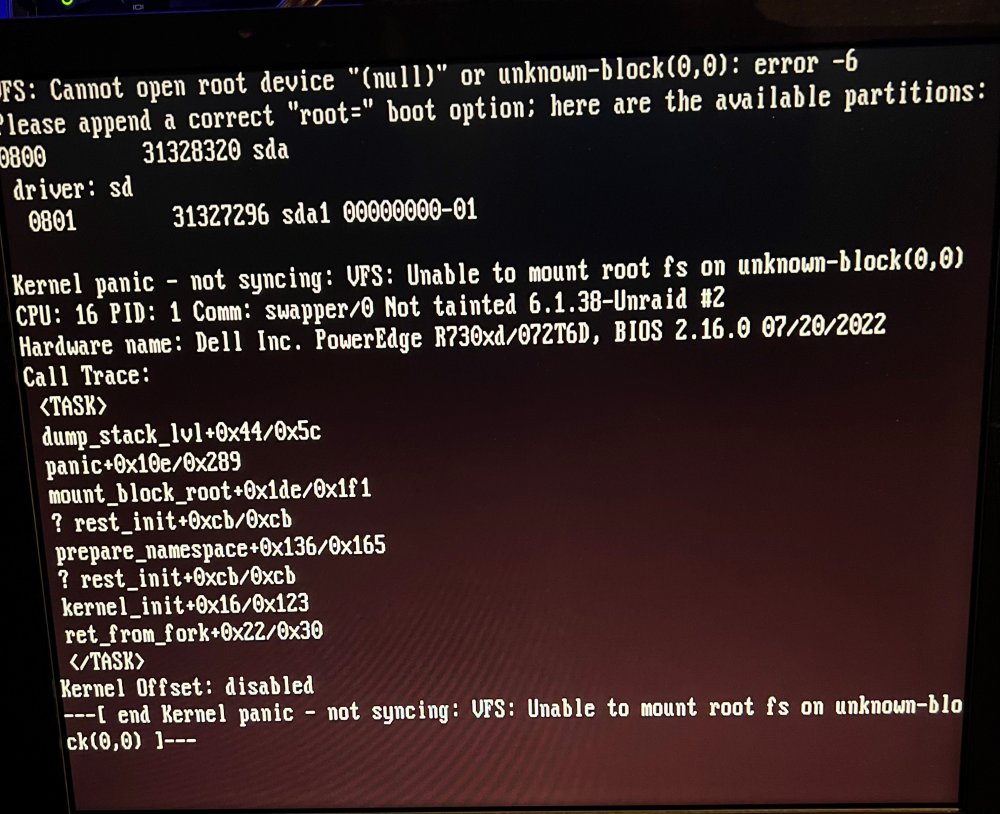
I lately have been having this kernel panic pop up when I need to restart unraid: Sometimes I can restart and it will go past it and sometimes it takes several restarts. Can anyone decode this for a layman? Once I get Unraid to boot, sometimes I will be missing some of my cache nvme drives. This probably happens 1 in 10 boots and I will need to restart for them to appear again. Then once I get it going with all the drives, I will have all my appdata owership change from nobody to unknown. This causes all my docker containers to not work until I run a script a few times switching it back. The appdata share is on a different cache pool than the nvme drives that disappear. I feel like this may all be related and a hardware issue, but I'm not sure where to start to diagnose this. Any help? chunkymonkey-diagnostics-20230809-1143.zip
-
As the title says, I keep having ownership changes with my entire appdata share and only that share. It causes issues with all my containers. I happen to catch it in the middle of a change and copied the attached diag file. It started changing sometime around 11-12am today(6/21). I don't see anything that stands out in my log file. Can someone more experienced look through and see if anything stands out that may be causing this? chunkymonkey-diagnostics-20230621-1158.zip
-
My appdata share keeps changing owner from nobody to unknown when appdata backup runs. Any ideas what’s happening and what steps I may need to do to fix it?

