





Khynze
Members
-
Joined
-
Last visited
Everything posted by Khynze
-
It's a good idea, sadly I'm renting and will be moving in about 6 months so that's not something I can do. Thank you though!
-
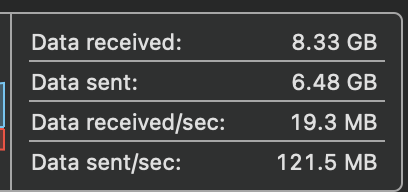
Harder to read as my only laptop is a mac, however I was seeing transfer speeds of 120MB/s when connected directly to the switch the server is on. That's fairly conclusive, it has to be powerline or network related. At least I can now do more troubleshooting.
-
I shall give it a go, thank you! I have three, one by router, one in the garage where the server is, and one in my office. They're Netgear PLP1200's. Out of curiosity I did try a transfer with my PC on Wifi (which has a fairly decent card in it) and same speeds.
-
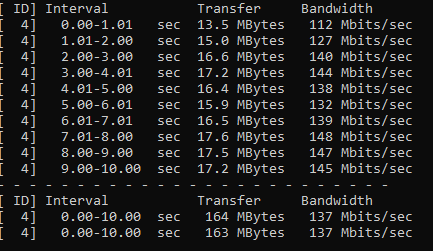
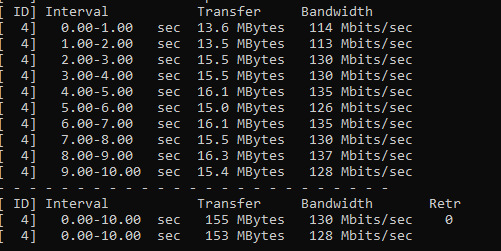
Client to Server Server to Client That took a while, first time both hearing about iperf and running it! Even I can tell however that is quite conclusive, but I'm not sure how to remedy it. My PC has 2.5G networking, the server has Gigabit, my switch is 1GB, and my powerline adapters at 1200Mbps. I'm honestly not sure where to go from here.
-
Yeah it's a slow drive but I don't think it should be that slow, but at 320 MB/s write it should at least get to the gigabit network max of 125 MB/s ish? I've tried turbo write/reconstruct write and same speed. I guess it could be network related then?
-
bump
-
Kingston A400 SA400S37/480G. The diagnostics should be attached to this reply. galacticempire-diagnostics-20230215-1930.zip
-
Please be gentle, I am very much a noob with unraid or anything server related! I have a Fujitsu Primergy TX140S2 w/ a Xeon E3-1230 v3 3.30GHz, 32GB DDR3 RAM, 3 3TB 7200RPM HDDs with 1 as parity and a 480GB Kingston SATA SSD as a cache drive. It also has onboard gigabit networking. My home network speeds are gigabit, and I use gigabit powerline to connect server and PC to my router due to living in an old rented house. My shares are set to use cache pool (set to Yes instead of Prefer), and I've tried both read/write/modify and reconstruct write with little difference. I feel as if I should be getting better write speed than just 20MB/s. I understand parity calculations will slow down the speed (I think I've read half somewhere) and obviously I wouldn't get the full write speed of the SSD, but I was hoping for more than what I'm getting. I'd appreciate any help at all!
