




Skip to content
View in the app

A better way to browse. Learn more.

Unraid

A full-screen app on your home screen with push notifications, badges and more.

To install this app on iOS and iPadOS
  1. Tap the Share icon in Safari
  2. Scroll the menu and tap Add to Home Screen.
  3. Tap Add in the top-right corner.
To install this app on Android
  1. Tap the 3-dot menu (⋮) in the top-right corner of the browser.
  2. Tap Add to Home screen or Install app.
  3. Confirm by tapping Install.

0palescent

Members
  • Joined

  • Last visited

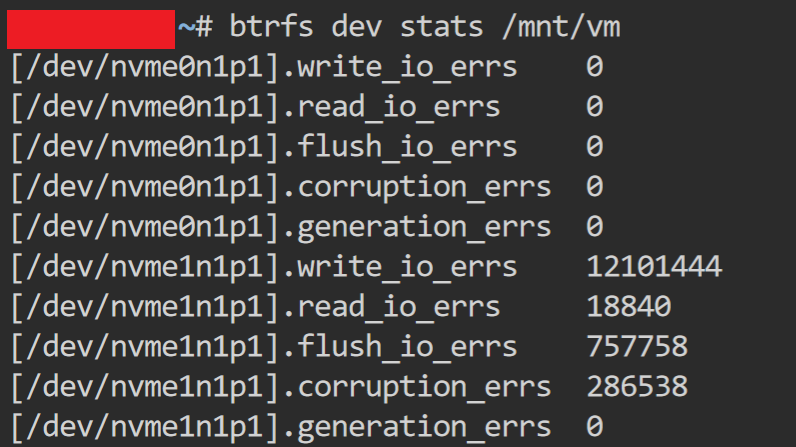
  1. To preface this I am fairly new to Unraid, so apologies if my explanation is not super clear. A few months ago, I logged into the web GUI to see thousands of messages saying "BTRFS missing devices /dev/nvme0n1". I ran 'btrfs dev stats' on /dev/nvme0n1p1 to get the following: I replaced both nvme1n1 and nvme0n1 (both pool devices -- both were Samsung Pro 980 drives which are known to have problems, I replaced the other just to be sure). I booted up the Unraid server, precleared the disks and assigned them back. Upon starting the array they appear as "Unmountable: No pool uuid". I was hoping I would just have the option to rebuild them from parity, but it doesn't appear as an option. Any help would be much appreciated! Thank you.
Account

Navigation

Search

Search

Configure browser push notifications

Chrome (Android)
  1. Tap the lock icon next to the address bar.
  2. Tap Permissions → Notifications.
  3. Adjust your preference.
Chrome (Desktop)
  1. Click the padlock icon in the address bar.
  2. Select Site settings.
  3. Find Notifications and adjust your preference.