zylex
Members
-
Joined
-
Last visited
Everything posted by zylex
-
Thanks for all your help! Really appreciate it.
-
Given there's not much on that drive and i'm now keen to take everything off and replace all the drives, I assume the rebuild is the faster option? If so i'll do that, then move all the data elsewhere.
-
Being almost empty is not surprising - I vaguely recall everything was loaded up on the first disk and there was very little on the others prior to this issue but didn't know Unraid well enough to know why. I'll go and look at making those changes now. Should I just attempt the rebuild process, and if so do I make those changes first or after? At this point I'm thinking I'll get it going, get all the data off it to something else, and then start fresh with four new drives and configure everything from scratch using best practice.
-
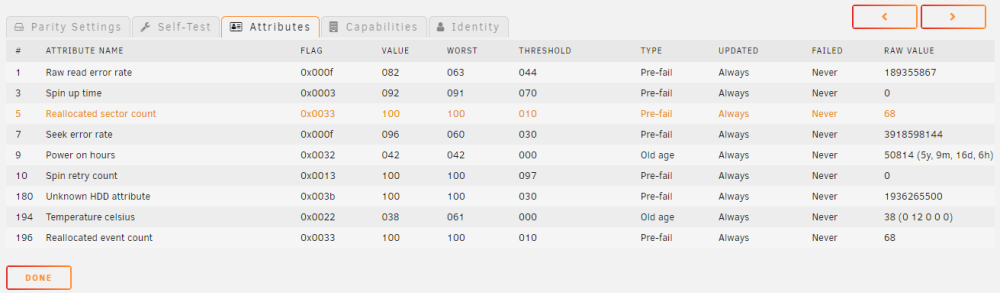
Just some additional information - looks like the parity drive has now failed a smart test (which I believe was after the diagnostics I posted above).
-
Looks promising so far - I have only followed your instructions and done nothing else as yet, so will wait until you've looked at diagnostics. microserver1-diagnostics-20230203-0952.zip
-
No problem - 'failed' disk definitely seems like a hardware failure. I removed it and put it in a usb drive dock connected to my laptop - unusual noises, undetectable, etc. if i remember correctly (it was late last year so I can attempt it again but will wait until you or others reply further before I do so). Drives are in a cage with a backplane type arrangement but i did try removing the drive to bypass that cable and plugging it directly into the motherboard - also no success. Apologies - forgot to mention that in initial post. I assume that because it detects the new drive in the same slot (and can carry out a smart test, etc) but couldn't on the old drive, that would also point to drive failure.
-
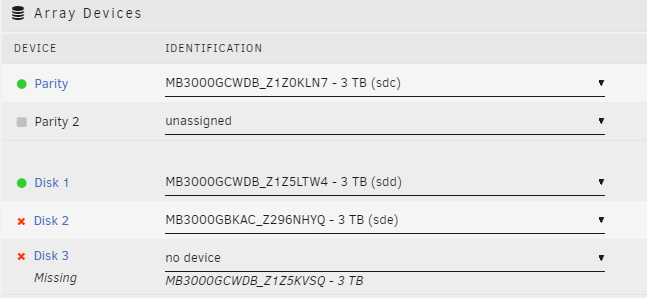
Hi all - I'm quite new to Unraid. Have a machine here that came to me with Unraid already on it, so I had a play and put a bit of data on it, then the next time I looked at it (probably months later) it was in this condition. This probably happened a year ago at a guess. I didn't have a spare drive of the right capacity at the time and it had been powered off for a while before we powered it back up and noticed this problem, so there's no useful syslog available. The data is nothing super critical but would like to regain access if possible. More importantly, I'd like to learn more about how to work with issues like this in Unraid, but had trouble finding info on what to do in this specific situation. Unraid 6.11.5 on an HP Microserver Gen8, 4 drives. One failed and one disabled - as far as I know this happened at the same time. Drives listed below: I have removed and replaced Disk 3. Old disk 3 - ID shown in screenshot was no longer detected in unraid. I have tried following instructions to re-enable DIsk 2, and tried selecting the 'new' disk 3, but can't seem to get to a point where the array says anything other than 'invalid configuration' so I can start it in maintenance mode as per the instructions for either disk replacement, or for enabling a drive by rebuilding onto itself - I assume this is because of the two drives being an issue at the same time. I've run a smart test on Disk 2 - only issue seems to be it exceeded a temperature threshold once. Diagnostics attached. microserver1-diagnostics-20230202-1858.zip