





tbeaugelin
Members
-
Joined
-
Last visited
Everything posted by tbeaugelin
-
Thanks for the quick answer, and indeed the solution to my problem. It’s working perfectly with smb://server.tailnet.ts.net!
-
Hi guys, I’m having a little bit of trouble with using this plugin. I’m trying to map a specific share into my Mac/iPad/iPhone using smb://unraidserver.local/share wich works as long as I’m on the same network. When trying to map it on my iPhone using only 5G, it does not work and return an error Unconnected Socket. It does works fine with smb://UNRAIDIP/share however. I don’t want to use the IP solution, as things tend to break if the IP is attributed on foreign networks. My config is: Exit node set up on my Unraid Server Subnet added as 192.168.1.0/24 Local split DNS from my router DNS for local domain. I can access Unraid Web UI on 5G by typing my IP in my browser, access everything, my dockers and stuff, but can’t map the smb://server.local…
-
Hi guys, Pretty new here, so might not be the best place to post this. I'm looking for a docker img, or an internal way of accessing a specific share, all over the world, without the hassle of VPN setup. It's not really for me, but my wife is not a tech savvy, and if I need to explain to her how she has to use the VPN it will never work. I don't want anything fancy, just a remote access to a share, that I can mount directly in her Mac, in Finder. I have multiple app accessible through Swag reverse Proxy, and a Wireguard VPN already working, but I know for fact that the VPN part will make her loose her head. Thanks for anyone stopping by, and again, sorry if it's not the right place to post. EDIT: I have Nextcloud setup too, but the WebDav part is really slow (announcing 8 days for 40gb of transfert, while uploading it to my Filebrowser instance only took 2h) so it's a NO-GO.
-
Finaly got everything to work, but BB still can’t download some files, even tho if I go myself to my defined libgen URL, search said book, I can indeed find the book and download it. Very strange… Do you think it would be possible to add multiple libgen url to use? To multiply chances of a match and download?
-
I was able to make this work. For some reason, some of my container don’t work properly without an additional --dns 1.1.1.1 parameter. It seems to now be working correctly. Thanks for the help! EDIT: new weird thing. Even tho I can find, by going myself to libgen, the books I look for, some of them return a No Link Found in BB. I tried changing my language from French to any, but it does not work either. Any idea on this?
-
Thanks for the reminder about the api key, but my Readarr isn’t exposed. Weirdly, I can now open libgen.is in my browser tonight, but I still get an error 111 in BB. Is it the fact that I’m asking for books in French? Should I set the language download to any?
-
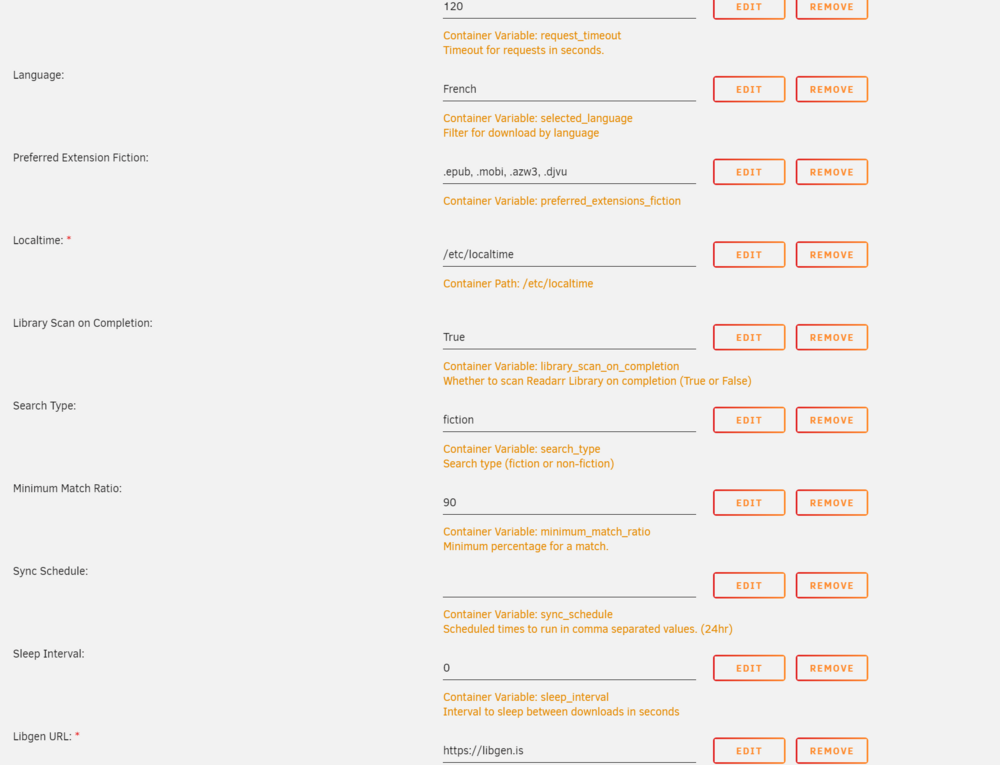
Hey there. I get this error a lot : "Error Searching libgen: HTTPSConnectionPool(host='libgen.is', port=443): Max retries exceeded with url: /url (Caused by NewConnectionError('<urllib3.connection.HTTPSConnection object at 0x14e2e165e810>: Failed to establish a new connection: [Errno 111] Connection refused'))" Here is the setup EDIT: it appears that at least in my country, libgen.is is not reachable. I tried searching for alternatives/mirrors, but then i directly get a Libgen error in the GUI.

-
Hi. I just downloaded BookBounty, set it up as folder in order to place downloads directly in my Readarr folder, and BB finds all my wanted books from Readarr. When I click on the ‘download’ button from Library Genesis side of the GUI, all the files are added and get a ‘searching…’ status, and that’s it. Nothing moves, I got a grey stripped bar at the top and every files stay in ‘searching…’ state. Am I missing something? Thanks for any help.

