





KingFabio
Members
-
Joined
-
Last visited
Everything posted by KingFabio
-
Yep, sadly. But was quite easy tho. But why the image was "empty" all of a sudden, I dont understand. The docker image made sense, as I know the resizing of the image, was the problem.
-
VM's are back as well ! As Tina Turner would have sung; "You are simply the best" Thanks alot for helping me out 🙂
-
"Ahh - that's why! But could that have anything to do with the Docker image being empty all of a sudden? I can confirm that after adding a 'new' disk to the pool and reinstalling the previous containers, they are now back to 'normal' with the same configuration! This is huge - thank you so much for your help, much appreciated. I will now try to get my VM's back.
-
I've added another disk to my pool. Its seems like its doing some reclaiming / allocating / data moving, as the math doesn't add up if I look at Size = Used + Free

-
I've tried to follow the steps in 'Re-Installing Docker Applications.' Now I have one of the previous containers installed, but I can't start it. The log states that the disk is full: Feb 2 13:51:35 Tower shfs: share cache full Feb 2 13:51:35 Tower shfs: assign_disk: /appdata/upsnap/data.db-wal (28) No space left on device However, when I check all the pools, there seems to be space available? 🤔
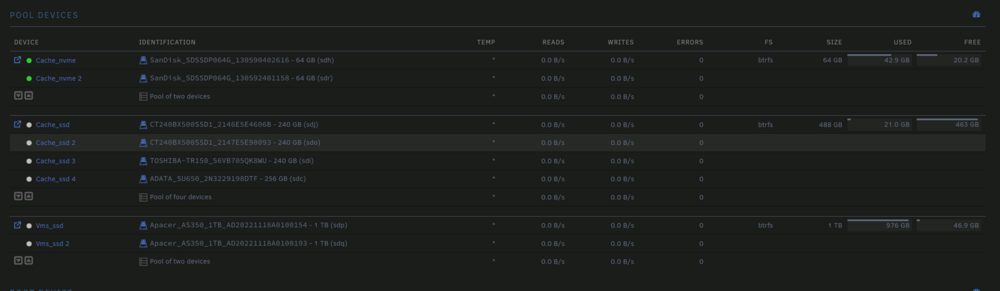
-
In regards of the libvirt.img, there seems only to be 1 file -> /mnt/cache_nvme/system/libvirt/libvirt.img /mnt/user/system/libvirt/libvirt.img As far as my understanding goes, these two "locations" are the same.. but I could ofc be wrong
-
Hi JorgeB I've just started the search. It seems a bit slow, but I'll give it some time. Regarding duplicates, I did make a copy of thedocker.img and the rest of the files located in ../user/appdata, before I resized the vDisk for docker. The copy is located at /mnt/user/backups/appdata_backup
-
Hi, I've been trying to figure out why the VM manager and Docker tab states that I don't have any VMs or containers anymore. As far as I can see, the files are located as they should be: I really hope someone can help. It should be mentioned that I tried to resize my Docker vdisk before installing the new version of Unraid. Since then, the VM manager and Docker tab state that I don't have any VMs or containers anymore, even though the files seem to be located correctly. tower-diagnostics-20250201-2300.zip




