Zito88
Members
-
Joined
-
Last visited
Everything posted by Zito88
-
Yes, I know that. Disk 1 contains "0MB" of data. All the data is either on Disk 3 or the Cache drive (Both SSDs). Obviously, I'm not getting the additional speed from the SSDs since the parity drive is a HDD. It lists Disk 1 because it has an empty, unused, folder on it that hasn't been modified since 2021. I didn't know you had to completely disable both Docker and VM Manager in order to make changes to or move them, but that definitely makes sense. I appreciate that info! I never setup system and domain shares to use my SSD but once I get things setup more optimally I'll switch them to using a separate cache pool. I already have a new HDD ordered to replace the SSD in the pool and will use that SSD for a separate cache pool just for those three shares.
-
No, all the array drives are connected via SATA cables either plugged directly into the MB or into the PCIe SATA card. The USB connection/disconnections were happening every few seconds, I disconnected the Conbee2 stick and they immediately stopped. I'm pretty confident that is the cause. I searched Google and the Unraid Forums and I saw a lot of other people saying they had this issue as well with Conbee2 sticks plugged into Unraid Servers. I'm not super concerned about this issue because I plan on migrating my deconz container along with several other containers to a different server soon, so that won't be plugged into this server for much longer. As a note, I've also noticed this doesn't happen anywhere near as often when the deconz container is actually running, so far in the last 24 hours it's only happened twice and they were within a few seconds of each other, when the deconz container was stopped it happened once every 5-15 seconds. appdata is set to only use disk3 which is an SSD, system and domain aren't. My original intent was to provide faster storage for Docker. Obviously, given what I know now, that isn't working as intended. I'll work on fixing that and setting it up properly. I plan on adding another HDD or two soon anyways, so this shouldn't be a big deal. Would it work to replace the 1TB SSD with an 8TB HDD, then rebuild it? I'm assuming that should work fine but just want to make sure it's not gonna limit that drive to only 1TB or something silly like that before I do it. After that I can just reinstall the SSD and set that up as a cache pool. Thanks for all your help so far! Also, the Disk6 rebuild went fine with no errors. I'm still not sure what caused this to happen in the first place, but I've checked several of the files on both Disk5 and Disk6 and all the data stored there seems to be fine.
-
Okay, so you're not seeing any issues with disks 5 or 6? I'm not sure why disk 6 failed and I got so many errors kicked out on disks 5 & 6 when the parity operation was running then. Any insight or guesses? I know it's not gonna show in the logs since I restarted, I wish I would have downloaded a copy before I restarted, lesson learned. Maybe related to the error log being full? I am not sure if the USB connection/disconnection issue with my Conbee2 stick was occurring before, I never noticed anything but don't check the logs every day. For the appdata, domains, system shares, I originally setup the SSD as part of the array instead of as a separate cache pool before I really knew what I was doing with Unraid, and never noticed any issues running it this way before so I never bothered changing it. Any easy ways to switch that but also use the same SSD?
-
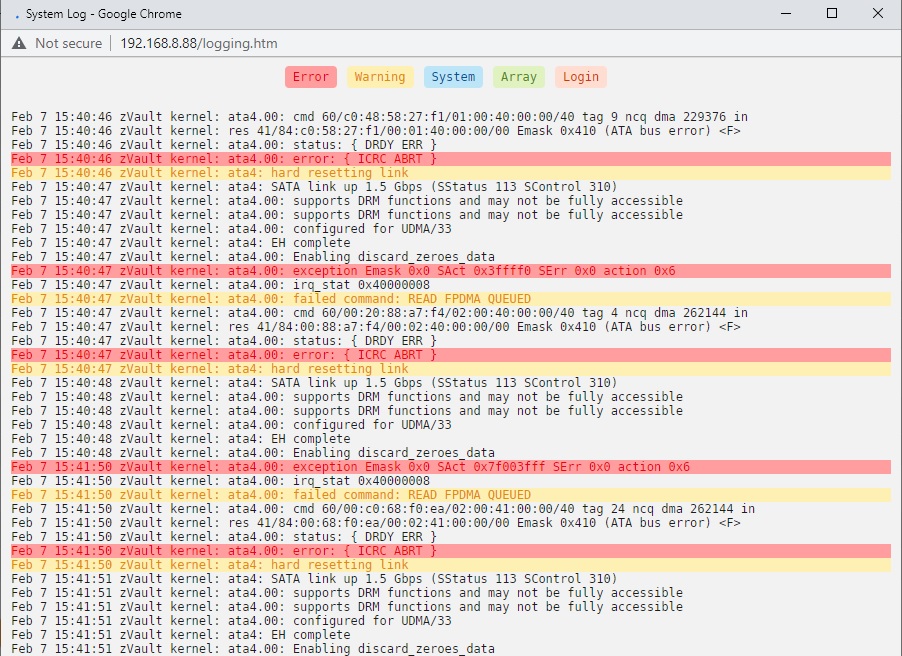
I've had this server running for about a year and a half now. I run a parity check the first Monday of every month, they have always come back good until now. I added 2 HDDs within the last year, but as I was out of SATA ports on my MB, I purchased a PCIe SATA Expansion Card to plug them in. I have a suspicion this might be the cause of my issues but I'm not sure. My newest HDD, installed within the last 6 months, failed last night during the parity check and went offline. After running a few tests on it and searching through past Unraid Forum posts I couldn't see any major issues except that both my two most newest HDDs had error counts in the millions from the parity check which failed about 80% of the way through. But only Disk 6 went offline, Disk 5 remains online and currently shows it is operating normally. I did notice that the memory allocated to the log was maxed out at 100%, so I shut everything down, rebooted, and I am currently rebuilding the missing disk back onto itself. As soon as I started the rebuild process (which appears to be working, but I'm super paranoid it won't) I pulled up the Log and noticed errors occurring over and over again. Looking through them it seems like the connection to the HDDs might be resetting repeatedly and I'm concerned that since two drives are connected via the same SATA Card that I might lose data since I only have one parity drive currently. Hopefully someone with more knowledge than me can take a look and tell me if I'm barking up the right tree or not. Full diagnostic download is attached, but I also took a screenshot of the current errors I'm getting. Prior to this the only errors I have ever really noticed are the usual "199 UDMA CRC error count" which I know is an Unraid issue and usually safe to ignore. I get them a pretty good amount but usually just Acknowledge them and move on. I mainly get this on the two disks plugged into the SATA Card but I also get them on an SSD plugged directly into the MB. While rebuilding I noticed a USB device constantly disconnecting and reconnecting and after searching that issue realized it was my Conbee2 USB stick for Deconz and unplugged that and those errors stopped, I think it's unrelated but worth mentioning. Any insight would be greatly appreciated. zvault-diagnostics-20230207-1528.zip