





AshleyAitken
Members
-
Joined
-
Last visited
-
FYI, I replaced the disks one after the other, letting the system rebuild one disk before doing the other, and now it's all green lights. Now going to explore Docker apps... see if this very old hardware (without address mapping) can run it and handle any load. Overally, I'm generally impressed with UnRaid and thankful for support I received here. [Apologies for any dupes... I wasn't logged in and didn't realise it would post but be moderated.]
-
Yes, minimal data, this is just a trial to get to know UnRaid. I am replacing both disks (one at a time) now, as a learning experience. I will see how it goes and if it doesn't work out I will restart. Thanks again.
-
Started array again (with Disk 2 as No Device) and still functioning without second disk. Stopped array again and the second disk is still no-where to be seen. I will hopefully get some new disks this weekend. Thanks for your help and guidance!
-
I shutdown the array. Set the disk to "No device." Then tried to set the disk back to the disk that "failed." It seem to set temporarily but then there were some notifications (sorry lost those after reboot) and that disk disappeared from the drop-down and is no longer in the list of "unassigned devices." I rebooted and still it doesn't appeared, so perhaps that disk has completely died 😞
-
Thank you, so disabled means the disk has "failed" (or got out of whack somehow) and the array is running without it. Interesting, I would have thought that would have been a more significant event and made headlines news on the Dashboard and Main (disks) page. Here is my diagnosis, but please don't waste too much time on it, because of your advice (and thanks for heads-up on those disks), I am going to replace the disks. They are old but haven't been used for a number of years. media-diagnostics-20230224-1930.zip Also, somewhat strange (IMHO) is that there is no clear direction from the web UI on what to do in this case (the whole reason for having Unraid?). There is, however, some nice documentation giving the procedure, which is relatively simple. Let's see how I go...
-
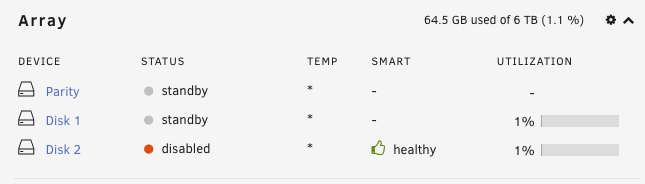
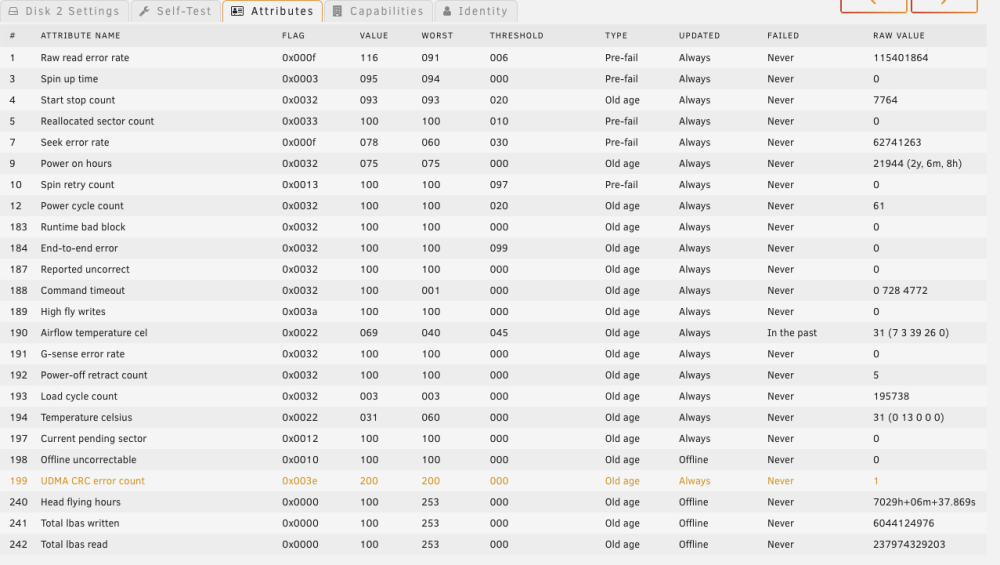
I must say I am impressed with the look and feel of the Unraid web UI but somewhat disappointed with the vagueness (at least it seems so to me) and confusion with regards to disk / array status. Here's an other example: Disk 2, which has been the better disk so far, has now had 22 errors/warnings and shows this in the dashboard. Why is it "disabled" when SMART is showing healthy (after errors and warning)? As an end user I would really like to know Unraid best understanding is to the overall status of each disk, e.g. healthy, failing, replace asap, and failed, and similarly for the array, e.g. healthy, needs repairing, repairing. Nothing more... (unless I go to an advanced page etc). IMHO, having to understand and research different disk errors and try to work out what the UI is telling me (without popups explaining different values and information etc) is not good.
-
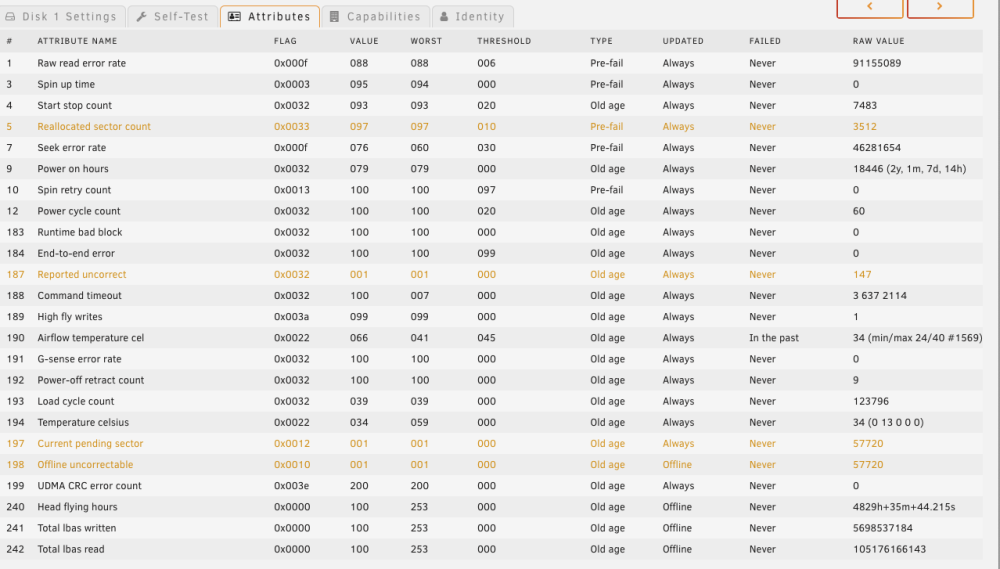
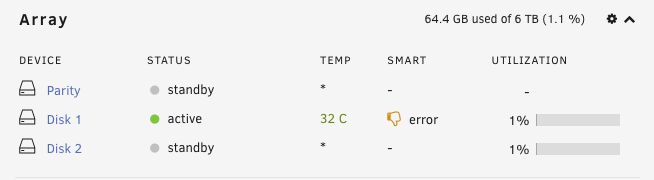
Thank you again. I think I did reboot (probably more than once). Disk 2 now also showed an error in the main dashboard. But strangely no errors show on Main page. The attributes for each disk show as: Why do they show "Never" for Failed column (except for airflow temperature)?

-
Thank you @trurl for your replies. TBH, I was overwhelmed by the SMART data and focussed on the "Passed" status. Is this disk usable? No. It's working as a part of the Unraid array (AFAIK). I can copy files to and read them from the array, but of course that could be the other drive doing the work? I would have thought Unraid would have told me if it was having trouble writing or reading to a disk in the array, and I should replace the disk? I would hope I would get more than a "warning." And now it does seem to be, although I don't believe it showed this "error" status before I had run the SMART Self-Tests. Even when I was setting up the array and there were 9000+ *warnings* the UI dashboard didn't show anything. Notifications do come up in Unraid and I do get emails but again they were listed as "warnings" in the notifications and emails (AFAIK), whereas in the Main page > Array Devices they are listed as errors. The disk does report these attributes: and in more detail: Those "Pre-fail" look ominous 😞 and probably mean I should replace the disk? But still I am confused why SMART reports "PASSED." Surely it should be saying something like "going to fail" or "replace"? Again, I am only learning and there's no real data on the array as yet. Thanks for all comments and suggestions.

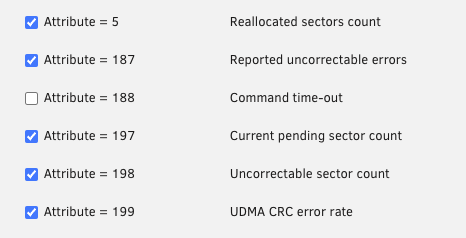
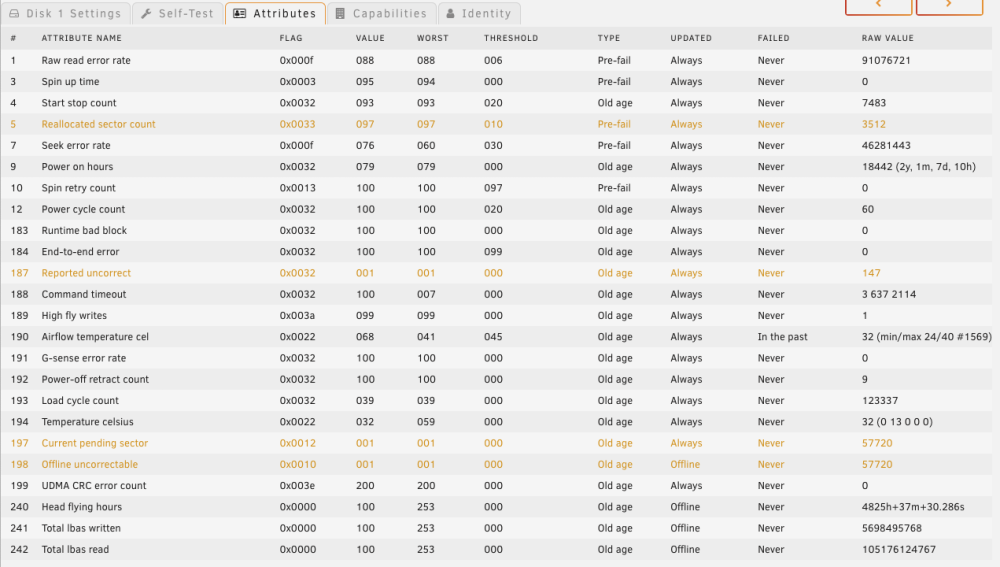
-
Hi All, I'm new to Unraid and SMART (although I have setup my Unraid array and generally know about SMART). I'm testing now and learning about both of these. I have one disk in the array that's reported 9000+ errors (particularly when setting up the array). I run an extended self-test and it stops at 10% with "Completed: read failure" When I look at the SMART report though it suggested the disk "Passed." How can that be? Is the disk usable? Unraid is not reporting failure or need to replace etc. The SMART report is attached. Thanks for any suggestions. Cheers, Ashley. ST3000DM001-1ER166_Z501RTHG-20230216-0922.txt


