AviatorNL
Members
-
Joined
-
Last visited
Everything posted by AviatorNL
-
Hello all, The issue has been resolved. There was still a folder with the same name in /mnt/. After deleting this folder, Unraid was able to build the ZFS pool successfully.
-
Hello all, Today I installed three new SSDs and tried to create a new pool. However, after creating the pool, Unraid asks me to format all the disks. When I do this, it says that formatting is in progress, but after a while an error appears saying that the disks are unmountable. If I create a new pool using only the HDDs, everything works fine. Does anyone know what the problem could be? tower-diagnostics-20251128-2123.zip
-
The server is up and running again. In the pool configuration, I had to change the number of hard drives in the pool. I changed diskFsWidth="6" to 5, and Unraid started working again. Two weeks ago, there was a power outage, which may have caused one of the hard drives to fail. Now I will look into how to get rid of the PCI errors.
-
Hello all, I have a problem with my Unraid server. I can’t access the web GUI — the browser shows the error message ERR_CONNECTION_REFUSED. I can still access the server via SSH without any issues, but even when I boot the server in Safe Mode, I still can’t access the web interface. Hopefully, someone can help me — I’ve been struggling with this for a couple of days now. Things what I already done Replaced the USB stick without success. When I install a new USB stick without copying the config folder, the server boots and I can see all the drives. So there must be a fault somewhere in the config folder, I guess. Removed the sata controller because it was giving some PCI error messages — without success. Tried to start emhttp from the CLI, but without success tower-diagnostics-20251013-0519.zip
-
That's what I was afraid of.... What i also have tried is to remove the upper m2 ssd and put them in the lower slot. Also with no POST. I think you are right and the motherboard is failing
-
Hello all! I have done an CMOS reset to remove the battery and the fastboost is disabled. I cleaned the m2 slot as well but without succes
-
I’ve already set de bios back to his default settings in the bios but maybe clear the CMOS would be help. I give it a try
-
Hello All, i know this is not an unraid, issue but hopefully somebody can helpt me. I got a problem with my unraid setup. One of my M2 ssd was getting to hot so I decided to install an m2 ssd cooler on the ssd. But after that the server got stuck in the POST test. I change the SSD (in slot M2M) for an new one because I thought that my ssd was failing. But also, with the new SSD it is not pass the POST test as well and the VGA led on the motherboard is lighting up. When I remove my SSD (in the slot M2M) he is passing the POST test and I can enter the BIOS. I have already done a BIOS update but also with the new version no success. My setup is: Gigabyte Z390 Aorus elite I7 8700 64GB Ram extra ethernet card with 4 nics (PCIE x1) Asus hyper M.2 x16 gen 4 No video card installed I have already removed the Asus hyper & extra network card but without success. Hopefully somebody here can help me.
-
Hello, Thank you for your quick reply. I don't know how but the last 2 checks where done by an speed of 300 mb/ps and that is good for me. Maybe he had something to rebuild on the parity?
-
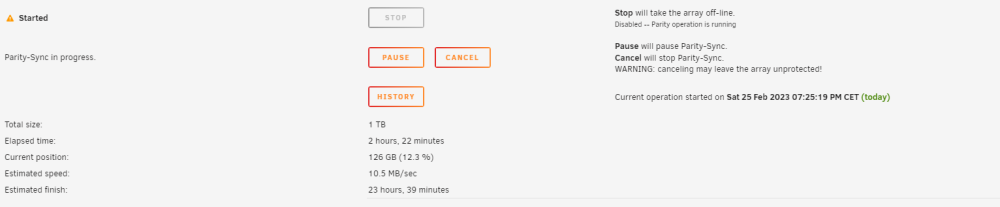
Hello All, I'm quiet new with unraid but i have some problems with the parity sync of my unraid server. My parity sync is very slow. On the picture the speed is 10.5 MB/sec but sometimes it drops to 2.5 MB/sec Yesterday i have swaped my HDD for an SSD, The problems start after the HDD swap. Do somebody have some advice for me? tower-diagnostics-20230225-2122.zip