tzotz
Members
-
Joined
-
Last visited
Everything posted by tzotz
-
The dashboard says: Isn't that enough?
-
HI Jorge, thanks for your response - I'm afraid I don't follow - first I replaced the parity and synched it judging by the array activity all the disks were read and the parity rewritten - and still not valid parity? thanks also why disk disk 2 in error when I didn't touch it? I only replaced disk 3?
-
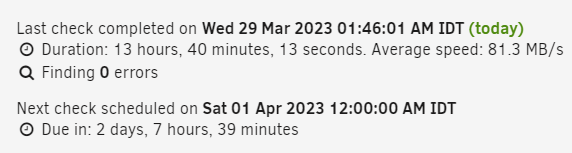
Hi' itimp, thank you for this prompt response - Parity was synched for 13 hours - why all that time if it wasn't rebuilt. Anyway - Do I have to return the 1TB that I meant to replace and rebuild parity? - please tell me how so I won't make a mistake here. Thanks.
-
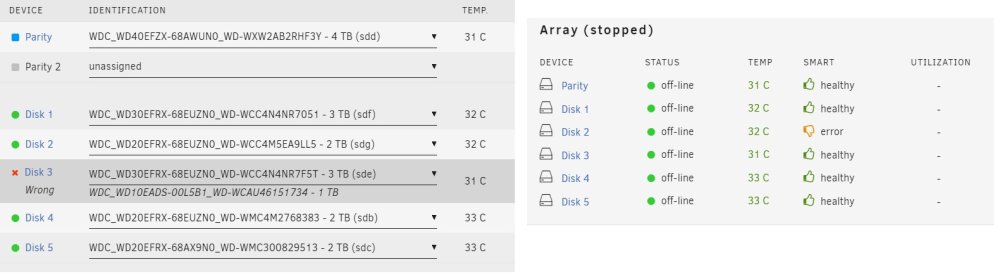
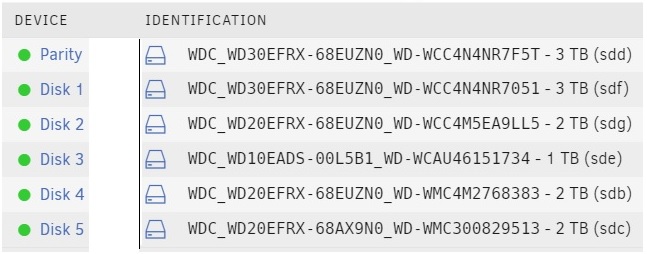
Hi unRaid community, I must have done something wrong here but I can't figure what it is/was - I was careful to not override data disks. Step 1 - Replace Parity with a 4TB disk and resynched Step 2 - I replaced disk 3 with the old parity drive and got "too many wrong or missing disks" now disk 2 shows and error and disk 3 remembers the old 1 TB that was removed and replaced. replaced disk 3 with the old 1 TB and the array started fine. I'm on unRaid 6.11.5 What gives? Appreciate all the help I can get, also if more info is required do let me know. Best, tzotz