



Skip to content
View in the app

A better way to browse. Learn more.

Unraid

A full-screen app on your home screen with push notifications, badges and more.

To install this app on iOS and iPadOS
  1. Tap the Share icon in Safari
  2. Scroll the menu and tap Add to Home Screen.
  3. Tap Add in the top-right corner.
To install this app on Android
  1. Tap the 3-dot menu (⋮) in the top-right corner of the browser.
  2. Tap Add to Home screen or Install app.
  3. Confirm by tapping Install.

DrRooo

Members
  • Joined

  • Last visited

  1. @kricker Thanks, that was super easy, just had no idea where to start, everything works perfectly now!
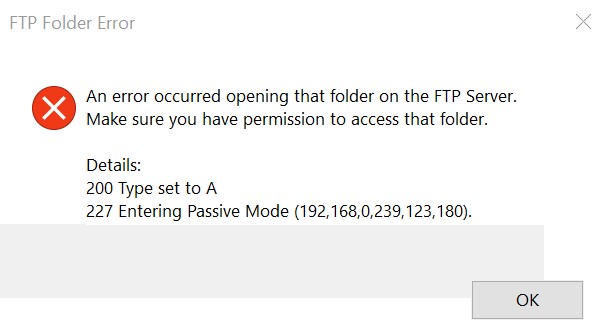
  2. @SlrG First off thanks for everything you have done for this plugin, I am pretty much a newbie to this stuff and your support is greatly appreciated. I successfully set up my ftp server following this tutorial (I did change the port from 21 to something less obvious) The server works perfectly on my local network, however, as soon as I try to access it from outside the local network, I get the error attached. I'm looked up the error and most issues seem to stem from a firewall or other things I don't understand. Do you know what could be causing this and if there is an easy fix?

Account

Navigation

Search

Search

Configure browser push notifications

Chrome (Android)
  1. Tap the lock icon next to the address bar.
  2. Tap Permissions → Notifications.
  3. Adjust your preference.
Chrome (Desktop)
  1. Click the padlock icon in the address bar.
  2. Select Site settings.
  3. Find Notifications and adjust your preference.