mountaindonky
Members
-
Joined
-
Last visited
-
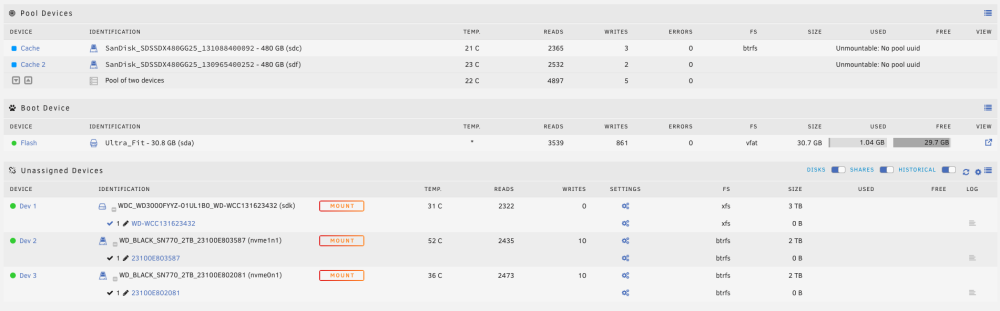
In an attempt to replace my existing cache pool disks, I seem to have lost the btrfs filesystem and data on the previous cache pool disks. I am hoping someone can assist me in recovering the btrfs filesystem and/or data on the previous pool disks. Details: Previously working cache pool disk: 2 Sandisk 480GB SSDs with btrfs filesystem (device ids: sdc, sdf) New cache pool disks: 2 WD 2TB NVMEs (device ids: nvme0n1, nvme1n1) Here is what I did to cause this: Stopped array Added Cache 3 and Cache 4 devices to the pool, 2TB NVME drives (device ids: nvme0n1, nvme1n1) Started array (cache healthy and data present) Waited about an hour for what I thought was a copy of data across all of the new disks Stopped array Removed Cache 2 device from cache pool, Sandisk SSD (device id: sdf) Started array (cache healthy and data present) Stopped array Removed Cache 1 device from cache pool, Sandisk SSD (device id: sdc) Started array (cache unhealthy and data not present) Stopped array Noticed that the new NVME disks were not yet formatted, formatted these new disks Started array (cache healthy and data not present) Stopped array Removed the new NVME disks from the cache pool, leaving no cache Started the array Stopped the array Added the old SSD disks back to the cache pool in their original device locations Started the array (cache unhealthy with error Unmountable: No pool uuid) Investigation/remediation attempts: btrfs fi show Label: none uuid: 0ea24342-ffd0-439a-a136-2105a9c78903 Total devices 1 FS bytes used 684.00KiB devid 1 size 1.00GiB used 126.38MiB path /dev/loop2 Label: none uuid: e2f6c5b4-203f-4e32-ad8f-9c4c99c3f6a3 Total devices 2 FS bytes used 768.24MiB devid 1 size 1.82TiB used 2.03GiB path /dev/nvme0n1p1 devid 2 size 1.82TiB used 2.03GiB path /dev/nvme1n1p1 btrfs check -s1 /dev/sdc1 using SB copy 1, bytenr 67108864 Opening filesystem to check... warning, device 4 is missing bad tree block 4770155839488, bytenr mismatch, want=4770155839488, have=0 ERROR: cannot read chunk root ERROR: cannot open file system btrfs check -s1 /dev/sdf1 using SB copy 1, bytenr 67108864 Opening filesystem to check... warning, device 4 is missing bad tree block 4770155741184, bytenr mismatch, want=4770155741184, have=0 ERROR: cannot read chunk root ERROR: cannot open file system btrfs-select-super -s 1 /dev/sdc1 warning, device 4 is missing ERROR: cannot read chunk root ERROR: open ctree failed tower-diagnostics-20230405-2052.zip