





surface
Members
-
Joined
-
Last visited
-
I appreciate all of your (the mods) help. I had 10 more drives to upgrade and I didn't want to potentially do this 10 more times. So after it worked, I opted to take the data loss, changed the 10 drives all at once, then restored all my files from backup. All 35TB of it. Again, I appreciate all of you, including the time you take and work you do to help the community
-
What I did to fix this was, and I'm not saying this is going to work for everyone or even if this is correct, but I stopped the array, unassigned the disk, started the array, stopped the array again, assigned the disk. Then I went to tools, and new config, and preserve current assignments. Then started the array again. My disk was then accepted. The weird thing is I didn't see this step in the documentation. So I'm not sure this is the correct way of accomplishing this, but it worked for me
-
I appreciate your quick responses, and sorry for my rapid fire questions. EDIT: I've started the SMART tests via terminal. I'll update in ~16 hours. Thanks for your help! Also, here are the logs from the SMART tests rknas03-smart-20240126-0725.zip rknas02-smart-20240126-1033.zip
-
Both say they're at 100% complete, but they're also showing that they're still running. Should I just stop both, then run that command from terminal?
-
Manually via a plugin? Or is there a different way you recommend? I guess my question really is, how would I manually run a SMART test on the drive?
-
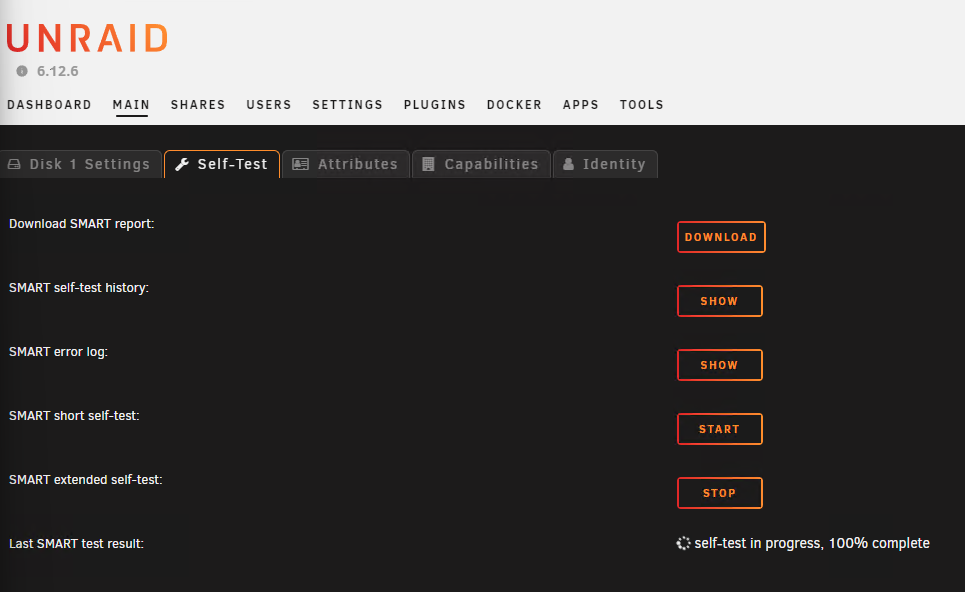
Just as an FYI, this same issue is happening on my nas02 (the one we've been talking about) as well as nas03. I ran a long SMART test on both the 10TB SAS disks that are having issues on nas02 and nas03 about 15 hours ago. They're almost done. Nas03 is at 100% but looks like it's still running. Nas02 is at 98%. Both drives are 10TB Seagate SAS drives. They were purchased used and came from the same seller.
-
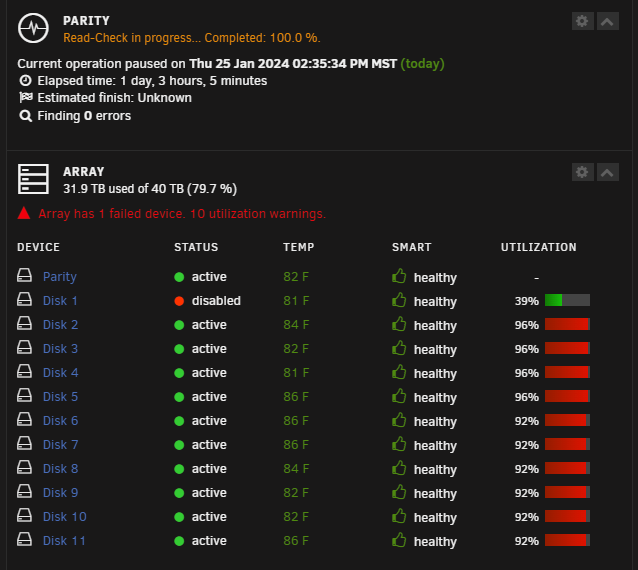
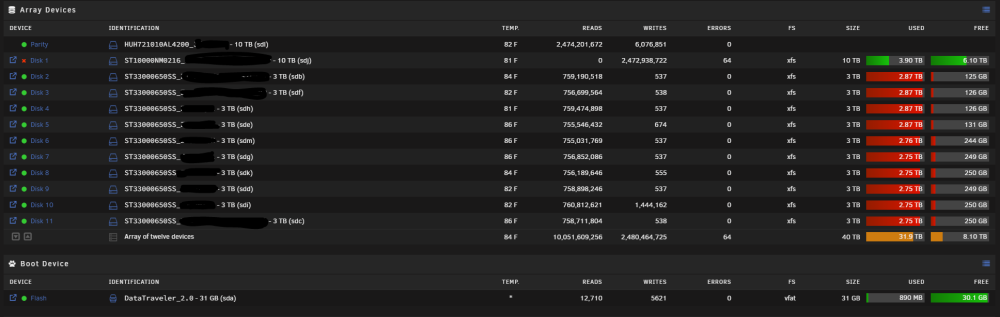
Just noticed 64 errors that I hadn't noticed before. Also in syslog, I just found this Jan 25 14:35:34 RKNAS02 kernel: critical target error, dev sdj, sector 19532742384 op 0x1:(WRITE) flags 0x0 phys_seg 64 prio class 2 Jan 25 14:35:34 RKNAS02 kernel: md: disk1 write error, sector=19532742320 Jan 25 14:35:34 RKNAS02 kernel: md: disk1 write error, sector=19532742328 Jan 25 14:35:34 RKNAS02 kernel: md: disk1 write error, sector=19532742336 Jan 25 14:35:34 RKNAS02 kernel: md: disk1 write error, sector=19532742344 Jan 25 14:35:34 RKNAS02 kernel: md: disk1 write error, sector=19532742352 Jan 25 14:35:34 RKNAS02 kernel: md: disk1 write error, sector=19532742360 Jan 25 14:35:34 RKNAS02 kernel: md: disk1 write error, sector=19532742368 Jan 25 14:35:34 RKNAS02 kernel: md: disk1 write error, sector=19532742376 Jan 25 14:35:34 RKNAS02 kernel: md: disk1 write error, sector=19532742384 Jan 25 14:35:34 RKNAS02 kernel: md: disk1 write error, sector=19532742392 Jan 25 14:35:34 RKNAS02 kernel: md: disk1 write error, sector=19532742400 Jan 25 14:35:34 RKNAS02 kernel: md: disk1 write error, sector=19532742408 Jan 25 14:35:34 RKNAS02 kernel: md: disk1 write error, sector=19532742416 Jan 25 14:35:34 RKNAS02 kernel: md: disk1 write error, sector=19532742424 Jan 25 14:35:34 RKNAS02 kernel: md: disk1 write error, sector=19532742432 Jan 25 14:35:34 RKNAS02 kernel: md: disk1 write error, sector=19532742440 Jan 25 14:35:34 RKNAS02 kernel: md: disk1 write error, sector=19532742448 Jan 25 14:35:34 RKNAS02 kernel: md: disk1 write error, sector=19532742456 Jan 25 14:35:34 RKNAS02 kernel: md: disk1 write error, sector=19532742464 Jan 25 14:35:34 RKNAS02 kernel: md: disk1 write error, sector=19532742472 Jan 25 14:35:34 RKNAS02 kernel: md: disk1 write error, sector=19532742480 Jan 25 14:35:34 RKNAS02 kernel: md: disk1 write error, sector=19532742488 Jan 25 14:35:34 RKNAS02 kernel: md: disk1 write error, sector=19532742496 Jan 25 14:35:34 RKNAS02 kernel: md: disk1 write error, sector=19532742504 Jan 25 14:35:34 RKNAS02 kernel: md: disk1 write error, sector=19532742512 Jan 25 14:35:34 RKNAS02 kernel: md: disk1 write error, sector=19532742520 Jan 25 14:35:34 RKNAS02 kernel: md: disk1 write error, sector=19532742528 Jan 25 14:35:34 RKNAS02 kernel: md: disk1 write error, sector=19532742536 Jan 25 14:35:34 RKNAS02 kernel: md: disk1 write error, sector=19532742544 Jan 25 14:35:34 RKNAS02 kernel: md: disk1 write error, sector=19532742552 Jan 25 14:35:34 RKNAS02 kernel: md: disk1 write error, sector=19532742560 Jan 25 14:35:34 RKNAS02 kernel: md: disk1 write error, sector=19532742568 Jan 25 14:35:34 RKNAS02 kernel: md: disk1 write error, sector=19532742576 Jan 25 14:35:34 RKNAS02 kernel: md: disk1 write error, sector=19532742584 Jan 25 14:35:34 RKNAS02 kernel: md: disk1 write error, sector=19532742592 Jan 25 14:35:34 RKNAS02 kernel: md: disk1 write error, sector=19532742600 Jan 25 14:35:34 RKNAS02 kernel: md: disk1 write error, sector=19532742608 Jan 25 14:35:34 RKNAS02 kernel: md: disk1 write error, sector=19532742616 Jan 25 14:35:34 RKNAS02 kernel: md: disk1 write error, sector=19532742624 Jan 25 14:35:34 RKNAS02 kernel: md: disk1 write error, sector=19532742632 Jan 25 14:35:34 RKNAS02 kernel: md: disk1 write error, sector=19532742640 Jan 25 14:35:34 RKNAS02 kernel: md: disk1 write error, sector=19532742648 Jan 25 14:35:34 RKNAS02 kernel: md: disk1 write error, sector=19532742656 Jan 25 14:35:34 RKNAS02 kernel: md: disk1 write error, sector=19532742664 Jan 25 14:35:34 RKNAS02 kernel: md: disk1 write error, sector=19532742672 Jan 25 14:35:34 RKNAS02 kernel: md: disk1 write error, sector=19532742680 Jan 25 14:35:34 RKNAS02 kernel: md: disk1 write error, sector=19532742688 Jan 25 14:35:34 RKNAS02 kernel: md: disk1 write error, sector=19532742696 Jan 25 14:35:34 RKNAS02 kernel: md: disk1 write error, sector=19532742704 Jan 25 14:35:34 RKNAS02 kernel: md: disk1 write error, sector=19532742712 Jan 25 14:35:34 RKNAS02 kernel: md: disk1 write error, sector=19532742720 Jan 25 14:35:34 RKNAS02 kernel: md: disk1 write error, sector=19532742728 Jan 25 14:35:34 RKNAS02 kernel: md: disk1 write error, sector=19532742736 Jan 25 14:35:34 RKNAS02 kernel: md: disk1 write error, sector=19532742744 Jan 25 14:35:34 RKNAS02 kernel: md: disk1 write error, sector=19532742752 Jan 25 14:35:34 RKNAS02 kernel: md: disk1 write error, sector=19532742760 Jan 25 14:35:34 RKNAS02 kernel: md: disk1 write error, sector=19532742768 Jan 25 14:35:34 RKNAS02 kernel: md: disk1 write error, sector=19532742776 Jan 25 14:35:34 RKNAS02 kernel: md: disk1 write error, sector=19532742784 Jan 25 14:35:34 RKNAS02 kernel: md: disk1 write error, sector=19532742792 Jan 25 14:35:34 RKNAS02 kernel: md: disk1 write error, sector=19532742800 Jan 25 14:35:34 RKNAS02 kernel: md: disk1 write error, sector=19532742808 Jan 25 14:35:34 RKNAS02 kernel: md: disk1 write error, sector=19532742816 Jan 25 14:35:34 RKNAS02 kernel: md: disk1 write error, sector=19532742824 Jan 25 14:35:34 RKNAS02 kernel: md: recovery thread: exit status: -4 Maybe this drive is bad?
-
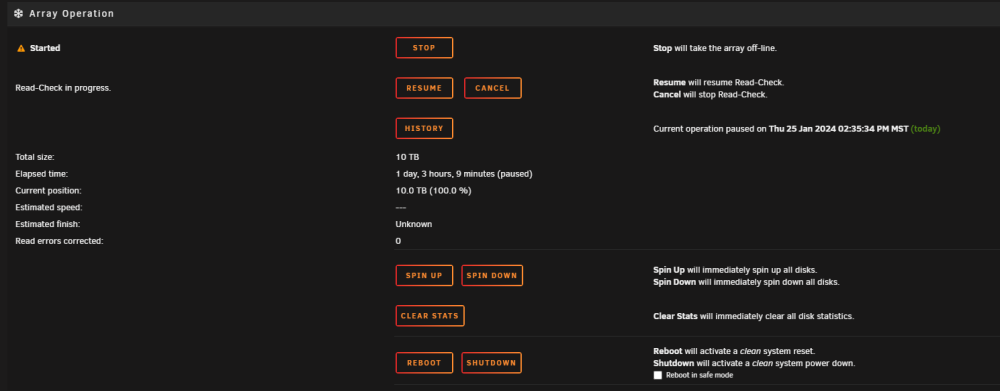
Here are a few screenshots, and the diag. It's still showing as "Device is disabled, contents emulated" after the rebuild. But all the folders are there rknas02-diagnostics-20240125-1755.zip

-
No, it isn't finished. I'll post diag when it's done. Looks like about 6 more hours. Thank you for clarification /hi5
-
Post #4 has my diag attached unless you're asking me to post a new one?
-
I appreciate you pointing that out. I have found the current documentation regarding replacing a disk to increase capacity. My steps were pretty similar Parity check was run and was/is valid. Stopped the array unassigned the disk Started the array clicked the red x to forget the disk Stopped the array Shutdown (this isn't in the documentation, but did it for good measure. I hope that didn't mess with anything) removed old 4 TB drive installed new 10 TB drive Powered on the server Logged in and stopped the array Formatted the disk assigned the new disk in place of the old one Started array, and it started rebuilding. ~20 hours later it was done, but Disk1 (which was just upgraded from 4 TB to 10 TB) shows "device is disabled, contents emulated" But "Size", "Used" and "Free" columns all showed correctly with 10 TB, 3.9 TB and 6.1 TB respectively under each column header. Is this normal behavior? Was the initial 20+ hours the pre-clear, and now the next 20 hours is rebuilding data?
-
Thank you for your reply. I have attached the diagnostics file. I've also turned on the syslog server on both my servers. Thank you for the suggestion! diagnostics-20240124-2052.zip
-
I forgot to mention that the disk capacity showed up with 3.9 TB used, and 6.1 TB available after the initial rebuild. And it still shows that now as it's rebuilding again. All drives in the array are XFS file system. And there are no SMART errors or disk errors on any of the drives. I'm fairly new to unRAID, so if I've left out info please let me know and I'll update. I appreciate any help I can get, and your time spent helping me
-
Hello, I am upgrading all my drives in one of my unRAID servers. I'm running 6.12.6 on both. First, I swapped out the parity drive from a 4TB SATA drive to a 10TB SAS drive following this documentation. After about ~20 hours, everything was fine and great. Everything was green. Next, I swapped out Disk1 which was also a 4TB SATA drive for another 10TB SAS drive following this documentation. However, in the documentation step 9 says "Put a check in the Yes, I'm sure checkbox (next to the information indicating the drive will be rebuilt), and click the Start button" But a check box was not there. However, I did see that check box when swapping the parity drive. So I clicked the Start Button anyway. And again, about ~20 hours later, it was done. But then I had a red X by the drive, and it said "Device contents emulated" So I stopped the array. Then started the array back up. It still showed the same thing. Then I stopped the array again, and restarted the server. The server is back up, but drive still says disabled and contents emulated. So I stop the array again, unassign the disk, start the array, stop the array, assign the disk back, and now it says it's rebuilding the data. But this time there is no timer where it shows me how long it's been going, and how much longer it estimates it's going to take. Is there something I'm missing? I thought the steps were pretty straight forward minus the check box not being there for "Yes, I'm sure"



