





Xonline
Members
-
Joined
-
Last visited
Everything posted by Xonline
-
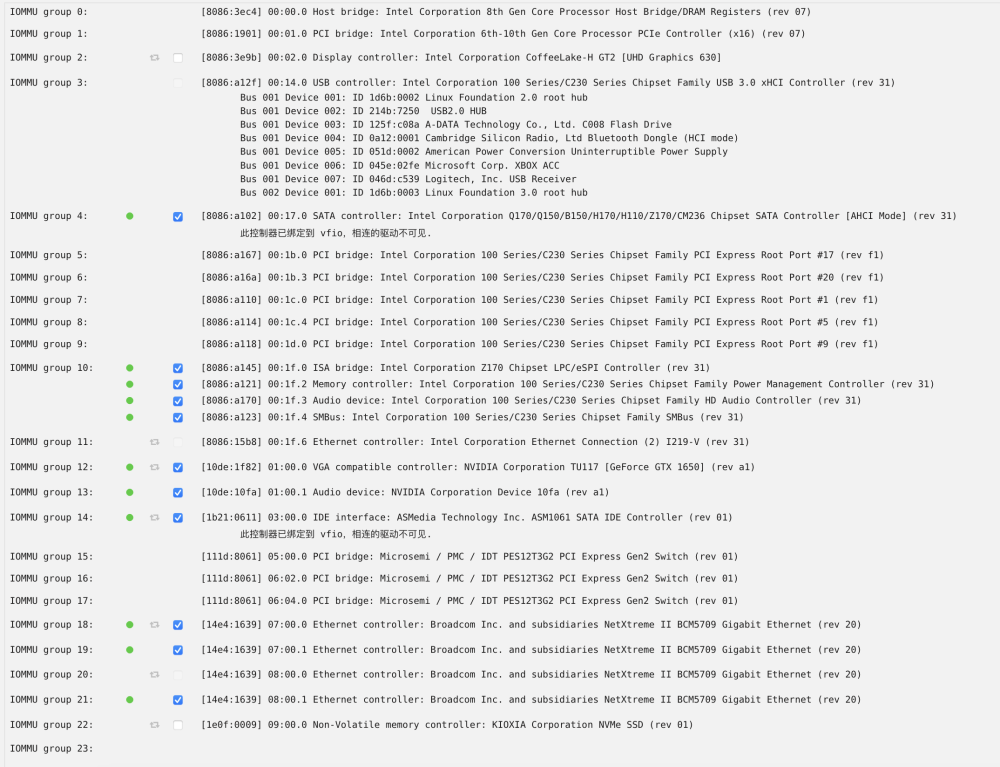
Thank you very much for your reply. I understand what you mean by backing up the vfio.pci.cfg file (mv) into vfio.pci.cfg.newbak. At the same time, I found that there are two other backup files in the directory. I haven't backed up this file before. I restarted the computer after modifying the file and reset the vfio-bind. The problem reappeared after starting the virtual machine status of vfio after a problem occurs The contents of the previously backed up files found are as follows and new diagnostic files tower-diagnostics-20230228-1942.zip
-
Hello everyone, after the latest unexpected power failure, one of my unRAID virtual machines has a problem. When I start a Windows10 virtual machine that has passed through Nvidia graphics card, the nvme where the unRAID array is located will be uninstalled when using the graphics card. This problem does not occur when I use mstsc after starting the virtual machine or change the video card to VNC connection. I put on the specific diagnostic documents and some other information, please help me to see how to solve, thank you tower-diagnostics-20230228-1545.zip
