Skip to content
View in the app

A better way to browse. Learn more.

Unraid

A full-screen app on your home screen with push notifications, badges and more.

To install this app on iOS and iPadOS
  1. Tap the Share icon in Safari
  2. Scroll the menu and tap Add to Home Screen.
  3. Tap Add in the top-right corner.
To install this app on Android
  1. Tap the 3-dot menu (⋮) in the top-right corner of the browser.
  2. Tap Add to Home screen or Install app.
  3. Confirm by tapping Install.

Laguna85

Members
  • Joined

Everything posted by Laguna85

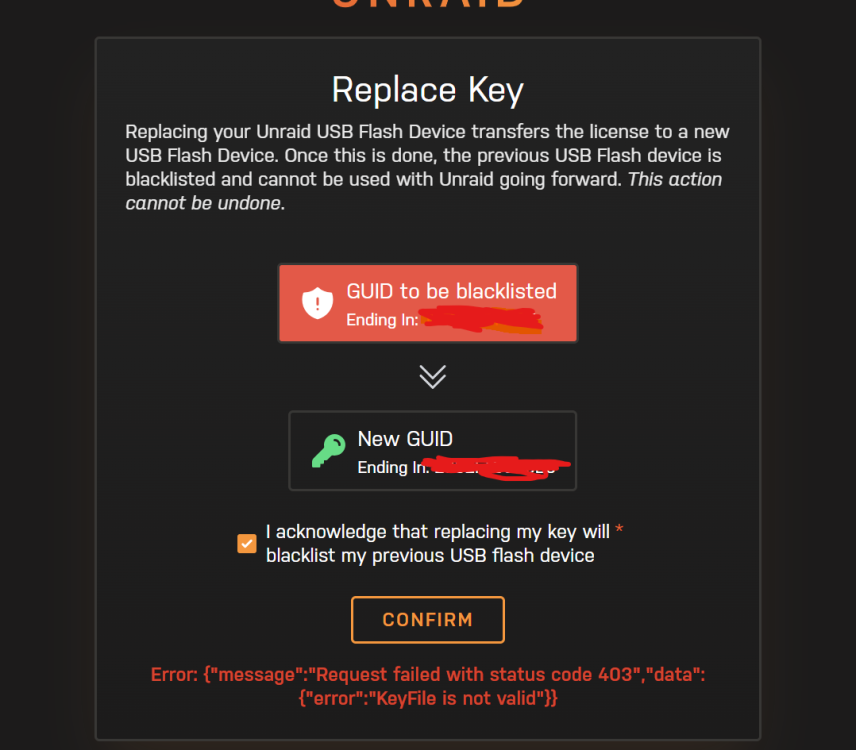
  1. Ehi guys, as i said, i made a mess and not sure how to fix it. After months of uptime with 0 issues, in the last couple of weeks my server become very unstable. After few days, or few hours i was not able to log in, all service was down and only a force hardware shutdown was necessary. I'm not super expert and i blame my usb stick. It's a very old one, so i backup my flash and changed with another one stick. Yesterday same problem. So, i spend my day trying to fix it, and it ends with me, reflashing the first backup again in the second usb stick. And here the problem, now i can restore the proper lincese: So, first step. Replace the key. Second, enable logs and stuff. Third, fix my headache too. Thanks for your help.

  2. rebooting works for me.

Account

Navigation

Search

Search

Configure browser push notifications

Chrome (Android)
  1. Tap the lock icon next to the address bar.
  2. Tap Permissions → Notifications.
  3. Adjust your preference.
Chrome (Desktop)
  1. Click the padlock icon in the address bar.
  2. Select Site settings.
  3. Find Notifications and adjust your preference.