Server_for_plex
Members
-
Joined
-
Last visited
-
Have a Synology NAS with 2 8TB Seagate NAS harddrives (7200 RPM) in raid 1. Have about 6.7 TB of Data that I am transferring over to my Unraid Server (2 16TB Seagate NAS harddrives (7200 RPM)). The transfer speed are consistent at 5MB/s but when I transfer from my computer to the unraid server, its runs at 10MB/s and to the Synology its between 15 to 20 MB/s. Both are connected through ethernet and I have 970Mb/s upload speed from my internet provider. Cannot figure out what to do with this. Tried using a cache drive (M.2 Nvme 250G Samsung) with reconstruct write enabled and it did nothing. plex-server-diagnostics-20230309-2203.zip

-
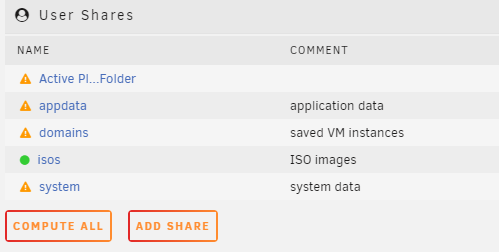
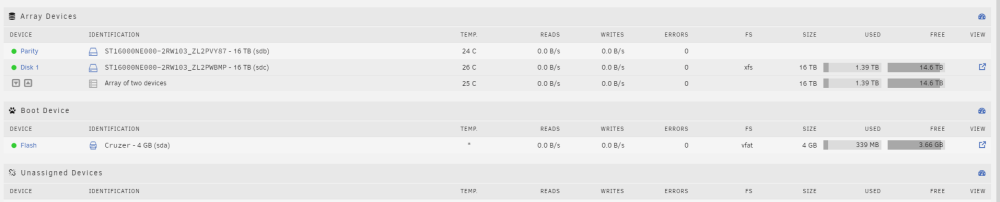
My mistake, I thought my array was including the parity space with the disk space within the overall share. The issue that I cannot seem to fix is making the shares show that the files are protected. plex-server-diagnostics-20230307-1902.zip
-
Hello, I've recently built my Unraid Server -AMD 5700X -32G of 3200 Ram (non-xmp) -2 16TB Nas Drives -1 250G M.2 NVme -GeForce GT 730 I tested the ram to make sure its stable and did the self check for both the drives. When I put one of the disks as the parity drive and the other as a normal disk, it ended up pooling both of the storage together. Is that normal? I thought I was supposed to lose the space of the parity drive so that if one one my drives fails, I won't lose any data. The other part is that all of the shares are displaying the message "Some of All Files are Unprotected" How would you be able to fix this? Thanks!