





skedow
Members
-
Joined
-
Last visited
-
Thank you, i will try it
-
Thank you for the reply. I am sorry if it is a dumb question, but how will i know if the drive has a mountable file system or not? Follow step 3 or? Because it says: Assign all drives as data drives, then start the array. Once it has started, make a note of the serial numbers of drives showing as unmountable as these are most likely our parity drives. But if i start the array in an incorrect order would it result with data loss? I am currently scared shitless about losing some of my data, i dont wanna do any wrong steps.
-
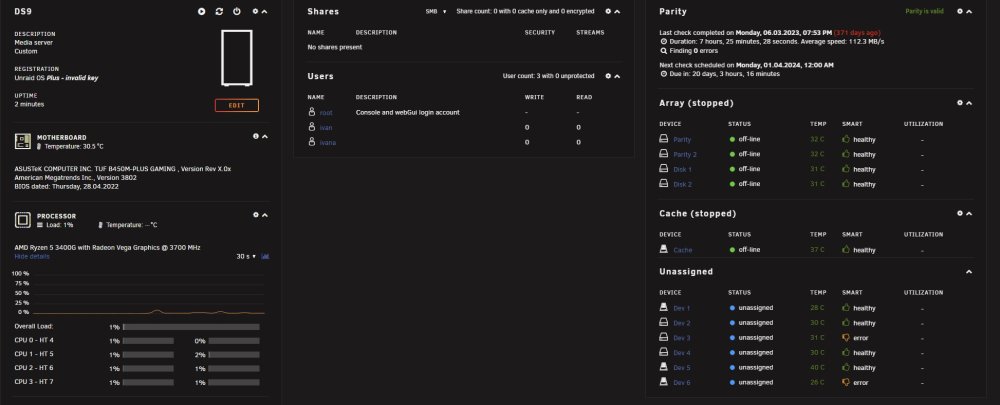
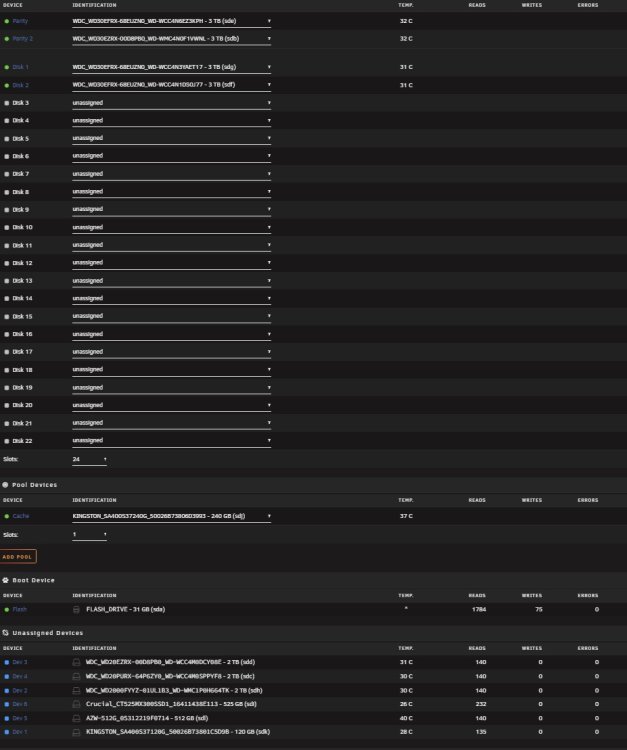
Hello everyone, been using unraid for some time now. Today my flash drive failed, i had backup so i have flashed backup data to a new flash drive. Backup was 4 months old, but i have not added any drives since or made any major changes. After booting I can login without issues but my array is all messed up. I have 4 OK drives and 6 unassigned ones (of which 2 are in error state, but they were ok before restore procedure). Cache drive is set incorrectly (it is set to a 240 GB SSD and i had a flash pool of two 500 GB SSDs) 3 HDDs are unnasigned that were part of the array. I dont care about cache now or two small SSDs (they were used for testing some VMs) I want to restore my array. Is it possible now? My super.dat from backup seems corrupted. I am attaching 2 screenshots from the current state and my diagnostics. Also my license is missing but I have it and believe I can restore it after i fix my array. I would very much appreciate if someone could help me. Thank you ds9-diagnostics-20240311-1951.zip
-
Hi, i got lost in a lot of tutorials and appears to have made a mess with my configuration. If there is a good soul to help me out i would be eternally grateful. I am using unraid for quite some time now, but only as a NAS and for plex in the past, jellyfin now. Tried to setup sonarr, radarr, bazarr together with qbittorrent and it did not pan out. I know my folder structure is not the recommended one, but i have a quite large library for some time now and tried to make it work without creating new shares and moving such large library. I have also setup jellyseer and as far as I can see it does sends request to sonarr (only one tested), request is approved but nothing happens afterwards. how to make it work now, sonarr and radar to download stuff using download client, bazzar to download subtitles? My docker mappings: https://imgur.com/CHWmsgR My folder structure: https://imgur.com/fZ5hASY radarr CAN see and import all my movies radarr did not detect any configuration issues Root Folder path is /media/Movies Indexers added without issues using Jacket Download client (qbittorrent) test OK Download client Remote Path Mappings host -> ip address, Remote Path: /mnt/user/Media/torrents/movies, Local Path: /media/torrents/movies sonarr CAN see and import all my movies sonarr did not detect any configuration issues Root Folder path is /media/Shows Indexers added without issues using Jacket Download client (qbittorrent) test OK No Remote Path Mappings Wanted shows status is missing from disk for all of them bazarr connected with sonarr and radarr without issues, both have LIVE status When trying do download subs error is: BAZARR Error (Path does not exist) trying to get video information for this file: /media/Shows (or movies) /... Status in bazzzar for shows and movies is This Sonarr/Radarr root directory does not seems to be accessible by Please check path mapping. If i try to add mapping in bazarr i cant find my folders: My qbittorrent settings are: https://imgur.com/TwSFjBZ Category settings (same for sonarr, just shows instead of movies): https://imgur.com/ktYBghH I appreciate any help.

