





zhtengw
Members
-
Joined
-
Last visited
Everything posted by zhtengw
-
Sorry, it's the first version with web setting page. May cause some file conflicts. Could you please try remove the old plugin then install the new one?
-
I just fix this issue in unRaid 6.11.5, remove /boot/config/plugins/i915-sriov/5.19.17 and reboot will update the module https://github.com/zhtengw/unraid-i915-sriov/commit/ecbfcab448ea0c07974b8f00ca278bba9fefba87
-
https://ark.intel.com/content/www/us/en/ark/products/212275/intel-core-i511600k-processor-12m-cache-up-to-4-90-ghz.html https://www.intel.com/content/www/us/en/support/articles/000093216/graphics.html According Intel's documents, i5-11600K is RocketLake which only supports gvt-g. Could ask the updating for intel-gvt-g plugin.
-
根据intel的支持文档,https://www.intel.com/content/www/us/en/products/sku/212270/intel-core-i511400-processor-12m-cache-up-to-4-40-ghz/specifications.html?wapkw=11400 i5-11400就是只支持GVT-g,https://www.intel.com/content/www/us/en/support/articles/000093216/graphics.html 。 只能等gvt-g的驱动更新了。
-
看dmesg的输出,你的核显不支持SR-IOV,应该尝试GVT-g。
-
Your Rocketlake is not supported SR-IOV, please try GVT-g instead.
-
你好,这个我不清楚,可以安装插件,然后看看“cat /sys/devices/pci0000:00/0000:00:02.0/sriov_totalvfs” 和 “lspci -vs 00:02.0 ” 这两个命令的输出
-
很遗憾,totalvfs显示是0,赛扬这个U虽然支持SR-IOV功能,但可用的vf是0,分配不出来虚拟显卡。
-
你好,可以看看“cat /sys/devices/pci0000:00/0000:00:02.0/sriov_totalvfs” 和 “lspci -vs 00:02.0 ” 这两个命令的输出吗?
-
跟直通其他硬件差不多,也参考英文支持帖的这个帖子 后续有时间给插件加个页面,方便设置虚拟显卡数量和查看信息
-
对,跟直通其他设备差不多,先在Tools->System Devices里面把虚拟显卡绑定到VFIO-PCI,重启后虚拟机主显卡选择虚拟显卡的地址就行了。虚拟机系统里也要安装驱动。
-
这个可能是因为我给虚拟机设置页打的补丁过于简单了,有些情况没考虑到,今天更新了一下补丁,更新插件试试。
-
目前SR-IOV没有帧缓冲区,无法输出显示。我们只是Intel驱动的搬运工,没有能力做到更多,还得看Intel的后续开发更新。
-
During my multi reboot test, the terminal complain that sriov_numvfs not found several times when run to "echo 4 > /sys/devices/pci0000\:00/0000\:00\:02.0/sriov_numvfs" in go script. Then I found out that it is because of i915 sriov module not fully loaded. So I add "sleep 3" after "modprode i915" to wait 3 seconds. Then I have no "sriov_numvfs not found" issues in my reboot tests.
-
The PF is worked. What the output of "cat /sys/devices/pci0000\:00/0000\:00\:02.0/sriov_numvfs". And have you tried running "echo 4 > /sys/devices/pci0000\:00/0000\:00\:02.0/sriov_numvfs" manually?
-
有的,最后两行就是
-
你好,我的硬件也是铭瑄h610itx和i3-12100,你把 dmesg | grep i915 的输出贴出来看看
-
I update the plugin, add sleep 3 after modprobe i915 to ensure it is fully loaded. And add /usr/local/sbin/vfio-pci. You may reinstall the plugin and have a try. I am very grateful that you can help me to test my first plugin.
-
You can run dmesg | grep i915 to check if the PF mode works and all the VFs are created.
-
DO NOT do this. The IGPU 0000:00:02.0 should always use the i915 sriov module to make VFs work. You should only bind VFs to vfio-pci.
-
I test the address with 0000:06:10.0, and the VF also works fine in guest system. <hostdev mode='subsystem' type='pci' managed='yes'> <driver name='vfio'/> <source> <address domain='0x0000' bus='0x00' slot='0x02' function='0x1'/> </source> <address type='pci' domain='0x0000' bus='0x06' slot='0x10' function='0x0'/> </hostdev> Then I shutdown the guest system and change the address to 0000:06:10.1, after reboot, the GPU device disappeared. So for iGPU VFs, the function number of PCI address should be 0.
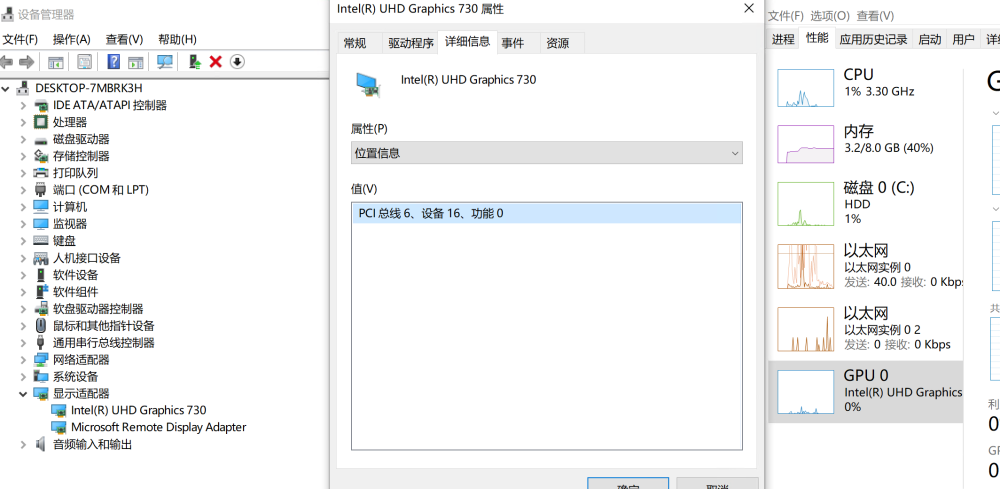
-
the number 2 is just an example. You can change to 3 or 4 as you wish. And add /usr/local/sbin/vfio-pci to the last
-
And one more thing, 6) install intel gpu driver in your guest, both for Windows and Linux
-
There is a CONFIG_INTEL_IOMMU_DEFAULT_ON=y in unRAID kernel config, so intel_iommu=on is not needed. The plugin will create a i915-sriov.conf in /boot/config/modprobe.d/, and add "echo 3 > /sys/bus/pci/devices/0000:00:02.0/sriov_numvfs" to /boot/config/go. And run /usr/local/sbin/vfio-pci in /boot/config/go may be needed.
-
No, this plugin and the custom kernel are two things but provide the same function.

